An engineer’s guide to demos

Butterflybullet

Photo by RazZiel

I met up with some friends last night and did an off-the-cuff show and tell. I left feeling I'd failed to get across what's so interesting about Mailana, reminding me that in my natural state I give terrible demos. Since they're a crucial part of selling an idea, I've had to work hard to fix that. I know I share that affliction with almost every engineer I know, so here's some tips that have helped me.

Accept that it's important

In most engineering situations, if I know something interesting and you don't, you're expected to make an effort to learn it. That's completely reversed when you're trying to sell your idea. You may be certain that it's the best thing since sliced bread, but you're the one who has to make the effort to communicate that to investors, customers or journalists. They have massive numbers of people trying to persuade them to take action, so they can only spend a small amount of time and thought on each proposal. That means you have to spend a lot of time and effort crafting your demo.

Rehearse relentlessly

Stop coding at least a couple of days before, turn on your web cam, start recording and practice what you're going to say. Watch it back every time, and then do it again. My rule of thumb is that I need to do it at least 25 times before I start sounding natural, ironically. This also comes in handy if you want to produce a web video of your presentation, the one I'm still proudest of is my pitch for SearchMash from a few years back. It sounded crazy to me at first to spend so much time on it, f you don't believe me, just read about the days of prep Steve Jobs puts in for his keynotes.

Show, don't tell

Jason Calcanis's demo guide is spot on. People don't want to hear about your life story, just show them your product within the first 30 seconds, preferably doing something awesome. My Achilles heel is going into all of the really interesting technical details of how it works. That's like having a car commercial with the hood popped just showing them the engine. They want to see what it does for them, not how it does it.

And if you want to know how this all works out in practice, come along to Defrag to see me in action!

Where can you find all the Javascript answers?

Coffee

Photo by _tomanthony

Javascript is the unsung hero of the last few years. Originally designed as a lightweight scripting language, it's taken the weight of building complex browser applications onto its shoulders. There are definitely occasional creaks under the strain though, and if you're hitting problems, the first place to look is Quirksmode.

It's essentially a collection of Peter-Paul Koch's notes from his own work using JS for web development, but the breadth and depth of the coverage is amazing. Whether you need to restyle file upload buttons, communicate between windows, detecting keystrokes or discover which events work in different browsers, you'll find the definitive answer in a clear, well-written page.

If you're a Javascript developer, bookmark Quirksmode and buy his book. If you're not, hire him if you need any JS work. I want to make sure he keeps saving me vast amounts of debugging!

An XML Format for Email

Xrayspecs

Photo by Photobunny

Breaking down information silos is the key to making better tools. Email stores are the biggest and most interesting silos out there, and one reason for the lack of progress is the lack of interchange standards between mail systems. Sure there's IMAP/POP, and RFCs galore, but they're all either connection oriented transport protocols, or are hard to decode with modern tools like MIME. For my own work I'm taking mails from diverse sources like Gmail through IMAP, Outlook through OOM and Exchange through MAPI and converting them into XML so that I can write the rest of my pipeline once and ignore where the mails came from.

Seeing Tim O'Reilly asking Postbox about their XML use reminded me that an agreed standard for email in XML would help everyone. XMTP is an effort based on RFCs, but a simple duplication of headers into XML tags is not much different than parsing the original raw text. What I needed was something that had a layered approach, hiding details like the exact type of a recipient to allow easy dumping of everybody who received it, rather than having to separately collate the to, cc and bcc headers. And nobody should ever have to deal with MIME's multi-part implementation ever again.

Here's some information on my format, with a DTD and an example encoded message. It's aimed at my need to pass around messages within a data analysis pipeline, so it skips a lot of less-used headers, but it captures what I need. I'll put together a minimal expat-based PHP parser in the future. Contact me if you're using any other email XML formats, I want to understand what else is out there.

In style I've completely avoided attributes, putting everything within the data section of a tag. This makes parsing simpler, and also brings it closer to JSON style notation for easy data interchange using map arrays in languages like PHP.

Download message.dtd

Download examplemessage.xml

The example message demonstrates the tag, containing a plain text and HTML body, along with a single image attachment. Here's an explanation of the tag types:

<messagelist> This surrounds an unordered list of <message> objects

<message> Contains all the data for a message

<messageuid> A globally unique ID for the message (eg a UUID)

<sourceuid> Some ID that uniquely identifies the message at the location where it originated (eg an EntryID in Outlook). This is different from the <messageuid> because different copies of the same message may be present in the pipeline.

<subject> The subject line of the email

<fromaddress> The email address of the sender

<fromdisplay> The display name of the sender

<deliverytime> The time of arrival for the message in the recipients inbox. Stored in Y-m-d H:i:s format (will need time-zone added, but currently assuming GMT).

<recipients> Surrounds an unordered list of <recipient> objects

<recipient> Contains information about an individual recipient

<address> The email address for a recipient

<display> The display name for a recipient

<role> The type of recipient, either 'to', 'cc' or 'bcc'

<contenttext> The plain text version of the message body or an attachment. My tools take .doc, .pdf, and .xls attachments and convert them into both text and HTML versions for easy searching, analysis and viewing.

<contenthtml> The HTML version of the message body or attachment.

<sourcefolder> Somewhat misnamed, this actually indicates whether the mail was 'sent' or 'received

<attachments> Surrounds an unordered list of <attachment> objects

<attachment> Begins an individual attachment

<attachmentuid> A globally unique identifier to refer to the attachment

<filename> The full filename of the attachment

<filetype> The MIME type of the attached file

<filedata64> The actual data for the attachment, base64 encoded into a text form

The plight of abandoned mascots

I enjoy Jonathan Salem Baskin's vigorous assaults on the cargo-cult of 'branding' over at Dim Bulb, and in his new book Branding Only Works on Cattle, so I got a kick out of this musical number he put together. Reminiscent of Southpark's Island of Misfit Mascots, he's drafted the Pets.com sock puppet to lament the harsh realities of life after the commercials stop airing. I could definitely handle more business books if they were in musical form.

Make the most of your email with Postbox

Postboxlogo

I recently heard from Sherman Dickman at Postbox. They're building a very interesting mail client, implementing a lot of the tools I think will be essential for working more effectively with your email. Their focus on tagging, search and organization is spot-on, the web has raised the bar for interacting with large data sets. Why can you search Google in 0.02 seconds, but your mail can take minutes? They have some strong tools for quickly previewing all the content in attachments too, another big opportunity that conventional clients are missing.

They're implementing a Mac client initially, which might be a smart move considering their main competition in the professional market is the sadly-neglected Entourage. It's not released yet, but you can learn a bit more from this TechCrunch coverage.

I'm really pleased to see them moving forward with some innovative solutions, and look forward to downloading it once there's a version available.

Automatically tagging using Wikipedia

Wikitaggerscreenshot

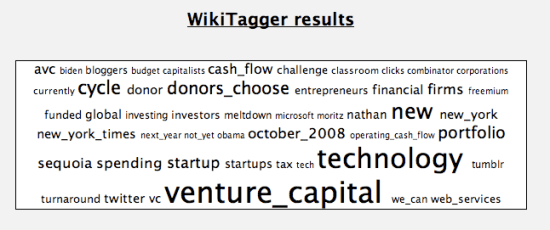
Here’s my new tag cloud generator that uses a list of all the Wikipedia article titles to produce a visualization of the concepts on a web page. You can download the source PHP code here, or enter a URL in the box below to get a cloud:

It’s an extension of the standard tag cloud technique of counting word frequencies. I’ve included a white list of all the Wikipedia article names, as an approximation of ‘interesting concepts’. Only phrases that appear amongst the million titles are included in the cloud. I’ve weeded out the top 10,000 most commonly used words to reduce the noise. An extension would be using the expected average frequency of a word versus its actual frequency to produce statistically improbable phrases like Amazon.

This is a by-product of some of my email analysis work. Tag clouds just based on the number of times a word appears in a piece of text often generate surprisingly good summaries. People tolerate the noise of incorrect words in a way they wouldn’t with a bullet-point list.

The underlying technology of semantic analysis is making very slow progress, so I’m picking applications and interfaces that are extremely tolerant of bad input, where the broad coverage you get from automating the analysis wins out over its poor quality.

One example of this is creating a profile for someone based on the contents of the emails they send. In a large company you’d have a white-list of skill and project keywords, similar to the Wikipedia titles. The people who mention those words most often in their emails would have them added to their expertise list in a searchable employee directory. The consequences of some incorrect entries aren’t too painful. As long as there’s a white list, no private or embarrassing terms will appear there, and the profile can be hand-edited by the user to fix anything glaringly wrong.

How to profile MySQL

Rocketlaunch

Photo by davesag

MySQL 5.037 added a profiler, and I've been using it to track down bottlenecks in my email analysis. If you're doing any serious database access, it will be a godsend. I'd recommend starting by looking through the official introduction but here's the highlights:

Quickstart

– Log into the mysql command line client
– type set profiling=1;
– Run your slow query (eg SELECT * FROM messages WHERE fromaddress='pete@petewarden.com';)
– type SHOW PROFILES;

You should now see a table with a single row, with the number 1 to the left of your query.

– type SHOW PROFILE FOR QUERY 1;

You'll see a table summarizing how long each stage of executing the query took:

+--------------------+-----------+
| Status | Duration |
+--------------------+-----------+
| (initialization) | 0.000063 |
| Opening tables | 0.000015 |
| System lock | 0.000005 |
| Table lock | 0.120696 |
| init | 0.000056 |
| optimizing | 0.000017 |
| statistics | 0.000249 |
| preparing | 0.000026 |
| executing | 0.000008 |
| Sorting result | 0.000005 |
| Sending data | 11.371813 |
| end | 0.000019 |
| query end | 0.000006 |
| freeing items | 0.00002 |
| closing tables | 0.000011 |
| logging slow query | 0.000004 |
+--------------------+-----------+
16 rows in set (0.00 sec)

What each row means

Some of the status names were self-explanatory. If I saw a lot of time in Table lock I knew that had to be waiting for another process to finish updating the same table. What on earth does Sending Data mean though?

I eventually found the answer in the list of thread states, after chasing some links from the profile reference page.

Use the source, Luke

The entry for Sending Data is The thread is processing rows for a SELECT statement and also is sending data to the client. That still didn't help me understand why it was stuck in that state for so long. The open-source nature of MySQL came to the rescue. By doing SHOW PROFILE source FOR QUERY 1; I got this table:

+--------------------+-----------+-----------------------+---------------+-------------+
| Status | Duration | Source_function | Source_file | Source_line |
+--------------------+-----------+-----------------------+---------------+-------------+
...
| Sending data | 11.371813 | mysql_select | sql_select.cc | 2287 |
...
+--------------------+-----------+-----------------------+---------------+-------------+

That told me exactly which file and function was taking all that time. By heading over to the MySQL product archives for my 5.0.45 version, I was able to download a snapshot of the full source code. If you have a different version, go to the list of releases, open the page for yours and then look for the source link at the bottom.

I brought up that function and could see exactly what the underlying code was doing. It still didn't completely clear up what was happening, but I think it was getting jammed on a lock waiting for another thread in my case, so I was able to focus on other simultaneous accesses to the database as the culprit.

Good old EXPLAIN

I'm mentioning this last, but it should be the first thing you try. The most useful tool for debugging slow performance is putting EXPLAIN at the start of your query and seeing what the SQL optimizer thinks of it. Look at whether it has found an index to use. If it hasn't, it's scanning rows to check their values which rapidly makes it unusable as your dataset gets larger. Look at the far right box for notes on optimizations. If you see Using filesort when you're ordering your results, run screaming and reindex your data to allow fast sorts, since this also takes forever with lots of data.

Three good reasons you should use Amazon Web Services, and one bad

Amazon

Photo by Don Cram

Amazon Web Services has received a lot of coverage since it launched. I've held off investigating it, since it smelt like one of those shiny things that end up distracting me from my core work. Last week I realized I was hitting the limits of my cheap dedicated server and needed some sort of change, so I decided to dip my toe into AWS. Two days later I had a big smile on my face, and my whole service switched over. I was surprised at how much it offered to an early-stage startup like mine. Here's some unexpected benefits of the change:

It saves me time on administration

I had to spend a few hours upfront creating a custom AMI disk image with all the software I needed pre-installed, and a couple of EBS volumes for my site code and database files. With that done, it is literally a 30 second job to create a new server instance, mount the volumes and have a new copy of the site running. With one click I can create a remotely stored backup of all my data. No early-stage startup could afford to create the infrastructure to make things this easy themselves. As a big bonus, the wonderful ElasticFox Firefox extension gives you a very fast way to manage all your services too. It's already saved me hours of messing around.

I can rapidly prototype

Having an easy way to revert to frequent backups means I can stop worrying about trashing my system and try out risky changes without fear. A straightforward way of creating new servers lets me leave a production version running while I try out something scary on a development machine. It's like the difference a version control system makes for source code. Suddenly I'm able to rapidly develop new systems, safe in the knowledge I can quickly back out my changes if they prove to be a mistake. This has helped me add new features much faster than before.

I'm only paying for what I use

If I need to do some processing on the 500,000 emails in the Enron database, having a blazingly-fast machine can save me a lot of waiting. With EC2 I pay by the hour, so I can pay $1.60 for 120 minutes of their fastest machine, and then switch back to something much cheaper for standard web serving. This flexibility lets me keep my costs very low, without compromising performance.

There is one very tempting reason to move to Amazon, but I think it's a trap:

Scalability

If you're an engineer at an early-stage startup, it's a lot of fun to spend time building to cope with a million visitors. After all, look at Twitter's troubles, wouldn't they have been better off with a more scalable architecture? No, premature scalability is a company-killing mistake. Having too many visitors to your site is a great problem to have, and at that point you'll have people throwing money at you, you can use that to re-engineer. Most companies die before that point because they don't release, and time spent on scalability is time taken from features, bug-fixing and actually getting the damn thing shipped.

If the only appealing thing about AWS for your unreleased project is scalability, forget it and focus on development.

The best automatic tagger you’ve never heard of

Gifttags

Photo by Sarah Parrot
I was searching for other applications that were using Wikipedia entry titles for semantic analysis of texts, when I came across Chris Sizemore's conText experiment. Testing it out, I was blown away by how well it worked as an automatic tagger, better than commercial semantic analysis solutions like OpenCalais or SemanticHacker.

I used the same two texts I tried those two services with, an asteroid news article and one of my own blog posts. Here's the top ten results for the news article:


Asteroid_deflection_strategies


Asteroids_in_fiction


99942_Apophis

Impact_event
Near-Earth_asteroid
Asteroid


Planetary_defense
Human_extinction
Space_colonization
Risks_to_civilization,_humans_and_planet_Earth

And for my 4th of July blog post:

Thunder_on_the_mountain
The_Dilbert_Future


Art_of_Motion_(album)
Joseph_T._Bockrath


List_of_Elvis_Presley_songs


List_of_disco_artist
Songs_of_the_Century
Farris_Hassan
To_Tell_the_Tooth

List_of_Beatles_songs

9 of the top 10 results for the asteroid article are one's I'd pick as good categories for it. That's a much better hit ratio than OpenCalais or SemanticHacker in my tests. The results for the blog post are all completely unrelated, but the commercial tools do only slightly better, picking out one or two related concepts. Having text that's full of abstract musings rather than concrete nouns seems to be bad news for any semantic analysis.

In fairness I should mention that both OpenCalais and SemanticHacker are not primarily aimed at my goal, which is to automatically extract a small set of categories from short-form pieces of text (eg emails), so the comparison isn't apples to apples. It is still good news for me that Chris' approach is so useful for my purpose though.

What's really fun about his project is that it's a true garden-shed effort, produced as part of the BBC radio labs from open-source parts without requiring a massive development budget. Here's how he did it:

– Download the whole of Wikipedia, and save out each article as a file on disk.
– Index all those files using the open-source search framework Lucene.
– For every candidate text, use 'More like this' (Lucene's equivalent of Google's related sites) to generate a list of the most similar Wikipedia articles.

I really like this approach. It's all statistically-based so you get the advantage of very broad and robust coverage and don't have to sweat over hand-tuned vocabularies. I'm also a firm believer in using Wikipedia as a list of concepts for semantic analysis. The one downside is that the current implementation of the 'More like this' functionality is slow, it can take 20-30 seconds to process an article. Happily that seems open to improvement, rather than anything fundamental.