How does Blue Coat speed up Exchange access?

Bluecoat

Photo by Will Merydith

One of the highlights of Defrag was the email BoF dinner on Sunday night, where I finally got to meet Scott Chasin. Founder of MX Logic, he's got an incredible depth of knowledge on the mail world. One of the things he told me about there was a network device by Blue Coat, that actually understands MAPI RPC communication between Outlook and Exchange, and uses that knowledge to reduce the bandwidth used within corporate WANs. In dispersed companies, mail servers may end up centralized at HQ for regulatory or administration reasons, so remote branch offices can put a severe load on the network. Their MAPI proxy can dramatically reduce the strain by breaking the calls down into their components, and compressing each one.

That's nice Pete, but why are you so interested? It's a practical demonstration that it's possible for a third party to sit between Outlook and Exchange and understand their network traffic. That means you can use a reverse-engineered MAPI RPC implementation as a reliable API to Exchange's data store, a key route to breaking open that silo. It doesn't help me implement that at all, but it does show it's worth trying.

Why Microsoft loves startups

Shutupandkissme

Photo by Bob Fornal

I've just signed Mailana up for BizSpark, Microsoft's new initiative to offer free software to startups. It's a great deal, giving Mailana access to copies of Exchange, MS SQL and Windows installs, though I'll still have to pay for Office licenses to develop with Outlook. But why are they being so nice to me?

The Beast of Redmond isn't generally known for its uninterested altruism, but they've always had a strategy of trying to build an ecosystem around their own software. They make it easy for third-party developers to run on their platform, and bet that their investment in support pays off by locking the users of those applications into purchasing the MS foundations.

This might sound like a no-brainer, but Apple takes the opposite approach. Their culture is to fiercely guard the user experience, and third-party extensions are always a threat to that. That's why Safari and most other internal apps have no support for add-ons. This philosophy definitely helps protect the stabilty and robustness of the platform. Even a lot of hardware drivers are supplied by Apple to avoid the common Windows problem of those installs hosing your system.

In this case, Microsoft's immediate objective is to give early-stage tech companies an alternative to the current default of LAMP for their servers. The official launch of Windows on Amazon's EC2 helps here too. In the end, the reason they're being so helpful is that the open source movement has ended up with an even better environment to develop in than the Microsoft world. This looks like the start of an arms race to win startups' business, which can only help the tech world.

Why has Exchange never been beaten?

Boxers

Photo by Okinawa Soba

Exchange holds around 60% of the business market, and it's still growing. What makes it so popular?

No missing features. There's lots of competitors out there like Zimbra, but they're all offering essentially the same functionality as Exchange, just with evolutionary improvements. There's no painful unsolved problem to drive customers to a competitor.

Network effects. There's a massive ecosystem of other devices and applications that are designed to work with Exchange, most notably Outlook. There are solutions like add-ins that let you use some of these tools with other servers, but that adds a massive cost for installation across an organization above any server change. Standardizing on Exchange lets you work with the rest of the world without worry.

Widely-known skills. The sheer number and long history of Exchange means there's a large pool of people capable of administering it. That also means there's a lot of training and reference material available to sort out any problem.

Cheap. At a few thousand dollars for the base server, and then between $70 and $100 per client, Exchange is not a bank-breaking cost for most companies. It's Microsoft's big success in the enterprise infrastructure world, helping drive adoption of Sharepoint and other services, so I expect they'll keep it low.

Mission-critical. There's no compelling reason to switch, and email uptime is crucial to any business, so the costs of experimentation are high. If it ain't broke, don't fix it.

I do think there are trends that may give Exchange a bloody nose, and I'll cover those too in a later post, but anyone looking to change email in the enterprise has to first acknowledge its current strengths. For most people right now, buying Exchange is the rational thing to do.

SnagAJob makes the world a better place

Drivethru

Photo by Pine Red

I was 19, newly married, struggling to get myself through college, and had bills I couldn't pay. I tried to hunt down a retail job near my university in Manchester, a town I didn't know anyone in. The UK was in the middle of a recession, and the city had been hit hard, so they weren't easy to find. I walked from shop to shop, and tried to find a manager to ask in each one. In most cases I was told there wasn't any work, or that they'd take my application and keep it in case something came available. It was depressing and pretty humiliating. After weeks I finally got hired as a shelf-stacker at Kwik-Save in Fallowfield.

The job was objectively terrible, with awful pay and a manager, Mr Albinson, who memorably told me "Our customers are scum. You have to treat them like scum". I only lasted a year. Yet it made a massive positive difference to my life. It was a lifeline financially and the pressure made it the closest team I've ever worked in.

I was thinking about that as I talked to Lou Paglia at Defrag. He's the product head of SnagAJob.com, a job site for hourly employees. You'll never see them in TechCrunch, they aren't listed in LinkedIn's directory and I bet you've never even heard of them. Yet they're doing more good for the people left out in the cold than any other company I can think of, and making a profit too. It's as revolutionary as Ebay, making a whole area radically more efficient.

For job seekers, SnagAJob give you the chance to enter your details once, and then find dozens of nearby hourly jobs. It makes the process dramatically faster, simpler and more efficient, all massive helps if you're struggling to make ends meet. You even get more choice, because you see at a glance a number of employers who are actively hiring, letting you can pick your favorite. This is worlds better than the old process I went through, it leaves people with dignity and more control over their lives.

The site is popular with employers because it's got some unique features to make it efficient for them too. Unlike traditional services like Monster aimed at individual salaried jobs, it's designed for recurrent, hourly positions with multiple locations. The interface is designed for harassed local managers who aren't recruitment professionals.

Lou told me about the massive number of thank-you emails they receive from people they've placed, dozens a week. I believe him, I would have been so happy to have that help getting a job back then. They're really doing something that matters, and I think the tech world should celebrate that achievement.

What can you do with gadgets in Gmail?

Milk

Photo by Denmar

I was very excited when I saw that you could now add third-party Gmail gadgets through a new labs feature. My obsession is opening up the closed silos that hold our email, so I hoped this would give external developers access to messages. Unfortunately for me, the gadgets interface gives you access to the UI of Gmail, but there's no new API for looking at emails. That is very handy for tools like Remember The Milk, which make sense as part of your mail interface, but don't need to know anything about your messages, but I'm still stuck with IMAP and 'Lockdown in sector 4 (Failure)'.

If you want to build your own Gmail gadgets, it's essentially the same process as building one for iGoogle. Have a look at the docs for gadgets.*, and be aware that this is still a labs feature, so your users will have to jump through several hoops to install the add-in. There is one ray of hope; since you can now inject your own html into the Gmail interface, it should be possible to screen-scrape the email information that's currently displayed. Xoopit is doing exactly this in their Firefox plugin, so they could probably create an equivalent Gmail gadget and have a lower-friction adoption path.

Defrag is here!

Huddle

Photo by BBC Jersey

I'm here in Colorado, stoked to be attending the second Defrag. Things really kick off tonight with an email dinner hosted by Microsoft, but I've already caught up with Rob from EventVue for brunch. I've raved at length about how good this conference is, but I realized last night it feels like a huddle in the middle of a match. Everyone who attends spends the rest of the year on the field getting things done, we have a few days break to meet up, catch up and learn. Then we all fan out again to do our part in building our version of the shared vision. It's not a conference based around making news and announcements. Eric's kept it small enough that you end up having conversations, not just sitting and listening while somebody important tells you how things will be.

This year's integration of EventVue is a massive aid to this sort of meaningful conversation. They're conglomerating every attendee's twitter feed, along with Facebook and LinkedIn integration, so you can make connections you never expected. If you're attending, make sure you log in, or you'll be missing out. I've wanted a better way to connect at conferences for a long time, that was why I prototyped Defrag Connector last year, but Rob and Josh have really knocked it out of the park.

Explore the gorgeous LA mountains

Oakandsunflowers

Gary Valle dropped me an email today after running into our volunteer crew fixing up Old Boney Trail. He just wanted to link to the Trails Council site from his page, but once I started checking his blog out I knew I had to write it up here. Over the last few years he's taken his camera with him on his trail runs, and he's taken some gorgeous shots. Looking at the pictures and reading the stories takes me out into the mountains, it's perfect after a long day spent staring at code. Here's a few of my favorites:

The Mountain Lion Saga
Snow on the Chumash Trail
Running through the lightning
Hawk, Bobcat and Rabbit
San Gorgonio
Glowing Manzanita
Rough Trip from Hwy 2

If those inspire you to get out there, he's also got a large set of Google Earth GPS tracks for the routes he runs. Photographyontherun.com is an awesome resource for anybody who loves the wilderness, good job Gary.

The best way to create screencast demo videos

Camtasialogo2

After working for years on Final Cut Studio, I've always turned to Final Cut and Motion when I need to produce demo videos, using Snapz Pro X to capture the screen. I needed to do some Windows capturing this week, so those weren't an option. Instead Nick Napp recommended I check out Camtasia, and I've been very impressed. It's got extremely limited functionality and flexibility compared to a professional editing suite, but its laser-sharp focus on a single workflow makes it a dream to use if you're producing screen-casts. Here's how it works.

Start by loading the program, and clicking on the New Screen Recording button in the welcome panel:

Camtasiascreenshot1

That brings up the Camtasia Recorder program. After you select an area, you can start the capture process by clicking the Record button that appears at the bottom right. Even running through Parallels on my MacBook Pro, the capture process didn't noticeably affect application performance.

Once you've run through the steps you want to demonstrate, press F10 to stop the recording. As soon as it's done, a preview of what you've just captured will play back. That's a great chance to do a sanity check on your material, to make sure you've captured the right area and everything seems roughly correct. If you're happy with what you've got, click on the Save button to store the video.

Camtasiascreenshot2

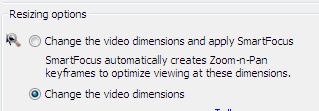
Choose Edit my recording from the options dialog, and click OK to begin a new project based around that movie. Leave the options at their defaults, except for SmartFocus, which I prefer to turn off and rescale, rather than having it automatically crop based on the area you're working with.

Camtasiascreenshot5

You'll then see a timeline and canvas layout appear, that will seem very familiar to anyone who's used a video editor. The actual tools you get for editing are a bit primitive, with cut, trim and split and not much else. What really makes the app is their task-based UI:

Camtasiascreenshot6
Camtasiascreenshot7

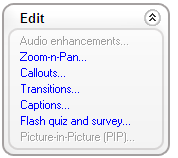
They've created custom UI for the dozen most common tasks you'd need to do when editing a screencast demo. Each of these is a modal interface that guides you through the process, offering a small set of targeted options specifically for the job at hand. For example the Voice narration section will extend a hold frame of the current clip to match the length of your audio.

Probably my single favorite feature is the Zoom-n-Pan control panel. It's surprisingly hard to handle scaling and cropping to a specific area of a video even with the slick UI of Motion, though using a camera with the new 3D helps. To move to a small area of the screen in Camtopia, all you need to do is select the region, choose how fast to move to it, and the program handles figuring out the animation needed to get that result.

Once you're satisfied with the look of your piece, you can move on to producing the final output. I was again very impressed by the targeted options. Being able to render directly to a self-contained flash video for the web was a lot easier than my previous hand-tweaking of codecs in QuickTime Player. Even better, the options it used resulted in a file that only took up a few MB for a minute of video, with no noticeable artifacts.

Overall, I really liked the thought that had obviously gone into designing Camtasia. It's no competition for a professional editor if you're producing a general feature, but it's perfect for the job it's designed for, producing screencast demos.

How to read Outlook data from Java

Coffeecup

Photo by Tom Anthony

I recently came across MoyoSoft's Java Outlook Connector. I haven't tried it myself, but if you've got a Java project that could benefit from accessing all that lovely data held in Outlook, it looks like a perfect fit. It lets you read messages, calendar entries, contacts and send mails, pretty much everything that's exposed by Outlook's native OOM API.

They offer a free evaluation version, code examples and a demo application if you want to check it out for yourself. Even if you've got a web-based service, this looks like a great way to create a downloadable app to import contact information from Outlook.

10 tools definining the future of email

Raygun

Photo by Don Solo

Email's the dominant way of communicating on the internet, but our tools for dealing with it have barely changed in a decade. Here's the services I think will define whole new ways of working with email over the next few years, let me know any I missed in the comments:

One of the pioneers of email productivity, ClearContext's Outlook add-in offers dozens of targeted tools to help you get the information you need faster. It's progressing towards a whole new interface to email, one that's several steps beyond a plain list of subject lines.

I only recently came across Sherman Dickman and his team, but the mail client they're developing hits my buttons. Being able to search, sort and categorize your email through a modern interface makes it possible to do more in less time, and uncover hidden information. I'm looking forward to trying it once they open up the beta.

Unlike a lot of the other tools here, IWantSandy isn't a new way of reading your emails. Instead, you can control a lot of scheduling, appointments and tasks by emailing requests to their service. In geek terms, it's like a command-line interface through email to the system. Email's a great interface if you want quick and easy access to an application. Like Twitter, the minimalism it enforces keeps everything very simple. I'm hoping to see a lot more applications take this approach.

The team have been making great strides trying to do something different inside Outlook, with lots of innovative features like their contact ranks. Recently they've narrowed in on search as their primary focus, based on user feedback. That definitely makes sense, being able to search effectively is almost always the first killer app for any massive data set whether it's the web or email.

I recently covered the great features that OtherInbox offers for organizing your non-human email. Our inboxes have become the entry point for a lot of information other than personal messages, the only way to keep them useful is to have some sort of organizer like this. I wonder if there will ever be a standard for identifying and classifying these auto-mails, like the list-serv id?

Google's initial implementation of web mail was stunning, with their conversation sorting and search all spot on. I've been worried that they haven't built on that, but recently their Google Labs has shown some promising initiatives, bringing out new and useful services like canned responses.

A beta which garnered rave reviews from testers, but then disappeared into the vaults of Redmond never to be seen again, Knowledge Network analyzed email to identify experts. I'm hoping that the technology will resurface as part of Exchange or Outlook, it seems like a big step forward.

Similar to Knowledge Network, Tacit mine a company's email to identify experts, and connect them with people in need of help. I've heard very good things from users of their system, but it still seems little-known.

Focused on Enterprise Relationship Discovery, essentially building a LinkedIn style network automatically for an organization from their email patterns. Contact Networks were recently bought by Thompson, I'm hoping that those new resources will help them press forward building out their system. Like expertise, relationships between people are reflected in email content, and at the moment that useful information is being ignored by most organizations.

Mailana

I have my own startup building new email tools for the enterprise, since I'm convinced there's a lot of new ground to cover. If you're at Defrag, come on over and I'll show you more.