What’s the secret to Amazon’s SIPs algorithm?

Calvincloud

The statistically improbable phrases that Amazon generates from a book’s contents seem like they’d be useful to have for a lot of other text content, such as emails or web pages. In particular, it seems like you could do some crude but useful automatic tagging.

There’s no technical information available on the algorithm they use, just a vague description of the results it’s trying to achieve. They define a SIP as "a phrase that occurs a large
number of times in a particular book relative to all Search Inside!
books".

The obvious implementation of this for a word or series of words in a candidate text is

  • Calculate how frequently the word or phrase occurs in the current text, by dividing the number of occurrences by the total number of words in the text. Call this Candidate Frequency.
  • Calculate the frequency of the same word of phrase in a larger reference set of set, to get the average frequency that you’d expect it to appear in a typical text. Call this Usual Frequency.
  • To get the Unusualness Score for how unusual a word or phrase is, divide the Candidate Frequency by the Usual Frequency.

In practical terms, if a word appears often in the candidate text, but appears rarely in the reference texts, it will have a high value for Candidate Frequency and a low Usual Frequency, giving a high overall Unusualness Score.

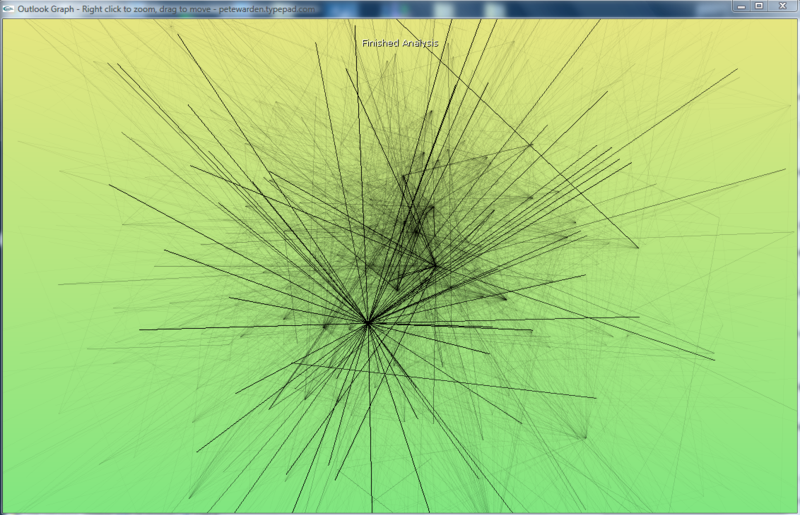
This isn’t too hard to implement, so I’ve been experimenting using Outlook Graph. I take my entire collection of emails as a reference corpus, and then for every sender I apply this algorithm to the text of their emails to obtain the top-scoring improbable phrases. Interestingly, the results aren’t as compelling as Amazon’s. A lot of words that intuitively aren’t very helpful showing up near the top.

I have found a few discussions online from people who’ve attempted something similar. Most useful were Mark Liberman’s intial thoughts on how we pick out key phrases, where he discusses using "simple ratios of observed frequencies to general expectations", and how they will fail because "such tests will pick out far too many words and phrases whose expected frequency over the span of text in question is nearly zero". This sounds like a plausible explanation for some of the quality of the results I’m seeing.

In a later post, he analyzes Amazon’s SIP results, to try and understand what it’s doing under the hood. The key thing he seems to uncover is that "Amazon is limiting SIPs to things that are plausibly phrases in a linguistic sense". In other words, they’re not just applying a simplistic statistical model to pick out SIPs, they’re doing some other sorting to determine what combinations of words are acceptable as likely phrases. I’m trying to avoid that sort of linguistic analysis, since once you get into trying to understand the meaning of a text in any way, you’re suddenly looking at a mountain of hairy unsolved AI problems, and at the very least a lot of engineering effort.

As a counter-example, S Anand applied the same approach I’m using to Calvin and Hobbes, and got respectable-looking results for both single words and phrases, though he too believes that "clearly Amazon’s gotten much further with their system".

There are some other explanations for the quality of the results I’m getting so far. Email is a very informal and unstructured medium compared to books. There’s a lot more bumpf, stuff like header information that creeps into the main text that isn’t intended for humans to understand. Emails can also be a lot less focused on describing a particular subject or set of concepts, a lot closer to natural speech with content-free filler such as ‘hello’ and ‘with regards’. It’s possible too that trying to pull out keywords from all of a particular person’s sent emails is not a solvable problem, that there’s too much variance in what any one person discusses.

One tweak I found that really improved the quality was discarding any word that only occurs once in the candidate text. That seems to remove some of the noise of junk words, since the repetition of a token usually means it’s a genuine word and not just some random characters that have crept in.

Another possible source of error is the reference text I’m comparing against. Using all emails has a certain elegance, since it’s both easily available in this context, and will give personalized results for every user, based on what’s usual in their world. As an alternative, whilst looking at a paper on Automatically Discovering Word Senses, I came across the MiniPAR project, which includes a word frequency list generated from AP news stories. It will be interesting to try both this and the large Google corpus as the reference instead, and see what difference that makes.

I’m having a lot of fun trying to wrestle this into a usable tool, it feels very promising, and surprisingly neglected. One way of looking at what I’m trying to do is as the inverse of the search problem. Instead of asking ‘Which documents match the terms I’m searching for?’, I’m trying to answer ‘Which terms would find the document I’m looking at in a search?’. This brings up a lot of interesting avenues with search in general, such as suggesting other searches you might try based on the contents of results that seem related to what you’re after. Right now though, it feels like I’m not too far from having something useful for tagging emails.

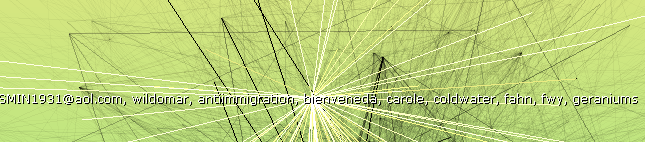
As a final note, here’s an example of the top single-word results I’m getting for an old trailworking friend of mine:
Ronsips

The anti-immigration one is surprising, I don’t remember that ever coming up, but the others are mostly places or objects that have some relevance to our emails.

One thing I always find incredibly useful, and the reason I created Outlook Graph in the first place, is transforming large data sets into something you can see. For the SIPs problem, the input variables we’ve got to play with are the candidate and reference frequencies of words. Essentially, I’m trying to find a pattern I can exploit, some correlation between how interesting a word is and the values it has for those two. The best way of spotting those sort of correlations is to draw your data as a 2D scatter graph and see what emerges. In this case, I’m plotting all of the words from a senders emails over the main graph, with the horizontal axis the frequency in the current emails, and the vertical axis representing how often a word shows up in all emails.

Ronscatter

You can see there’s a big log jam of words in the bottom left that are rare in both the candidate text, and the background. Towards the top-right corner are the words that are frequent in both, like ‘this’. The interesting ones are towards the bottom right, which represents words frequent in the current text, but infrequent in the reference. These are things like ‘trails’, ‘work’ or ‘drive’ that are distinctive to this person’s emails.
If blog comments are dark matter, then what’s the dark energy?

800pxwmap_2003
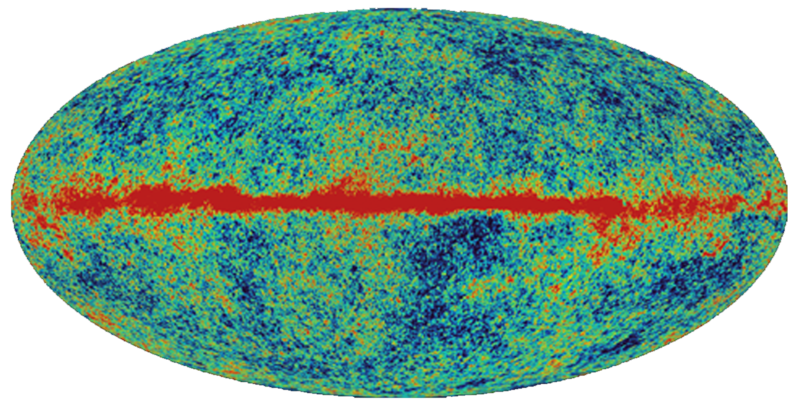
Brad called blog comments as the dark matter of the net. They’re really hard to search, and so there’s a lot of useful information that’s effectively lost to the world. What’s driving a lot of my work is my belief that email is the dark energy.

Dark energy makes up 74% of the universe, versus  22% for dark matter. There’s an estimated 200 billion emails sent every day, whereas the number of active blogs is in the low millions. I’m wandering dangerously close to Chinese math, but even assuming the vast majority of emails are low in information content, that’s a lot of untapped data that people are entering into computers.

The reason nobody’s taking advantage of this is that emails are a very personal and private medium, not intended for public consumption, unlike blog posts or comments which are explicitly published to the world. My hypothesis is that there’s a category of people for whom exposing partial information about their email, possibly to a limited audience, will solve some painful problems. JP Rangaswami is my poster child; he opened up his inbox to all his direct reports, as a way of mentoring and sharing information with them, as well as ensuring he doesn’t hear much complaining about each other! I wouldn’t go that far, but I do wish I could easily expose all of my technical discussion email threads to the rest of my team.

There’s practical steps that can be taken within a business setting to make a lot more information available, since that’s one place where you have access to a whole set of interacting email messages. I want to find subject matter experts within the organization, or people who have been in contact with an external group or person you want information on. Doing social graph analysis on an exchange server full of messages will help with that, as will statistical analysis for picking out keywords. I’m excited to see what tools I can build on these foundations. Stay tuned…

Want the average frequencies of 13 million words?

Graph
Last year, Google released a list of how frequently single words and combinations appeared, based on analyzing over a trillion words on public web pages. It has over 13 million individual words, and the frequencies of combinations of up to 5 words. It’s available on 6 DVDs for just $180 from the Linguistic Data Consortium at the University of Pennsylvania.

If, like me, you use statistical analysis to pick out unusual words or phrases from documents, this is a god-send. It should be a great base-line to compare the document’s text against, and eliminate the common phrases, leaving just the distinctive parts. I’m hoping to at least use it as an uber-stop-word file. The main down-side is the restrictive license, that forbids "commercially exploiting" the data. It shouldn’t be rocket-science to reproduce similar data by crawling the web when that becomes an issue, so I’ll work within those limits for now.

The LDC has a great collection of other raw data sets too. It’s worth checking out their English Gigaword archive of millions of news stories if you want some more baseline data. Thanks to Ionut at Google Operating System for leading me to the article in the official Google Research blog covering this release.

Inboxer – An easy way to spy on your employee’s emails?

Inboxer
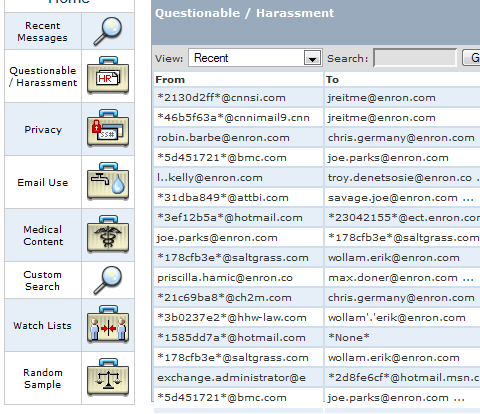
I first ran across Inboxer through their excellent Enron email exploration site. They offer a server appliance that sits inside a company’s firewall, analyzes all internal email, and offers a GUI interface to explore the messages. They have some sophisticated tools that let you see some common types of emails that management would be interested in, such as objectionable content, recruitment-related or by external contacts. They also let you set up alerts and triggers if particular conditions are met, such as unauthorized employees emailing messages that appear to contain contracts to external addresses. You can experiment with their UI through the Enron site, it seems to be pretty well laid out, and simple enough for non-technical people to use.

Inboxertimegraph

They offer graphs of important statistics over time.

Inboxerscreenshot

There’s a set of pre-packaged searches for things management are commonly concerned about. You can drag and drop any of them onto the main pane, and you’ll get a view of all the relevant emails.

They’ve done a great job technically with Inboxer, it seems like a well-rounded service. I’m a bit disturbed that the this is what the market is demanding though. Despite it being pretty clear from a legal standpoint that the company has no duty of privacy, most people don’t treat their work emails as public documents. Some of the searches, such as those for recruitment terms, are clearly aimed at catching employees doing something they don’t want management to know about, but that aren’t aimed at harming the company. I get worried that it would be incredibly tempting to use this as a technical fix for a management problem. Instead of focusing on keeping employees from job-hunting by keeping them happy, just try and punish anyone who makes the mistake of using the company system in their search.

I believe the Inboxer team has done their homework, they’ve clearly tried a lot of different tools, and this is the one that seems most successful. There’s a lot of legitimate uses, especially in regulated industries and government organizations, where there’s liability issues that require some email controls. I just wish that a less command-and-control, top-down approach was more popular. If Inboxer also offered a client-side version, I’d much rather work for a company that required that. It could make it clear which emails would be flagged and looked at, before they were sent, and help employees understand how public their work emails really are.

Roger Matus, the CEO of Inboxer, has collected a lot of useful email and messaging news in his blog, Death by Email. I’d recommend a visit if you’re interested in their work.

How to access the Enron data painlessly

Enronicscreenshot

Yesterday I gave an overview of the Enron email corpus, but since then I’ve discovered a lot more resources. A whole academic ecosystem has grown up around it, and it’s led me to some really interesting research projects. Even better, the raw data has been put up online in several easy to use formats.

The best place to start is William Cohen’s page, which has a direct download link for the text of the messages in a tar, as well as a brief history of the data and links to some of the projects using it. Another great resource is a mysql database containing a cleaned-up version of the complete set, which could be very handy for a web-based demo.

Berkeley has done a lot of interesting work using the emails. Enronic is an email graph viewer, similar in concept to Outlook Graph but with a lot of interesting search and timeline view features. Jeffrey Heer’s produced a lot of other interesting visualization work too. He’s produced several toolkits, and some compelling work on collaborating through visualization, like the sense.us demographic viewer and annotator.

Equally interesting was this paper on automatically categorizing emails based on their content, comparing some of the popular techniques with the categorization reflected in the email folders that the recipients had used to organize them. Ron Bekkerman has some other interesting papers too, like this one on building a social network from a user’s mailbox, and then expanding it by locating the member’s home pages on the web.

The secret to showing time in tag clouds…

Animatedtags

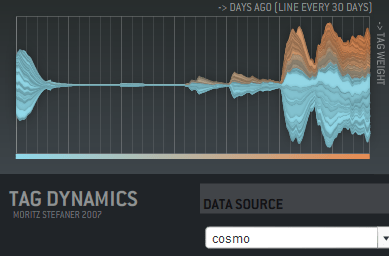
… is animation! I haven’t seen this used in any commercial sites, but Moritz Stefaner has a flash example of an animated cloud from his thesis. You should check out his other work there too, it includes some really innovative ways of displaying tags over time, like this graph showing tag usage:

Taggraph

His thesis title is "Visual tools for the socio-semantic web", and he really delivers 9 completely new ways of displaying the data, most of them time-based. Even better, he has interactive and animated examples online for almost all of them. Somebody needs to hire him to develop them further.

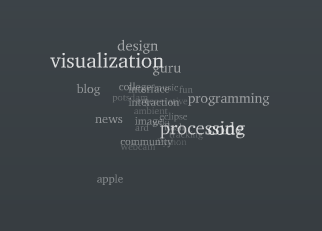
Moritz has his own discussion on the motivations and problems with animated tag clouds. For my purposes, I want to give people a way to spot changes in the importance of email topics over time. Static tag clouds are great for showing the relative importance of a large number of keywords at a glance, and animation is a way of bringing to life the rise and decline of topics in an easy to absorb way. Intuitively, a tag cloud of words in the subjects of emails would show ‘tax’ suddenly blinking larger in the US in April. On a more subtle level, you could track product names in customer support emails, and get an idea of which were taking the most resources over time. Trying to pull that same information from the data arranged as a line graph is a lot harder.

There’s some practical problems with animating tag clouds. Static clouds are traditionally arranged with words abutting each other. This means when one changes size, it affects the position of all the words after it. This gives a very distracting effect. One way to avoid this is to accept some level of overlap between the words as they change size, which makes the result visually a lot more cluttered and hard to read. You can increase the average separation between terms, which cuts down the overlap, but does result in a lot sparser cloud.

I’m interested in trying out some other arrangement approaches. For example, I’m fond of the OS X dock animation model, where large icons do squeeze out their neighbors, but in a very unobtrusive way. I’m also hopeful there’s some non-flash ways to do this just with JavaScript.

How to write a graph visualizer and create beautiful layouts

Mattnetwork

If your application needs a large graph, as I did with my Outlook mail viewer, the first thing you should do is check for an existing library that will work for you. Matt Hurst has a great checklist for how to evaluate packages against your needs. If you can find one off-the-shelf, it’ll save a lot of time.

If you need to write your own, the best way to start is absorbing this wikipedia article on force-based layout algorithms. It has pseudo-code describing the basic process you’ll need to run to arrange your graph. It boils down to doing a physics-based simulation of a bunch of particles connected by springs, that repel each other when they get close. If you’ve ever written a simple particle system, you should be able to handle the needed code.

It’s pretty easy to get something that works well for small numbers of nodes, since the calculations needed aren’t very intensive. For larger graphs, the tricky part is handling the repulsion, since in theory every node can be repelled by every other node in the graph. This means the naive algorithm loops over every particle every time when calculating the repulsion for each in the graph, which gives O(N-squared) performance. The key to optimizing this is taking advantage of the fact that most nodes are only close enough to be repelled by a few other nodes, and creating a spatial data structure before each pass so you can quickly tell which nodes to look at in any particular region.

I ended up using a 2D array of buckets, each about the size of a particle’s repulsion fall-off distance. That meant I could just check the immediately neighboring buckets that a particle was in to find others that would affect it. The biggest problem was keeping the repulsion distance small enough that the number of particles to check was low.

In general, tuning the physics-based parameters to get a particular look is extremely hard. The basic parameters you can alter are the stiffness of the springs, the repulsion force, and the system’s friction. Unfortunately, it’s hard to know what visual effect changing one of them will have, they’re only indirectly linked to desirable properties like an even scattering of nodes. I would recommend implementing an interface that allows you to tweak them as the simulation is running, to try and find a good set for your particular data. I attempted to find some that worked well for my public release, but I do wish there was a different algorithm that was based on satisfying some visually-pleasing constraints as well as the physics-based ones. I did end up implementing a variant on the spring equation that repelled when the connection was too short, which seemed to help reduce the required repulsion distance, and is a lot cheaper to calculate.

A fundamental issue I hit is that all of my nodes are heavily interconnected, which makes positioning nodes so that they are equally separated an insoluble problem. They often end up in very tight clumps in the center, since many of them want to be close to many others.

Another problem I hit was numerical explosions in velocities, because the time-step I was integrating over was too large. This is an old problem in physics simulations, with some very robust solutions, but I was able to get decent behavior with a combination of shorter fixed time steps, and a ‘light-speed’ maximum velocity. I also considered dynamically reducing the time-step when large velocities were present, but I didn’t want to slow the simulation.

I wrote my library in C++, but I’ve seen good ones running in Java, and I’d imagine any non-interpreted language could handle the computations. All of the display was done through OpenGL, and I actually used GLUT for the interface, since my needs were fairly basic. For profiling, Intel’s VTune was very helpful in identifying where my cycles were going. I’d also recommend planning on implementing threading in your simulation code from the start, since you’ll almost certainly want to allow user interaction at a higher frequency than the simulation can run with large sets of data.

See connections in your email with Outlook Graph

Outlookgraphscreenshot

Outlook Graph is a windows application I’ve been working on to explore the connections that exist in large mail stores. If you’re feeling brave, I’ve just released an alpha version:
Download OutlookGraphInstall_v002.msi.

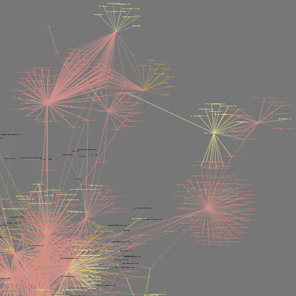
It will examine all of the Outlook mail messages on the computer, and try to arrange them into a graph with related people close together. The frequency of contacts between two people shown by the darkness of the lines connecting them. My goal is to discover interesting patterns and groupings, as a laboratory for developing new tools based on email data.

The application sends no network traffic, and doesn’t modify any data, but since it’s still in the early stages of testing, I’d recommend using it only on fully backed-up machines. It runs a physics simulation to find a good graph, so on very large numbers of messages it may take a long time to process. I’ve been testing on 10-12,000 message mailboxes on my laptop, so I’ll be interested in hearing how it scales up beyond that.

How to visualize hot topics from conversations

Twittercloud
I’ve found a new example of a good time-based visualization. Twitterverse shows a tag cloud of the last few hours, based on the world’s Twitter conversations. This is one of the things I’ll do with email, and it’s interesting to see how it works here.

There’s a lot of noise in the two-word phrases, with "just realized", "this morning", "this evening" and "this weekend" all showing up as the most common phrases. These don’t give much idea of what’s on people’s minds, but I can imagine you’d need a large stop word system to remove them, and that runs the risk of filtering out interesting phrases too.

A surprising amount of identifiable information came through, especially with single words. For example, xpunkx showed up in the chart, which looked like a user name. Googling it lead me to this twitter account, and then to Andy Lehman’s blog. It may just be a glitch of their implementation, but this would be a deal-breaker for most companies if it had been a secret codename gleaned from email messages. Of course, any visualization of common terms from recent internal emails would make a lot of executives nervous if it was widely accessible. Nobody wants to see "layoff" suddenly appear there and cause panic.

It’s also surprisingly changeable. Refreshing the one hour view every few minutes causes almost completely different sets of words to appear. Either the phrase frequency is very flat, eg the top phrases are only slightly more popular than the ones just below them, and so they’re easily displaced, or their implementation isn’t calculating the tag cloud quite in the way I’d expect.

The team at ideacode have done a really good job with Twitterverse, and there’s an interesting early sketch of their idea here. Max Kiesler, one of the authors, also has a great overview of time-based visualization on the web with some fascinating examples.

What most email analysis is missing…

Alarmclock
… is time. A mail store is one of the few sources of implicit data that has intrinsic time information baked in. The web has a very spotty and unreliable notion of time. In theory you should be able to tell when a page was last modified, but in practice this varies based on sites, and there’s no standard way (other than wayback) to look at the state of sites over an arbitrary period.

Once you’ve extracted keywords, it’s possible to do something basic like Google Trends. Here’s an example showing frequency of searches for Santiago and Wildfire:
Trendscreenshot
A friend suggested something similar for corporate email; it would be good to get a feel for the mood of the company based on either common keywords, or some measure of positive and negative words in messages. This could be tracked over time, and whilst it would be a pretty crude measure, could be a good indicator of what people are actually up to. Similarly, pulling out the most common terms in search queries going through the company gateway would give an insight into what people are thinking and working on. There’s privacy concerns obviously, but the aggregation of data from a lot of people makes it a lot more anonymous and less invasive. Its harder to turn the beefburger back into a cow, the combined data is a lot less likely to contain identifying or embarassing information.

Similar to Google’s trends, but with more information and better presentation is Trendpedia. Here’s a comparison of Facebook, MySpace and Friendster over time:
Trendpediascreenshot

So far, the examples have all been of fairly standard line graphs. There’s some intriguing possibilities once you start presenting discrete information on a timeline, and allowing interaction and exploration, especially with email. Here’s an example of a presidential debate transcript with that sort of interface, from Jeff Clark:
Transcriptscreenshot

All of these show a vertical, one-dimensional slice of information as it changes over time. It’s also possible to indicate time for two-dimensional data. The simplest way is to accumulate values onto a plane over time, so you can see how much of the time a certain part was active. Here’s an example from Wired, showing how player location over time was plotted for Halo maps to help tweak the design:

Haloscreenshot

What’s even more compelling is showing an animation of 2D data as it changes over time. The downside is that it’s a lot harder to implement, and I don’t know of too many examples. TwitterVision is one, but it’s not too useful. Mostly these sort of animations have to be client-side applications. For email, showing the exchange of messages over time on a graph is something that could give some interesting insights.

Thanks to Matthew Hurst for pointing me to a lot of these examples through his excellent blog.