Analyzing your Gmail

Mailtrends


Mihai Parparita
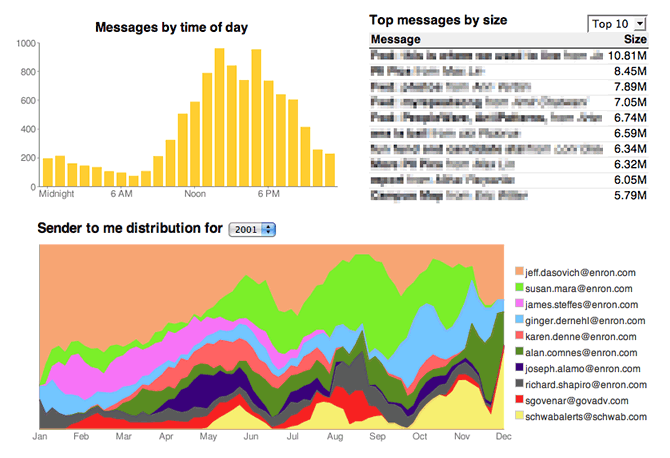
, a Google developer, has created a system to display information about your email over time. Mail Trends is a python script that connects to your Gmail account through IMAP, and generates a series of tables and graphs showing information about your mail account over time. The time aspect is key, it’s one of the most interesting parts of email, and something that distinguishes it from other implicit data we have access to. He has a demonstration using part of the Enron data set, and you can see the most prolific emailers, subjects and who sends you the most email. I was hoping it would also demonstrate searching by keyword, since being able to look for specific terms is very useful for research in Google Trends and similar buzz tracking sites for the web. One of my goals is to both show graphs of search keywords over time in your mail, in the same way that MarkMail does for its public mailing list search, and also have a animated tag clouds that show the most popular terms as they change over time. I’ll be watching closely for future developments, at least one of the blog commenters understands how this could build into something larger.

On the technical side, using IMAP is a great way to work around the lack of a proper Gmail API. He’s using the Python IMAPLib, I’ll have to look at the equivalents for other languages, since I have an irrational prejudice against any language in which whitespace is significant. Tabs in make files also bother me, but I’ve learnt to live with them. A hat tip to Brad and Googlified for pointing me towards Mail Trends.

How to build your own Facebook server

Sunstorm
Photo by Coccinelle69

In the last post I talked about the mechanics of how an app communicates with Facebook. With the alpha release of Ringside, there’s now an example of how to implement the server side of Facebook. It’s open-source and the two most interesting parts are their underlying mysql database and the PHP interface code that implements the API on top of that. Using mysql makes it hard to scale to massive numbers of users, so it’s not ready to power Facebook yet. On the other hand, having enough users to strain a single database server is a good problem to have. At that point you should have the resources to reimplement something more advanced under the hood.

Having a reference host for any plugin architecture is immensely helpful, especially one that’s open source. For example, if I was having trouble with the details of fetching events, I could open up ringside/api/includes/ringside/api/facebook/EventsGet.php and inspect exactly what their implementation is. There’s no guarantee that it’s the same as Facebook’s code, but it’s at least an unambiguous and exact specification of what somebody else thinks it should be doing. To get your own copy of the source using SVN, run
svn co https://ringside.svn.sourceforge.net/svnroot/ringside ringside

The other exciting part of Ringside’s release is their mysql schema. It could become a defacto standard for expressing the data that underlies all social networks. Anybody who’s able to take their own data source and translate it into the same tables can plug that into Ringside’s system. Turn the key, and you’ve got your own private Facebook. The schema is at ringside/api/config/ringside-schema.sql

If you want to customize it, the API source is full of great examples of how to work with the database to extend its capabilities, though the LGPL licence might require your changes to also be published.

What’s going on under the hood of Facebook’s API?

Clockwork

Photo by fallsroad

Facebook’s API comes wrapped in libraries for all the popular server languages, but there will come a day when you need to debug the raw HTTP transactions that they all boil down to. As a scripting language, the PHP implementation is easy to understand, and I ended up tweaking mine to output the exact text that’s flowing between me and Facebook. This was partly to help debugging, but also for my own curiosity. I’d like to model some of my interfaces on Facebook’s since it’s simple, robust and flexible.

You call a method by sending an HTTP request to "http://api.facebook.com/restserver.php". Arguments to the method are passed in the POST string sent as part of the request. Here’s an example for an event API call, split up on ampersands so that it won’t go off the edge of the blog, and with any secret values replaced with X:

uid=XXXXXXXXX&
eids=&
start_time=0&
end_time=1000000000000&
rsvp_status=&
method=facebook.events.get&
session_key=XXXXXXXXXXXXXXXXXXXXXXXX_XXXXXXXXX&
api_key=XXXXXXXXXXXXXXXXXXXXXXXXXXXXXXXX&
call_id=1206547876.5053
&v=1.0&
sig=XXXXXXXXXXXXXXXXXXXXXXXXXXXXXXXX

This is generated by taking the normal PHP arguments to each method, along with stored login and API keys, and serializing them into this string. If CURL is present on the server, this is then used to send the request, otherwise PHP’s native HTTP access functions are used.

Assuming that the call name (specified in "method") and the other arguments check out, then the Facebook server will return a string as its response. This string is in XML, and looks something like this:

<?xml version="1.0" encoding="UTF_8"?>
<events_get_response xmlns="http://api.facebook.com/1.0/&quot;
xmlns:xsi="http://www.w3.org/2001/XMLSchema_instance&quot;
xsi:schemaLocation="http://api.facebook.com/1.0/ http://api.facebook.com/1.0/facebook.xsd&quot;
list="true">
  <event>
    <eid>5172087276</eid>
    <name>Blog World Expo example</name>
    <tagline>http://www.blogworldexpo.com/</tagline&gt;
    <nid>0</nid>
    <pic>http://profile.ak.facebook.com/object2/5/55/s5172087276_7478.jpg</pic&gt;
    <pic_big>http://profile.ak.facebook.com/object2/5/55/n5172087276_7478.jpg</pic_big&gt;
    <pic_small>http://profile.ak.facebook.com/object2/5/55/t5172087276_7478.jpg</pic_small&gt;
    <host>BlogWorld</host>

… <snip …
</event>
</events_get_response>

The library then takes this simple XML string, and parses it into a PHP hierarchical array of values that looks like this:

Array
(
    [0] => Array
        (
            [eid] => 5172087276
            [name] => Blog World Expo example
            [tagline] => http://www.blogworldexpo.com/
            [nid] => 0
            [pic] => http://profile.ak.facebook.com/object2/5/55/s5172087276_7478.jpg
            [pic_big] => http://profile.ak.facebook.com/object2/5/55/n5172087276_7478.jpg
            [pic_small] => http://profile.ak.facebook.com/object2/5/55/t5172087276_7478.jpg
            [host] => BlogWorld

… <snip> …
        )
)

This always matches the structure of the XML. Facebook use a restricted subset that avoids tag attributes and anything else that might make it hard to map to this JSON style format.

Another possibility is that an error will be returned. In that case, the XML will normally just be a couple of tags, the error message string and the numeric error code. This gets converted to a PHP exception.

To dig into this code yourself, I recommend looking through facebookapi_php5_restlib.php in the client folder of the Facebook SDK. That’s a good place to add your own debugging code too, though there’s already some that can be enabled by setting the $GLOBALS[‘facebook_config’][‘debug’] variable to true.

How to convert mbox files to an Outlook pst

Kenlay
Photo by MotherPie

[Update- There's now a good alternative that includes separate PSTs for each user]

After getting the Enron emails into the mbox format, the next step was to convert them into something that the Outlook/Exchange world can understand. Thankfully I already had a great conversion program in mind, Aid4Mail. At its core its a translator between a large number of mail formats, including Outlook, Outlook Express, Windows Mail, Eudora, Thunderbird, Netscape Messenger, Pegasus Mail and a whole bunch of generic formats including several mbox variants. It can read and write to all of these formats, and has a large number of options to transform the mail as you do so. For example you can choose to only convert mails sent between certain dates, or to ignore attachments. If you're working with mail, I highly recommend giving this program a try, it's the swiss army knife of email tools.

To do the Enron conversion, I selected generic unix mbox as the input format. On the next screen I navigated to the root folder that contained all my files, and then chose Outlook pst as the destination type. I left all the other options at their defaults, so no filtering was done and the folder hierarchy was preserved. It took around 16 hours to process all 500,000 messages, and the pst file came out at around 5 GB.

I'm able to open it in Outlook and browse through the messages, and can also add them to my Exchange server. There are some issues, it doesn't preserve the original user structure, since they're all in one pst, attachments aren't included, and some of the addresses are obsfucated. It's good enough to give me the testbed I need to put some of my tools through some real-world stress tests.

Once the upload has finished, you should be able to access the pst yourself at
http://funhousepicture.com/enron.pst
It's 5 GB, so it won't be all there for a good few hours, and be prepared for a long download time.

The joy of nearly being eaten

Kingsnake_2

After growing up in Britain, where the apex predator is the badger, I feel lucky to be living where there’s truly wild wildlife. There’s something about the knowledge that you could be eaten or poisoned around the next corner to add an edge of alertness to any trip. The possible downside is being somebody’s next meal, but the certain upside is appreciating you’re in a true wilderness.

Liz once saw the rear end of a mountain lion disappear down the trail, but I’ve had to content myself with plenty of bob cats, coyotes and rattlesnakes. Two weeks ago, we even had a rattler who refused to leave our worksite, so he watched us warily for a few hours. Above you can see me relocating a harmless California King Snake after our maintenance had disturbed its home. Below are a few more of the lovely beasties we’ve encountered.

Scorpion_2

It’s not unusual to come across these small scorpions when you turn over a rock. So far nobody’s been stung, and from what I understand our local variety aren’t too poisonous anyway. It makes me feel like I’m in a western every time I spot one though.

Blackwidow1_2

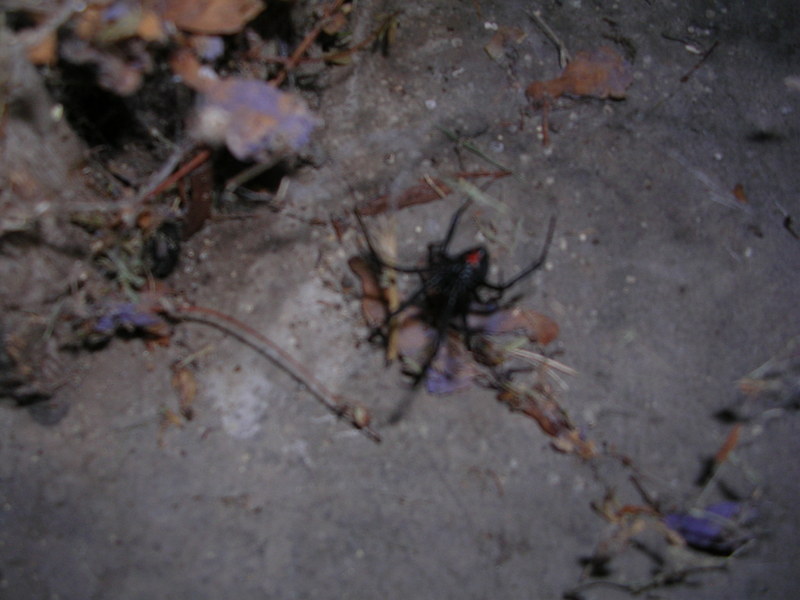
This action shot is a Black Widow in our back yard. We seem to have dozens around the outside of the house, they have the most beautiful sleek black bodies, with the distinctive red hourglass marking. We don’t have many closeup photos of them for obvious reasons.

Walkingstick_2

I’m not too worried about this Walking Stick insect eating me, but he’s one of the coolest designs I’ve seen in a long time. He’s definitely got the Apple elegance about him, the MacBook Air of the insect world.

How to convert individual email files to mbox

Pearls
Pearls by Matuko Amini

I need to load my Exchange server with a large set of real emails, so I can simulate how my tools will work on a big organization’s mail. The best data set out there is the Enron collection, but since most researchers are doing static analysis, it’s only available in easy-to-process forms like a mysql database or as individual files. There’s no obvious way to turn them back into something that can be imported into Outlook or Exchange.

I needed a way to get it into a form that standard mail programs would recognize. The easiest format to convert individual files to is mbox. In this setup, a set of email messages is stored in a single file ending with .mbox. Within each file, messages are seperated by a "From line". This consists of the characters ‘F’, ‘r’, ‘o’, ‘m’, ‘ ‘, followed by an email address and a date in asctime format. Each of these from lines must be preceded by a blank line. To make sure there’s no confusion with message content, any line beginning "From " in the body of a message must be changed to ">From ".

Since this all involves heavy text processing, I turned to Perl. Here’s a copy of my mailconvert.pl script, and I’ve included it inline at the bottom. It will take a directory hierarchy of individual email files, and for each folder will create a mailbox.mbox that contains all of the messages in that folder. It recognises emails by the inclusion of a "From: " header, and uses that address and the date header to create a complete from line seperator. Run it with the current working directory set to the root of the hierarchy. For example, cd to inside the maildir if you’re trying to convert the files extracted from the Enron tar.

I’ve tested with Apple Mail, and I’m able to import the files this generates. It’s a bit eerie seeing all the Enron mails show up in my inbox, and it’s a good reminder that these are messages that the senders never intended to be public. If you do use these mails yourself, please be respectful of their privacy.

Once you’re in mbox there’s a lot of tools available to convert them to Microsoft-friendly formats like psts. I’ll be covering those in a future article, along with some enhancements like grabbing the attachments and keeping the folder structure from the originals.

#!/usr/bin/perl
use strict;
use warnings;
use Cwd;
use POSIX;
use File::Find;
use Date::Parse;

# You need a date in the from line, though it seems redundant with the headers.
# Without a date there, Apple Mail at least won't parse the mbox files, so pick
# an arbitrary value to put in there if we don't find a header.
my $datedefault = "Tue, 18 Mar 2008 12:11:51";

# The name of the mbox file created from all the messages in the directory
my $outputfilename = "mailbox.mbox";

# Empty the file
open(OUTPUT, "> $outputfilename");
close(OUTPUT);

my $count = 0;

find(\&findcallback, cwd);

# This is called back for every file found, and appends the contents to the
# main mbox file for that directory, together with a from line of the format
# "From <email address> <asctime format date" and a blank line.
sub findcallback
{
my $file = $File::Find::name;

# If it's not a file then don't do anything
return unless -f $file;

# Avoid processing the output file
if ($file eq $outputfilename)
{
return;
}

open F, $file or print "couldn't open $file\n" && return;

my $text = "";
my $from = "";
my $date = "";
while (<F>)
{
my $line = $_;
# If this line is a From: header, and we haven't found one before, then
# grab the address to use in the "From " seperator between mail messages
if( ($from eq "") and ($line =~ /^From: .*$/) )
{
$from = $line;
$from =~ s/^From: /From /;
# remove the new line
$from =~ s/[\r\n]//g;
}
elsif ($line =~ /^From .*$/)
{
# If there's a line that looks like a "From " seperator, add a > to
# prevent it messing up the mbox parsing
$line = ">" . $line;
}

# If this is a Date: header, then grab the value to use after the address
if( ($date eq "") and ($line =~ /^Date: .*$/) )
{
my $inputdate = $line;
$inputdate =~ s/^Date: //g;

my $datevalue = str2time($inputdate);
$date = POSIX::gmtime($datevalue);
}
$text .= $line;
}

close F;

# If no date header was found, pick an arbitrary one with the correct format
if ($date eq "")
{
$date = $datedefault;
}

# Work out the final string if this looks like a valid mail file
if ((length($text)>0) and (length($from)>0))
{
my $outputstring .= $from . " " . $date . "\n" . $text . "\r\n\r\n";

open(OUTPUT, ">> $outputfilename");
print OUTPUT $outputstring;
close(OUTPUT);
}

}
A Facebook Ajax Example

Ajax
Photo of the original Ajax by Oboulko

One of the toughest parts of the Facebook API is their Ajax support. There’s a good page on their wiki with a small piece of sample code, but since Event Connector uses Ajax heavily, I thought it would be a good real-world example. Here’s the PHP source code.

I’ve removed the application settings from config.php, so you’ll need to create your own application in Facebook and follow the same steps you do for the Footprints sample before you can use it. There’s some inline comments explain the control flow, and covering some of the Ajax quirks. One thing to be aware of is the 10 second time-out in all Facebook page requests. If you’re doing any heavy work on the server, or it could get overloaded, you’ll need a strategy to prevent your users seeing an error screen, which is exactly why I went with Ajax for this situation.

More Facebook API posts

How X1 approaches enterprise search

Skyscrapers
Photo by 2Create

X1 are best known for their desktop search tool, but they offer an enterprise-wide solution that tries to integrate a lot of different data sources to allow searches that cover all of a company’s information. It mostly sounds very similar to Google’s search appliance, but they do have an interesting architecture that includes an Exchange component. It uses server-side MAPI, which limits it to Exchange 2003 and earlier unless you download the optional MAPI components for 2007. There’s also no mention of hooking into the event model, so I would be curious to know how much of a lag there is between a message arriving, and it being indexed. For my email search I’m working on Exchange Web Services support, since that’s the supported 2007 API to replace MAPI, and trying to get real-time access to the data by hooking into the Exchange event model.

It sounds as if they’re focusing more on the enterprise side of the world, after a recent change of management and a switch to a paid model for their desktop client. Back in November they mentioned signing up 60 large companies as customers for their enterprise service, which sounds promising, especially alongside their 40,000 desktop downloads at $50 each.

Trying to sell a release with no new features

"There’s really nothing to it. There’s no story, so it’s really hard to say anything."

This video of a friend-of-a-friend desperately trying to find something good to say about the latest release of his software brought back memories of trade shows past. When the powers-that-be want to bump up the version number, but don’t synchronize that with any actual development schedules, you end up trying to find something, anything, to demonstrate.

Visualizing the banking crisis

Bankvisual

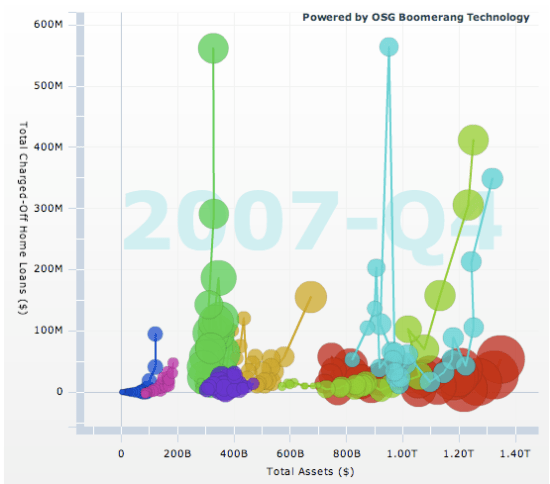
The web gives us an amazing opportunity to use animation in visualizations. Showing change over time graphically, and allowing users to absorb and interact by pausing and scrubbing in the timeline, lets you comprehend a lot more information than a static image can give. You can show an animation on TV, but that doesn’t give the viewers a chance to pause, rewind and really understand what’s happening. Of course, just as designing a good 2D picture to show information is a lot tougher than outputting a textual list, working out how to get across information in animation takes a lot of skill. That’s why I’m so impressed by these visualizations of bank’s mortgage liabilities.

The two charts show how many of the main banks’ mortgages are in trouble, either over 90 days delinquent on payments (the usual cutoff for the start of the foreclosure process) or the charged-off (aka written-down) value on all their mortgages. What’s fascinating is seeing sudden explosion in both measures of trouble in the last few quarters as you play back the animation. It makes the magnitude of the shock very clear, and explains why so many financial folks have been freaking out, far better than seeing the same figures in a static graph. Overall it does a good job of communicating some complex information in a very compact form.

The graphs themselves are written in Flex, and are examples of the Boomerang data visualization technology that the OSG group has developed for internal business intelligence applications. On the main site they have some slightly more complex and flexible versions of the same charts. They’re doing very interesting work with their projects like Savant and Hardtack to break down the barriers between the data silos that exist within most businesses. They seem to be approaching the problems with very modern techniques, using RSS and other tools that allow easy mashing-up of data from legacy systems. I’ll be interested to hear if they’ve looked at using email as a source too.

If you’re interested in more of the financial-nerd details of the mortgage meltdown, my favorite source is the Calculated Risk blog. Their analysis of the primary data on housing is invaluable.