Off the grid on Santa Cruz Island

Anacapa
Photo by Kevin Sarayba

Tomorrow morning I’m off for a four day camping trip to Santa Cruz Island, where we’ll be working with the NPS rangers to fix up some of the hiking trails. It’s like a trip back to the 19th century, with no phones, cars, planes, and no permanent inhabitants on a 100 square mile island. I can’t imagine any other way of escaping from my compulsion to check my iphone and RSS reader, and it’s one of the most beautiful places on earth to boot. All that and it’s just an hour’s boat ride from LA!

To keep you busy while I’m away, I recommend checking out the Bombay TV video mashup site. It’s very simple, just placing subtitles on some old bollywood movies, but the clips are perfectly chosen. I guarantee that you’ll wake up everyone in the room if you use this for your next presentation.

Why aren’t we using humans as robots?

Robot
Photo by Regolare

Yesterday I had lunch with Stan James of Lijit fame, and it was a blast. One of the topics that’s fascinated both of us is breaking down the walls that companies put up around your data. In the 90’s it was undocumented file formats and this decade it’s EULAs on web services like Facebook. The intent is to keep your data locked in to a service, so that you’ll remain a customer, but what’s interesting is that they don’t have any legal way of enforcing exactly that. Instead they forbid processing the data with automated scripts and giving out your account information to third-party services. It’s pretty simple to detect when somebody’s using a robot to walk your site, and so this is easy to enforce.

The approach I took with Google Hot Keys was to rely on users themselves to visit sites and view pages. I was then able to analyze and extract semantic information on the client side, as a post processing step using a browser extension. It would be pretty straightforward to do the same thing on Facebook, sucking down your friends information every time you visited their profile. I Am Not A Lawyer, but this sort of approach is both impossible to detect from the server side and seems hard to EULA out of existence. You’re inherently running an automated script on the pages you receive just to display them, unless you only read the raw HTTP/HTML responses.

So why isn’t this approach more popular? One thing both me and Stan agreed on is that getting browser plugins distributed is really, really hard. Some days the majority of Google’s site ads seem to be for their very useful toolbar, but based on my experience only a tiny fraction of users have it installed. If Google’s marketing machine can’t persuade people to install client software, it’s obvious you need a very compelling proposition before you can get a lot of uptake.

Illegal characters in PHP XML parsing

Kanji
Photo by Cattoo

If you hit the error "Invalid character" while using PHP’s built-in XML parser, and you don’t see the usual "<" or "&" characters in the input, you might be running into the same control code problems I’ve been hitting. I’d always assumed, and most sites state, that you can put anything within a CDATA block apart from < and &. I’m wrapping the bodies of email messages in XML, within CDATA’s, but I was still seeing parser failures like these. I also tried using various escaping methods instead, like htmlspecialchars(), but still hit the failure.

Digging into it was tricky, since it doesn’t give you the actual character value it’s choking on. In one case I tracked it down to "\x99", which looks like a Microsoft variant for the trademark character. That got me wondering exactly what character set was being used, so I tried specifying ISO 8859 1 explicitly when I created the parser, but still hit the same error.

Then I realized I was cutting some corners by skipping the starting <?xml> tag for all of the strings I was creating. That’s where you can specify the character set for the file, and sure enough prefixing it with
<?xml version="1.0" encoding="ISO-8859-1"?>
got me past that first error. I thought I was home free, but looking at my test logs, it looks like it failed again overnight after going through 1300 more emails. I shall have to dig into that further and see what the issue was there.

It does seem like a design flaw that the parser chokes dies on unrecognized characters, rather than shrugging its shoulders and carrying on. It may well be outside of the spec to have control characters that aren’t legal in the current instruction set, but it seems both possible and helpful to have a mode that either ignores or demotes those characters when they’re found, rather than throwing up its hands and refusing to parse any further. It has the same smell of enforcing elegance at the expense of utility that infuriated me with bondage and discipline languages like Pascal.

You need pictures

Rabidpoodles
Photo by The Pack

I’m a very visual person, and I love plastering photos over anything I can. Jud mentioned he got a kick out of some of them on here, so I’d better confess and acknowledge my sources. Thanks to the internet and a wonderful community of artists, you can spice up your own documents, presentations and blog posts with some stunning pictures, all for no money down and zero monthly payments.

Flickr users have made a lot of beautiful photos available through the Creative Commons license. If you do a search like this:
http://flickr.com/search/?q=the&s=int&l=3
you’ll get around 3 million CC attribution/non-derivative/non-commercial licensed pictures that contain "the" in their description, sorted most-interesting first. Alter the search term if you want to explore something more specific. Make sure that you include proper attribution for the photo if you do use it, and respect the licensing. Be careful though, sometimes I end up spending more time browsing for photos than actually writing the post!

Once you’ve got one you like, my preferred way of getting them for a blog post is to screen-grab from the thumbnail shown on the main page for the photo. This is about the right size, has been downsampled well, and lets me do any cropping I want to do, all very quickly without ever having to load up a photo editing program. On the Mac you press Command-Shift-4 to bring up the cross-hairs, and then the result is saved as Picture X.png on your desktop. On Vista, load up the "Snipping Tool" from accessories and choose "New" to do pretty much the same thing.

What’s that plant?

Lizplanthunting
Photo of Liz by Kim Kelly

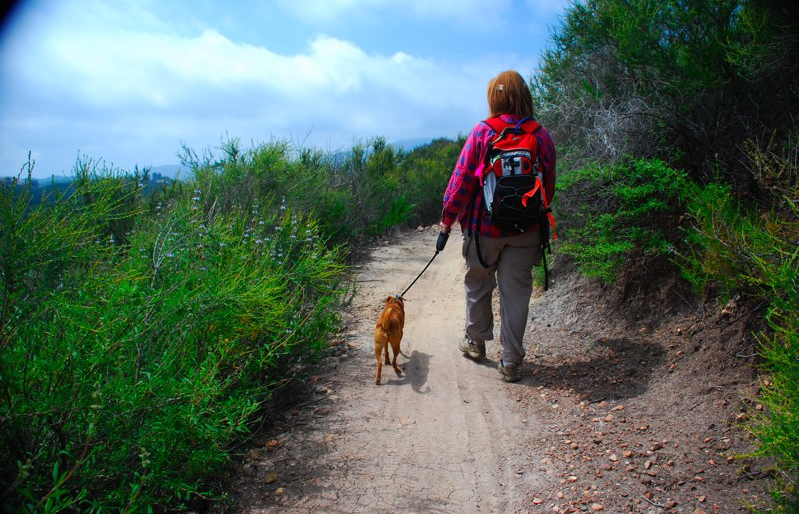
Pearly Everlasting. Liveforever. Manzanita. Shooting Stars. I love the names, but I’m hopeless at identifying local plants. Luckily I hang out with people a lot smarter than me. Liz has been writing Plant of the Month on the trails council site for the last couple of years, and she’s accumulated an amazing amount of knowledge of the local flowers. Probably the best way to learn more yourself is to go on an organized hike with the a group like the Conejo Sierra Club, or join one of our Saturday trail maintenance days. There’s usually at least one old hand who will happily tell you the story behind any of the plants.

If you want some books to take on the trail I highly recommend buying Milt McAuley’s Wildflowers of the Santa Monica Mountains. He’s a local legend who started building trails here in the 40’s, and who was still leading trail work a few years ago when I first arrived. The other book to turn to is Nancy Dale’s Flowering Plants: The Santa Monica Mountains. She covers a lot of detail and it’s a lot easier identifying something with an alternative source.

They haven’t figured out how to get internet access at the bottom of the canyons yet, but for when you’re back home Tony Valois has put together a very clear identification guide. He’s done a great job with the navigation, letting you look through his collection of photos by appearance, common names and scientific names.

With the recent sprinkling of rain, you’ll be able to see the best display for years, so don’t delay getting out there!

Lizandthor

Don’t repeat yourself with XML and SQL

Rascallyrepeatingrabbits
Photo by TW Collins

One key principle of Agile development is Don’t Repeat Yourself. If you’ve got one piece of data, make sure it’s only defined in one place in your code. That way it’s easy to change without either having to remember everywhere else you need to modify, or introducing bugs because your software’s inconsistent.

This gets really hard when you’re dealing with data flowing back and forth between XML and SQL. There’s a fundamental mismatch between a relational database that wants to store its information in columns and rows, and the tree structure of an XML document. Stylus do a great job describing the technical details of why XML is from Venus and SQL is from Mars, but the upshot is that it’s hard to find a common language that you can use to describe the data in both. A simple example is a list of the recipients of a particular email. The natural XML idiom would be something like this:

<message>
<snipped the other data>
<recipients>
<email>bob@bob.com</email>
<email>sue@sue.com</email>
</recipients>
</message>

But in mysql, you’re completely listless. To accommodate a variable length collection of items you need to set up a separate table that connects back to the owner of the data. In this case you might have a seperate ‘recipients’ table with rows that contained each address, together with some identifier that linked it with the original message held in another table. It’s issues like this that make a native XML database like MarkLogic very appealing if you’re mostly dealing with XML documents.

What I’d like to do is define my email message data model once, and then derive both the XML parsing and mysql interaction code from that. That would let me rapidly change the details of what’s stored without having to trawl through pages of boiler-plate code. I’m getting close, sticking to a simple subset of XML that’s very close to JSON, but defining a general way to translate lists of items back and forth is really tough.

I’m trying to avoid being an architecture astronaut, but it’s one of those problems that feels worth spending a little bit of upfront time on. It passes the "will this save me more time than it takes in the next four weeks?" code ROI test. I’d welcome any suggestions too, this feels like something that must have been solved many times before.

Do your taxes with implicit data

Turboscreenshot

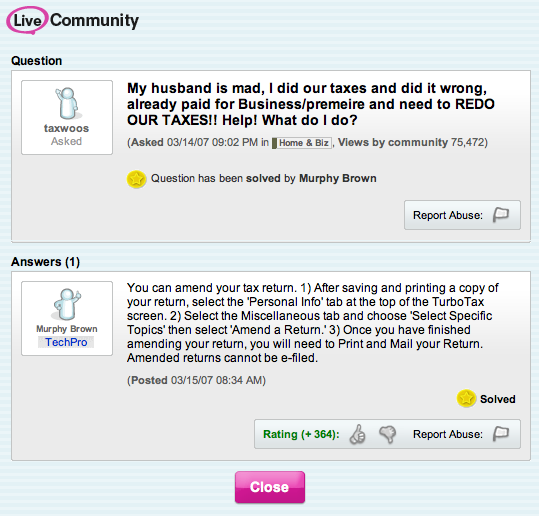
Quicken’s TurboTax is the slickest and deepest online app I’ve used. I’ve been a fan since 2003, and they just kept getting better. One thing that stood out this year was the unobtrusive but clear integration of their help forums into every page you’re working with. There’s a sidebar that has the most popular questions for the current section, ordered by view popularity. It’s applying Web 2.0-ish techniques, using page views to rank user-generated content, but for once it’s solving a painful problem. Maybe I’m just old, but I feel sad when I see all the great work teams are doing to solve mild consumer itches like photo organization that are already over-served, and my doctor’s practice still runs on DOS.

It was fascinating to read John Doerr’s thoughts on how Intuit was built, from his introduction to Inside Intuit. I’ve never managed to computerize my household finances (Liz has an amazing Excel setup that has to be seen to be believed) but their focus on customers has shone through all my encounters with them. It’s great to see they keep looking for ways to use the new techniques to improve their services, Microsoft could learn a lot from them. I know they sent someone to Defrag last year, so maybe I’ll see some more implicit web techniques when I do my 08 taxes?

Turboanswer

Using Outlook to import emails to Exchange is painfully slow

Tortoise

Outlookscreenshot

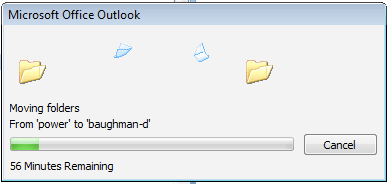
Once I’d converted the Enron emails to a PST and loaded them into Outlook, I thought I was almost done with my quest to get them on my Exchange server. The last remaining step was to copy them to an Outlook folder that’s in an account that’s hosted on that server. With the PST conversion taking about a day, I assumed it would take a while, but after running for 6 days, it’s still only up to the B’s in alphabetical order!

ExMerge is an alternative way to import a PST onto an Exchange server. It only supports non-unicode files though, and has a 2GB limit, so that doesn’t work for the 5GB Enron data set. Another suggestion (Experts’ Exchange, so scroll down past the ads to see the comments) is to turn off cached mode and do File->Import from within Outlook. I’ve cancelling my current copy and so far this approach seems a lot faster.

How to use IMAP as a Gmail API in PHP

Palomarstamp
Photo by Voxphoto

I’ve tended to avoid client/server APIs like IMAP or POP for my mail analysis work, because they’re inherently limited to a single account and a lot of the information I’m interested in comes from looking at an entire organization’s data. Mihai Parparita’s work with MailTrends impressed me though, so I’m going to show you how to access Gmail messages using IMAP as an API. I’ll be using a PHP script, since I have an irrational bias against Python. Something about semantically significant whitespace really gets my goat.

I’ve got a demonstration page up at http://funhousepicture.com/phpgmail/. You’ll need to enter your full gmail address and password if you want to try it out there, or you can download the sourcecode and run it on your own server. I’ve also included it inline below. After connecting, it will fetch all of the headers from your account, along with the full content of the first ten messages. This may take a few seconds

You’ll need PHP with support for the IMAP library enabled to use it yourself. I was surprised to find this wasn’t included by default in the OS X distribution, and after some considerable yak shaving trying to get my own copy of PHP compiled, along with all its dependencies, I gave up doing local development and relied on my hosted Linux server instead. Thankfully that worked right out of the box.

<?php

function gmail_login_page()
{
?>
<html>
<head><title>Gmail summary login</title>
<style type="text/css">body { font-family: arial, sans-serif; margin: 40px;}</style>
</head>
<body>
<div>This page demonstrates how to access your Gmail account using IMAP in PHP. </div><br/>
<div>Enter your full email address and password, and the next page will show a selection of information about your account.</div><br/>
<div>See <a href="http://petewarden.typepad.com/">http://petewarden.typepad.com/</a&gt; for more information.</div><br/>
<hr/><br/>
<div>
<form action="index.php" method="POST">
<input type="text" name="user"> Gmail address<br/>
<input type="password" name="password"> Password<br/>
<br/>
<input type="submit" value="Get summary">
</form>
</div>
<hr/>
</body>
</html>
<?php
}

function gmail_summary_page($user, $password)
{
?>
<html>
<head><title>Gmail summary for <?=$user?></title>
<style type="text/css">body { font-family: arial, sans-serif; margin: 40px;}</style>
</head>
<body>
<?php
   
    $imapaddress = "{imap.gmail.com:993/imap/ssl}";
    $imapmainbox = "INBOX";
    $maxmessagecount = 10;

    display_mail_summary($imapaddress, $imapmainbox, $user, $password, $maxmessagecount);
?>
</body>
</html>
<?php
}

function display_mail_summary($imapaddress, $imapmainbox, $imapuser, $imappassword, $maxmessagecount)
{
    $imapaddressandbox = $imapaddress . $imapmainbox;

    $connection = imap_open ($imapaddressandbox, $imapuser, $imappassword)
        or die("Can’t connect to ‘" . $imapaddress .
        "’ as user ‘" . $imapuser .
        "’ with password ‘" . $imappassword .
        "’: " . imap_last_error());

    echo "<u><h1>Gmail information for " . $imapuser ."</h1></u>";

    echo "<h2>Mailboxes</h2>\n";
    $folders = imap_listmailbox($connection, $imapaddress, "*")
        or die("Can’t list mailboxes: " . imap_last_error());

    foreach ($folders as $val)
        echo $val . "<br />\n";

    echo "<h2>Inbox headers</h2>\n";
    $headers = imap_headers($connection)
        or die("can’t get headers: " . imap_last_error());

    $totalmessagecount = sizeof($headers);

    echo $totalmessagecount . " messages<br/><br/>";

    if ($totalmessagecount<$maxmessagecount)
        $displaycount = $totalmessagecount;
    else
        $displaycount = $maxmessagecount;

    for ($count=1; $count<=$displaycount; $count+=1)
    {
        $headerinfo = imap_headerinfo($connection, $count)
            or die("Couldn’t get header for message " . $count . " : " . imap_last_error());
        $from = $headerinfo->fromaddress;
        $subject = $headerinfo->subject;
        $date = $headerinfo->date;
        echo "<em><u>".$from."</em></u>: ".$subject." – <i>".$date."</i><br />\n";
    }

    echo "<h2>Message bodies</h2>\n";

    for ($count=1; $count<=$displaycount; $count+=1)
    {
        $body = imap_body($connection, $count)
            or die("Can’t fetch body for message " . $count . " : " . imap_last_error());
        echo "<pre>". htmlspecialchars($body) . "</pre><hr/>";
    }

    imap_close($connection);
}

$user = $_POST["user"];
$password = $_POST["password"];

if (!$user or !$password)
    gmail_login_page();
else
    gmail_summary_page($user, $password);

?>

My own private Los Angeles

Gunplay

A friend who lives nearby sent me this photo. It’s pretty mind-blowing that there’s parts of LA where this is a necessary public service announcement, and got me thinking about how I experience the city. When I talked to the recruiter about jobs in the US the only guidance I gave was "anywhere but LA". I had grown up with LA Law, Baywatch and countless movies that left me certain that I’d hate it. Of course, all the interviews he arranged were in LA. I ended up accepting an offer here, with the idea I’d stay maybe a year.

A couple of days after I landed, I pulled out a street map and looked for any big patches of green, in the hope of finding some small place to walk in peace. I was surprised by the size of the blank spaces and picked one that looked promising. Rancho Sierra Vista was only a few minutes from where I was staying, and I found I could walk 9 miles straight through wilderness along Sycamore Canyon, right to the Pacific. Even more amazing was that this was the narrow axis of the parkland, it stretched for over 30 miles from Santa Monica to Camarillo. Ever since then, the Santa Monica Mountains have been my real Los Angeles.

Unlike any other city I’ve lived in, LA is entirely optional. Hardly anyone I know visits the east side, or even the sketchy neighborhoods near Santa Monica. The reliance on freeways means that downtown is a lot less important than you’d expect, with events and attractions scattered through the other hot locales like Hollywood. You can pick and choose which areas you want to visit and miss out on very little. It’s not like London where the center has all of the biggest shops, tourist traps and entertainment, reinforced by the flow of the tube lines. The only place that forces you to come into contact with Angelenos from the whole city is the freeway itself, with Humvees scattered between gardener’s pickups.

I’m not proud of my isolation from the majority of the city, but it does seem characteristic of LA. One of my favorite parts of trail work is getting local kids who have no idea there’s even wilderness on their doorstep excited about the outdoors. Many of their families are as ignorant of the beauty on offer as I was when I arrived, so getting the word out is crucial. The reason I’m writing up the local spots is so anybody who starts an internet search for hiking or camping hears about all the choices. I love my Los Angeles but I want to share it, even if that makes it a little less private.