Bike trails in Sycamore Canyon

Woodcanyonvista

Sycamore Canyon is one of the my favorite places to bike in the Santa Monica Mountains, and I’m not the only one. The two main trail heads are in Thousand Oaks in the north, and off the PCH at Sycamore Cove on the coast. I usually take the main fire road that runs south through Point Mugu State Park, and then branch off and explore some of the less-travelled back-country areas

There’s some breath-taking views, technical downhills and heart-pumping hills, and maybe a few rattlers, coyotes and bobcats if you’re lucky! Even though it’s a popular area, there’s enough trails that you can easily for hours without seeing anyone once you’re off the fire-road. I’ve mapped out my favorite routes on Google, but if you don’t know the area I’d recommend buying a commercial map, such as the Tom Harrison’s for Point Mugu or the National Geographic’s for the Santa Monica Mountains.

Starting from the north, you have a couple of choices for parking lots in Thousand Oaks. I prefer the dirt parking lot at the south end of Wendy Drive, which is free, easy to reach from the 101, and has a nice single track over to the main fire road. You can also park in the Rancho Sierra Vista/Satwiwa parking lot, which is right next to the start of the fire road.

The road is paved for the first few miles, and quickly heads downhill on a section known universally as the Asphalt Hill. Going down is fun, but as I learnt on a hot August afternoon when I was fresh off the boat, make sure you have enough water for the return or you’ll get heat-stroke! At the bottom of the hill, it’s a lot more wild, with a great section running through oak groves, gently downhill along the side of the creek.

The first big junction you’ll reach is with Ranch Center Road. The main fire road continues straight, and you branch off to the west to get to Ranch Center. The road is roughly paved, and has some decent uphill sections, followed by a great downhill to the old ranch buildings that led to its name. From there, you can take Wood Ranch trail back to the main fire road, and also get access to a lot of other side-trails.

You can either take the main fire road south for a couple of miles, or take some single tracks on the other side of the creek that parallel it, and join up again by the Wood Canyon junction. The first single track is Sin Nombre, recently opened to bikes, and so-called because it’s never had a name on its sign. There’s some fun technical sections, and it leads onto Two Foxes, a similar single-track.

From the junction of Wood Canyon trail and Sycamore, you can take the fire road three miles down to the beach. It’s a pretty gentle downhill, but in the rainy season you’ve got about a dozen stream crossings to navigate.

Off Wood Canyon, there’s one of my all-time favorite trails, Guadalasca. Built about 15 years ago by my friend Frank Padilla, it’s a sweet single track snaking up the mountain, with some great views and lovely switchbacks. Watch out for some patches of poison oak towards the top.

As an alternative for the hard-core, you can take Hell Hill up to the same Overlook Fire Road that Guadalasca connects with. As you might guess by the name, it’s not for the weak-hearted. An exposed, steep fire-road, it doesn’t take any prisoners.

Once you’re on the Overlook road, you can take that down almost to the beach, and meet up with the main Sycamore fire road, or there’s another challenging single-track you can take instead. Wood Canyon Vista trail is rocky and technical, with a lot of great views over the canyon as the name suggests.

There’s a lot more single track trails that I haven’t listed, but those are my favorites. Be careful not to take any trails heading east from Sycamore fire road, that whole area is a protected wilderness with no bikes allowed. Most of the trails have steps, close brush or other obstacles so biking them would not be much fun anyway.

If you want a gentle ride without anything technical, I’d recommend starting at the beach end, taking the fire road to the base of the Asphalt Hill, and taking the same way back.

For a bit more of a workout, with some mildly technical sections and decent uphills, start at the TO end, turn onto Ranch Center Road, take Wood Canyon, and then the main fire road back to the trail head.

More hard-core bikers will get a kick out of the Ranch Center-Guadalasca-Wood Canyon Vista-Two Foxes-Sin Nombre loop. This gives you some solid elevation gain, and a lot of technical single-tracks.

View Larger Map

Funhouse Photo User Count: 1,166 total, 60 active. Continuing the same trend as the last couple of weeks, pretty slow growth.

Event Connector User Count: 34 total, 9 active. I fixed a few more bugs, and added some more feedback to show progress for the friend checking.


Event connector in the directory

Yellowpages
After three submissions, and two rejections, Event Connector was finally accepted into the directory. I was initially rejected for not having an icon, which was my fault, but the second rejection was for displaying secret events, which I never understood and filed a bug on. I didn’t make any changes to fix that, since I had no clue what they issue was, but I resubmitted it unchanged and this time it was approved!

I’ve started to get some more users through the listing, and had a really helpful conversation with Nikki Sullivan that led me to make changes to the UI. I added some links to reach the main page, with a sidebar icon for the app as well as a link in the title of the profile box. I love getting this sort of help, thanks Nikki!

I’m still unsure who’s going to be using the app. My initial plan was to target promoters, and have them spread the app as a flyer for a particular event. It looks like it’s more popular with guests so far, and they’re using it as a hub to view and investigate all their events. If that’s the direction my users are taking me, that suggests some extra features:

  • A profile button that displays all the upcoming events someone is attending.
  • List all the events that your friends are going to.
  • A cleaner, more compact view of all the events.

This would take it in the direction of being a SuperEvent organizer, rather than the promotional tool I was imagining it to be. I’ll be thinking about this some more, and trying to understand how people are using it.

Funhouse Photo User Count: 1,154 total, 59 active. Much as before, I’ve made no changes in the last two weeks, and the growth rate remains the same.

Event Connector User Count: 27 total, 15 active. After its first day in the directory, it’s picked up a some users, though I haven’t seen it used to promote an event yet.

My conference wishlist

List

I stumbled into thinking about organizing conferences online by accident. I was looking for a way to see which of my friends were attending Defrag, there wasn’t anything out there that let me see that, and so I built a Facebook app to solve my problem.

That went down well, so I generalized it into Event Connector, and went looking for more events to try it on. I want to see if its simple services solve painful problems for guests and organizers, which types of events are the best fit, and build a relationship with some early-adopting event promoters to learn more about the market.

I’m also thinking about the folks over at EventVue. They’re building a much more advanced system, a suite of online tools to let conference organizers offer guests lots of interesting services. They’re a sharp team, just graduated from TechStars with an angel round under their belt, and we’ve chatted in the past about their work. I’d like to be able to back up any advice I offer them with some concrete data, and the only way to get that is to try a few things in the wild.

As an attendee, here’s my personal pain-points with conferences:

I don’t know who’s going.
I usually end up bringing up conferences in conversations or emails with acquaintances in the runup to a show, but I don’t always remember, and I don’t ask everyone. Meeting old friends and connections is a big reason for going to conferences to me, so anything that increases my chances solves a big problem.

Nobody else knows I’m going. For both practical reasons, and yes, status reasons sometimes, it’s a benefit to me if I can advertise my attendance at a show. If I’m speaking, or doing something else prestigious there, I would like people to know that too. It’s even useful for past conferences, think of the strings of ribbons people wear to SIGGRAPH to demonstrate they’re old-timers.

It’s hard to organize informal get-togethers. Birds-of-a-feather sessions are usually the most valuable part of the show, but often it can be hard to arrange them, hear about them, and understand which are likely to be most useful.

Discussions finish at the end of a session.
Of course, small groups usually peel off and continue chatting about ideas that came up from a presentation, but these are fragmented and there’s no process beyond arranging to start an email thread to continue them. I’d love to have a online area for each session where questions and discussions could go on past the conference.

Funhouse Photo User Count:
1,143 total, 60 active. Continuing the trend of gradual growth.

Event Connector User Count: 19 total. I reached out to a few prominent people in the tradeshow world like Rich Westerfield, Sue Pelletier and Tim Bourquin. Rich put up a blog post which was picked up by a few other blogs, and that’s helped boost my total. The directory submission is in the queue again. My goal is to get at least one more event using a connector within the next week.

Facebook User Statistics

Funhouse_users
It’s really important to collect a few important statistics to measure a project’s progress. One of my goals is to create an app that has over 25,000 users, an arbitrary number but one that’s high enough to use as evidence that it appeals to people outside the early-adopter geek crowd.

I’ve been collecting daily statistics since I launched Funhouse Photo, and I wanted to do analysis on them. At the top is a static image of the graph I created using Google Spreadsheets, and I’ve included a live link below. I’d never used the Google office products before, and I was pleasantly surprised. They’ve done a good job replicating the usability of a desktop app on the web. Unfortunately my OS X Firefox 2.0.4 wouldn’t display the graphs correctly, and neither would Safari. Luckily, if strangely, FF 2.0.4 on Vista did work, so I was able to complete the job using that.

Visualizing the data immediately gave me two important insights:

  1. There’s a knee in the total user curve, and that corresponds to my introduction of asynchronous image loading. This is strong evidence that it’s something that puts users off using the app, and so makes improving that seem important.
  2. It’s hard to see any other changes in the adoption curve’s slope. This means that all the other upgrades I’ve done to the app haven’t had an impact. Adding more effects, including notifications in user’s feeds and the profile button all failed to increase adoption. Getting a positive review didn’t result in more users.

Facebook recently introduced a "More Stats" option for all apps. This gives you access to a lot more information about the number of adds and removes, as well as a sample of the actual urls people are visiting. There’s no way to download the history, so for now I’ll keep manually entering them every day.


Funhouse Photo User Count: 1142 total, 74 active. Still the same slow growth trend. Extrapolating, the entire planet should be using the app in around 411,000 years.

Event Connector User Count: 11 total. I’m still waiting to hear back on the bug I filed about secret events, and on my resubmission to the directory, but I am talking directly to some event organizers about trying it with their meetings.

FBJS: Facebook JavaScript

Coffee
The best place to start learning about using JavaScript within Facebook apps is the developer wiki. It can be a bit disorienting at first, because they’ve constructed a very effective security sandbox. The only calls you can make are those they explicitly provide, so many common calls like alert() are not available.

There’s no list of all the legal function calls you can make, though the wiki does cover the DOM element calls. I’ve put in a request to the Facebook team to document the whitelist they use to parse scripts, but for now you need to use trial and error to find out which are filtered out. Some are obvious, anything that would let you add arbitrary unchecked content to the page, like document.write or eval(), are never going to be supported.

I had to write a script blocker for SearchMash, so I know how tough it can be. I’m very impressed with the job they do, managing to identify variables within JS and put them in a private namespace by adding a prefix is very clever. I do wonder if anyone’s gone through the full Cross-Site Scripting Cheatsheet though, since there are some funky methods of concealing scripts within html, and even after a few weeks of work I wasn’t able to exclude all of them. I had to deal with arbitrary external pages, so maybe Facebook can avoid those issues by refusing to parse anything that looks even slightly odd, since most of the exploits rely on ill-formed markup that still works in many browsers.

One of the interesting restrictions they have is that scripts in profile boxes will only be run as the result of a user action. This is a nice balance between allowing the app to do interactive things on the profile, but keeping the app from annoying the user when they’re not interested in it.

I’ve already done a big post on Facebook’s MockAjax, but a lot of the same points apply to general FBJS development. You’ll want to get FireBug to help you debug, and expect to spend a lot of time looking at the actual source of the pages Facebook is giving you. Luckily, if you’re the developer they include the FBML before it was processed by their parser, in comments towards the top of the page. This can be a real life-saver when you’re trying to work out what went wrong.

Funhouse Photo User Count: 1124 total, 104 active. Another day of steady growth. I’m going to see if I can chart the statistics I’ve been gathering here, but I’m pretty sure it’s been almost linear since I launched.

Event Connector User Count
: 9 total. Still need to research what they mean by ‘secret’ events, and how to exclude them, and then I can do another directory submission.

Back from Santa Cruz

Smugglersbeach

Liz and I returned from our trip to Santa Cruz Island last night. We had a wonderful time, camping under the eucalyptus with Richard, Kelly, Eric and Jennifer.

We had a chance to explore a few undeveloped and unmarked trails on the island too, with one thirteen mile hike that left us both pretty shattered. There isn’t much information about hiking the island available, so I’ll be trying to put up some notes with Google maps over this week.

Funhouse Photo
User Count
: 1,090 total, 109 active. It was good to see the steady growth continuing, especially since I’ve been focused on my day job and other projects, and haven’t done much to help it recently.
Event Connector User Count: 9 total. I’m currently wrestling with Facebook’s directory submission process. It was initially rejected as not showing any content, which I assumed was because the reviewer wasn’t invited to any events, so I just resubmitted it unchanged. It’s now been rejected for violating the ToS because it "stores user data beyond the context user session or specified timeout". This is very odd, because I’m actually not storing any data at all on my server, it’s all generated live through the Facebook API!
I’ll be adding a privacy policy note in the hope of clarifying this. There does need to be a two-way channel of communication between developers and the reviewers, at least somewhere I could add a note clarifying what I’m doing.

Camping in the Santa Monicas – Santa Cruz Island

Potatoharbor

In this installment of my guide to local camping, I’m going to cheat. The Channel Islands, just off the Ventura coast, are geologically part of the Santa Monicas, but not geographically. Tomorrow, me, Liz and some friends are off to Santa Cruz Island for a long weekend, so here’s the rundown.

The islands themselves are amazing. If you’ve never been, or have only visited Catalina, you really should head down to Ventura Harbor and catch a boat over, even if it’s just a day trip. Only Catalina is inhabited, the rest just have a few rangers, and it’s like going back in time. IslandPackers are the only regular boat service out there, they run daily trips out to most of the islands, and as a bonus you’ll often see dolphins and whales on the way.

Anacapa Island is the smallest, with an old lighthouse, and less than a mile of hiking trails on the top. There’s no access to the beach because it’s surrounded by steep cliffs, but you do get some great views of the sea-lions basking at their base. There’s also a massive population of very tame gulls, when I visited I was literally tripping over their chicks as they happily wandered in front of me! There’s a small campground, but I’ve never been tempted to stay, since the island itself is so tiny. It’s part of the Channel Islands National Park, so you can go to recreation.gov if you want to get a reservation.

Santa Cruz Island is my favorite. It’s the largest island, and is divided into two halves, with the east side part of the National Park, who allow unsupervised hiking. The western half is owned by the Nature Conservancy, and you need permission and a guide before hiking on their trails. The west has been public land for longer than the east, so the vegetation has had more time to recover from the sheep farming, and is a lot more typical of the chaparral, with lots of sage bushes and other shrubs.

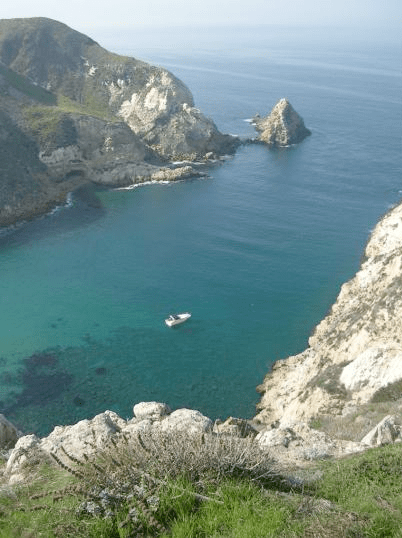
For the eastern side, you’ll land at Scorpion Harbor, site of the old ranch house. There’s a trail you can take to Canyon Point right by the landing, and you can continue on along the cliff-top to Potato Harbor, which is where Liz took the picture at the top. The campground is half a mile up a fireroad from the beach, at the bottom of a gentle canyon, surrounded by eucalyptus trees planted by the ranchers.

It’s divided into two sections, upper and lower, which are only separated by a few hundred feet. There’s drinking water and pit toilets in both, but no showers. I prefer the upper campground, but most of the spaces there are for groups of 11 or more. During the summer, it’s heavily booked, so you’ll need to get in early, but you may have more luck with some of the group spots. One enduring memory from a previous trip is a large group of local Chinese families arriving, complete with a video karaoke system and portable generator! Luckily, the rangers preserved the tranquility by confiscating the generator for the duration. As part of the National Park, you go to recreation.gov to reserve.

Here’s another great photo Liz took showing the campground in the early morning:

Camping

On the Nature Conservancy side of the island, there’s a campground called Del Norte. It’s for hard-core backpackers only, since it’s a tough 3.5 mile hike from Prisoner’s Harbor landing to get there, and there’s no water available. The trail was in very poor shape on our last visit too, it was so overgrown the rangers actually got lost trying to mark its location so we could work on it! We spent a couple of days with weed-wackers destroying the fennel and clearing it out, but that was over a year ago. You can see some of the pictures from that trip, including the campground, here. You’ll need to reserve with recreation.gov if you do want to camp there. One option is camping at Del Norte for a day or two, and then hiking over Montagnon Ridge to Scorpion, but that’s a rugged 12 mile walk with lots of elevation gain.

There’s several other islands open to visitors with camping available, including Santa Rosa, San Miguel and Santa Barbara, but I’ve not made it out to any of them yet.  They’re all part of the National Park too.

Funhouse Photo User Count: 966 total, 55 active. Still creeping upwards at a slow rate.
Event Connector User Count: 7 total. My adwords campaign was just disabled by Google, because my keywords, "Facebook event promotion", included a trademarked term. This took me by surprise, but wasn’t too much of a loss since I wasn’t able to get much of a click-through or conversion rate on this attempt. Luckily, it only cost me around $2 to experiment, so I count that as a good investment. I’m waiting on the app directory listing, to see how that affects things, and I’ll be thinking about other approaches to try.

“No Vision, All Drive” Review

Pinpointlogo

No Vision, All Drive is the story of Pinpoint Technologies, from its origins as a startup, through to its sale to ZOLL. One of the founders, David Brown, wrote it, but it includes some great sections from the other founder, David Cohen, as well as many of the long-time employees.

The employee’s stories are a great reminder that creating good jobs is not just an abstract statistic, it can make a real difference to people’s lives. Al Thompson (aka Weird Al the Tattooed Freak) describes how he was determined not to get another coffee-shop job, and got his only interview at Pinpoint, and was offered the job even though he didn’t have any experience. Six years later he’s a highly-skilled, highly-valued old-timer, and met his fiancee there too!

Marcie Cary got started as a receptionist, and went on to become marketing manager. She really gives an insight into how humiliating she felt the admin work could be, faxing and mailing packages. I’m no stranger to low-status jobs, having spent five years stacking shelves in supermarkets, but it was a good reminder. She also acknowledges the other side of the coin, that it can be really tough for the rest of the team to cope with someone avoiding all that work, when it’s their job to get it done. I don’t know what the solution is, but it’s a scenario I’ve seen play out many times. Maybe the combination of training and advancement, together with an insistence on keeping on top of the boring stuff is the right way to go.

My favorite part of this book is all the anecdotes, they really give you a flavor of the startup life, from the brown shag carpeting in their first office, to their receptionist being afraid to be left alone in the office with their first programmer!

It’s a great read, it keeps you turning the page, and is focused on the nuts and bolts of growing the business. I’d highly recommend it if you’re interested in an honest and informative account of a startup that succeeded.

Funhouse Photo User Count
: 958 total, 55 active. Much as before.
Event Connector User Count: 5 total. AdWords isn’t showing any conversions at all, so I’ll need to rethink my tactics there. It’s in the queue for the applications directory, I’ll see how that helps the totals.

A practical implicit web example

Web

It took me a while to warm to the term implicit web, but I’ve realized it is a good container for a lot of the improvements in browsing I want to see. I always find concrete examples better than abstract definitions, so I’ll outline a user experience I’d like to build, and how that ties in with the definition.

I have a handful of sites that I visit very often, because they contain trusted information in areas I work on.  I use the term local neighborhood to describe this set of sites. When I do a search, I want these sites ranked very highly, because their results are very relevant to me.

A lot of my friend’s interests overlap mine, and I am more likely to find relevant results in sites they visit frequently. I’d like my searches to rank sites in my friends local neighborhoods more highly too.

This is an implicit web process because the local neighborhood is built implicitly, from monitoring my browsing history, rather than some explicit method such as bookmarking. This is important because almost all users will not take explicit actions, even if they will produce some long-term gain. Technologies that rely on users doing something that feels like work end up stuck in a geek ghetto.  Nobody I know who works outside IT, uses del.icio.us.

General users are more willing than us to surrender some privacy in return for improved features. me.dium relies on this. I’m trusting them with my entire browsing history, and in return they give me information and communication about other users in my current local neighborhood.

Google is moving in the direction I want with its search history feature, but that only biases sites that you find through searching. I go to my local sites through typing the first few letters in the address bar, so they won’t be included. Flock has a search history feature too, that looks through the pages you’ve browsed recently. This is closer, but your history is kept locally, so you easily lose it if you move machines, reinstall, etc.

Neither of these approaches work with my friends’ local neighborhoods. There’s a serious obstacle to this happening; the information about my social graph is stored in a database owned by a different company than the one I use for searching. At the moment, information like this is only ever shared within an organization, since it’s treated as valuable and proprietary. This sucks for users, since they created a lot of the information themselves, and they can see it all, so why can’t their software?

Aggregators try to get around this by having users give them their passwords and user names, and screen-scraping using a central server. This is both fiddly for users to set up, and easy for the providers to block if they want. A few services also offer a web API, but these are fairly limited in the information they provide, and subject to being blocked by the providers at any time. The fundamental conflict is that the value of these companies is largely based on their data, and they aren’t about to give it away to a competitor.

A better way to solve this is with the semantic web. The idea is you make web-pages understandable by software, not just human readable. As you browsed Myspace, client-side software would interpret each page and discover who your friends are, and the more important ones whose profiles you visit, or who you exchange messages with.

Sounds great, but so far it’s been a pipe-dream, because it’s like web APIs, there hasn’t been a good reason to make your pages easily understandable by third-party software.

One of my big research efforts is finding some simple, practical ways of jump-starting this process, by using simple rules to reliably work out semantic information about a web page. Google Hot Keys is one result of this work; it analyzes pages to work out which are search results, what the search terms are, which links are the pages associated with those terms, and what the ‘next page’ link is. It’s promising to see that the rules are robust enough that they work with over 40 different foreign language Google sites, as well as Ask and Live.

It seems to me that the only way to fulfill the promise of the implicit web is to combine client-side technologies that have access to all the information a user does, and software that can pull data directly from the web-pages as they browse.

Funhouse Photo User Count: 944 total, 63 active. A bit of a larger total increase, still not very exciting.
Event Connector User Count: 5 total. The adwords campaign has gained me one user, got 16 clicks, and cost $1.13 so far. Probably time to change tactics!

Facebook debugging in PHP

Mantis
I’m using PHP to develop my facebook apps. I’ve never done server-side development before, and one of the more awkward aspects is debugging. Luckily, I have done plenty of other remote debugging before, and a lot of the general techniques cross over. Here’s what I use at the moment:

Error logging to a file

PHP writes out a message to /etc/httpd/logs/error_log whenever it hits a syntax error. I generally run this command line to see the latest errors:
tail -n 500 /etc/httpd/logs/error_log

You can also insert your own logging messages into the file using the error_log() function.

Error logging to the HTML output

Sometimes it’s quicker to see the errors right in the browser as you try to load the page. I don’t use this much for syntax errors, but I do often add print() statements to show debugging information. One of the most useful tools is the print_r() function, which displays all the internal elements of arrays and objects.

You can enable inline error reporting by changing the php_flag display_errors line in your php.ini file to ‘on’ if you want to see syntax errors too.

Ajax errors

Debugging Ajax-style server requests was very tricky. One way I found in Facebook was setting the response type to RAW, and then setting that response text directly into a div. Even better was using FireBug, a great extension for Firefox that gives you a lot of information about what the browser is up to.

Choose Tools->Firebug->Open Firebug from the main menu, and click the checkbox in the lower pane that appears to turn it on. Navigate to your ajax page, and click on the Console tab in the FireBug pane. You should now see a POST entry appear for every ajax call you make, with the time it took to get a response. Twirling that open shows a complete description of what you sent, and what the server returned, in Headers, Post and Response tabs.

Advanced debugging

My needs are simple enough that I haven’t moved beyond these basic logging techniques, but you can check out this page if you’re interested in stepping through code and inspecting variables using a traditional debugger with PHP.

Facebook App User Counts:
Funhouse Photo – 917 total, 57 active. Still very unimpressive growth.
Event Connector – 4 total. I’m giving Google adwords a try, to see if I can reach event organizers with he keywords ‘facebook event promotion’, and a very low budget.