How to write a socket server II

Plug

In the previous article I presented a simple socket-based server and client. The beauty of sockets is that they’re comparatively simple, especially for the client. A program wanting to connect to a server does the equivalent of picking up a phone and dialing a number, and then transfers data back and forth across that open connection.

The server’s job is a little harder, since they have to wait for a call from a client, and potentially take connections from many clients at once. This example doesn’t demonstrate handling multiple connections, but it does show how to take a call. I’ll go over the interesting points inline in the server source code, but the part I always found hardest to wrap my head around is that the server actually has two different types of sockets. The first, which I’ve called the listener below, is the one that gets notified when a client tries to contact the server. This is the one which has the port number assigned to it. No data is transferred over this socket though. Instead, you have to pull another socket from it for every client connection. This, which I call the transfer socket, is the one that the conversation with the client actually happens on, and is the one which handles passing data back and forth. You get a new one of these for every client connection on the server side, though to the client it just appears that they’re talking to the single socket they opened.

The actual file transfer is handled using file-like calls to read and write. There are plenty of more complex ways to transfer data over sockets, but for most purposes this sort of TCP/IP/Streaming style of connection is both simplest and sufficient.

If you want the raw source code, you can download the example here.


/* Pete Warden - A simple example demonstrating a socket-based server */
/* Adapted from code at http://www.cs.rpi.edu/courses/sysprog/sockets/sock.html */
/* See http://petewarden.typepad.com/ for more details */
#include <stdio.h>
#include <stdlib.h>
#include <string.h>
#include <sys/types.h>
#include <sys/socket.h>
#include <netinet/in.h>

void error(char *msg)
{
fprintf(stderr,"%s\n",msg);
exit(1);
}

int main(int argc, char *argv[])
{
if (argc < 2)
error("ERROR, no port provided\n");


This port number allows multiple server programs to listen for different clients on the same machine. Each service has to pick a number that’s like an internal phone extension in a company. Unfortunately there’s no good way to figure out if another service has already picked that extension other than trying to use it. Most well-known services like http and smtp have numbers below 2000, so the usual advice is to pick a random-looking number between that and 9999, and provide a user-configuration option to change that if the administrator of the machine you’re using discovers a conflict. The IANA maintains a list of registered ports here, but there’s no guarantee it’s complete.

	const int listenPortNumber = atoi(argv[1]);

const int listenSocketFile = socket(AF_INET, SOCK_STREAM, 0);

if (listenSocketFile < 0)
error("ERROR opening server socket");

struct sockaddr_in listenAddress;
bzero((char *) &listenAddress, sizeof(listenAddress));

listenAddress.sin_family = AF_INET;
listenAddress.sin_addr.s_addr = INADDR_ANY;
listenAddress.sin_port = htons(listenPortNumber);

const int bindResult = bind(listenSocketFile,
(struct sockaddr *) &listenAddress,
sizeof(listenAddress));

if (bindResult<0)
error("ERROR on binding");

listen(listenSocketFile,5);


The code above sets up the socket that’s going to sit on the port and listen for any incoming client connections. The sin_family = AF_INET tells the system we want a network socket, rather than one that’s only available to processes on the same file system. We don’t specify an address since it will be listening on the current machine rather than trying to connect remotely, and we pass in the user-specified port number. The bind() passes the request to the system and tries to set up the socket, which may fail if the port is already in use. Finally the listen() activates the socket so it can start accepting requests for client connections. The second argument is the number of connections to queue up for the server to deal with before new connections are rejected. On most systems the maximum is 5, so this is the usual setting.
A consequence of this is that you have to deal with each client very quickly or you’ll start rejecting connections if you have a lot trying to connect at once. I’ll be covering strategies to handle this later.

	struct sockaddr_in transferAddress;
socklen_t sizeofTransferAddress = sizeof(transferAddress);

const int transferSocketFile = accept(listenSocketFile,
(struct sockaddr *) &transferAddress,
&sizeofTransferAddress);


This call to accept() will not return until a client has tried to connect to the server. It’s possible to create non-blocking sockets that let accept return immediately with an error if there’s no clients waiting, but blocking is often a lot simpler.
The call returns a new socket file descriptor, which I’ve called the transfer socket. This is the actual connection to the client. You can think of the listener socket like an old-style switchboard operator, whose job it is to set up a direct call between the client and server, returning a socket that’s a private connection between the two.

The server can then treat this transfer socket as a file, though there are more advanced options for accessing the data that I won’t cover.

	if (transferSocketFile<0) 
error("ERROR on accept");

const int bufferLength = 256;
char buffer[bufferLength];

const int bytesRead = read(transferSocketFile,buffer,(bufferLength-1));
if (bytesRead<0)
error("ERROR reading from socket");

// Pete- On some systems the buffer past the read bytes may be altered, so make sure the string is zero terminated
buffer[bytesRead] = '';

printf("Here is the message: %s\n",buffer);


Getting data from the client is simply a matter of doing a read() call like you would do with a local file. I’m not demonstrating how to handle anything beyond a short input message here, but I will be covering that in a future post. One wrinkle I discovered that some examples don’t handle is that Linux (though not OS X) doesn’t define what will be in the buffer past the bytes that were read, even if you cleared the whole buffer to zero before the call, so I had to manually add a terminator.

	const char* outputMessage = "I got your message";
const int outputMessageLength = strlen(outputMessage);
const int bytesWritten = write(transferSocketFile, outputMessage, outputMessageLength);

if (bytesWritten<0)
error("ERROR writing to socket");


Just like reading, you call write() to send data back to the client.

	close(transferSocketFile);

        close(listenSocketFile);


Make sure you close both socket files before you exit. Some OS’s will close them automatically, but Red Hat Linux at least will leave them open as zombies even after the process has exited.

	return 0; 
}

All the articles in the simple server series

How to write a socket server I

Socket

One of the components I need for automatic tagging is an easy way to get the average frequencies of a set of words, so I can spot the unusual ones. The normal way of doing this would be to pull the data from a mysql database with a query, but investigating this route revealed a lot of performance issues . With the volume and complexity of the analysis I’m doing, a custom-coded database seems the way to go.

A simple way to do that would be a command-line program that handled everything. Unfortunately the raw word-frequency data files can be very large, and reloading them for every query kills performance too.

What I need is something that behaves like the mysql server, parsing the data-files once at startup and  then listening for requests. I did consider putting this into an Apache mod, but my needs are simple enough that writing a standalone socket server seemed preferable. It also avoids the overhead of routing everything through HTTP.

Since this seems like a fairly common dilemma, and there’s not much information on how to solve it, I’ll show you how to write a simple generic server over the next few articles. I’m using C, not because I’m stuck in the 80’s, but because the high-performance data structures I’m using are in C++.

As a start, here’s a tar file containing the source for a very simple socket-based server, which is based on this great socket page from the Rensselaer Polytechnic Institute. To use it you’ll need a unix-y OS (it’s been tested on Red Hat Fedora and OS X). Un-tar the folders and open two terminals. In one, go into wcserver and run make. Do the same in the second terminal for wcclient. That should compile the two executables you need. Then run ./wcserver 9998 from the server terminal and ./wcclient localhost 9998 from the client.

The server sits listening on the port you specify (9998 in this case) until a client tries to connect. The client asks you to type in a message and passes it to the server. The server prints it out on its own terminal, sends an acknowledgement to the client and exits.

In the next post I’ll go over the source code in depth, since there’s a lot of subtleties in the details. After that I’ll show you how to handle multiple connections and do something useful for the clients.

All the articles in the simple server series

40 mile bike ride through the mountains

Guadalasca

I needed to check out the Guadalasca trail before I lead a trail maintenance crew on it next Saturday (contact me if you’re in the LA area and want to play in the dirt). It’s a joint project with the CORBA biking group and their trail crew boss Hans Keifer invited me along on a group ride they were doing today. Hans organized it through the Over-the-Bars club, and those guys are mountain biking machines! I’m glad to say I made it through the countless hill-climbs and drops to the end, but it left me shattered. I like to think I’m fit, road-biking 4 days a week, but these are some tough hombres. Half of them were 20 years older than me too, which both gives me hope and makes me feel worse.

I’ll be spending the rest of tonight recovering with a martini and some Famous Dave’s

How can you solve organizational problems with visualizations?

Inflow

Valdis Krebs and his Orgnet consultancy have probably been looking at practical uses of network analysis longer than anyone. They have applied their InFlow software to hundreds of different cases, with a focus on problem solving within commercial organizations, but also looking at identifying terrorists, and the role of networks in science, medicine, politics and even sport.

I am especially interested in their work helping companies solve communication and organizational issues. I’ve had plenty of personal experience with merged teams that fail to integrate properly, wasted a lot of time reinventing wheels because we didn’t know a problem had already been solved within the company and been stuck in badly configured hierarchies that got in the way of doing the job.To the people at the coal-face the problems were usually clear, but network visualizations are a very powerful tool that could have been used to show management the reality of what’s happening. In their case studies, that seems to be exactly how they’ve used their work, as a navigational tool for upper management to get a better grasp on what’s happening in the field, and to suggest possible solutions.

Orgnet’s approach is also interesting because they are solving a series of specialized problems with a bespoke, boutique service, whereas most people analyzing company’s data are trying to design mass market tools that will solve a large problem like spam or litigation discovery with little hand-holding from the creators of the software. That gives them unique experience exploring some areas that may lead to really innovative solutions to larger problems in the future.

You should check out the Network Weaving blog, written by Valdis, Jack Ricchiuto and June Holley. Another great thing about their work is that their background is in management and organizations, rather than being technical. That seems to help them avoid the common problem of having a technical solution that’s looking for a real-world problem to solve!

Is there anything interesting MIT isn’t involved in?

Buddygraph

MIT is the Kevin Bacon of the web research world. It’s hard to investigate any bleeding-edge topic without bumping into one of their projects. For example Piggy Bank is one of the earliest attempts to build the semantic web from the bottom up, and now I’ve discovered their work with Social Network Fragments. Danah Boyd collaborated with Jeffrey Potter and his BuddyGraph project to explore how to derive interesting social graphs from someone’s email messages.

The app they show is somewhat similar to Outlook Graph. They’re using a wire and spring simulation system to produce the graphs and trying to derive some idea of what the underlying social groups are based on the positions that people end up in the network. They haven’t released a demo of the tool unfortunately, it appears that it involves more pre-processing than OG, but does have an interface for exploring changes over time, which is not something I’ve implemented yet. They don’t appear to be using any kind of weighting for the connections between people based on frequency of contact. It also requires some additional inputs from the user for things such as email lists and the user’s own email identities, and I’d imagine the system assumes a fairly clean set of email without too many automated or junk messages to muddy the data, though they can discard ‘isolated’ nodes that only have a few connections.

Here’s a short demo video showing BuddyGraph in action. The project page doesn’t seem to have been updated for a few years, so I’ll email Danah and Jeffrey to see if they’ve done anything interesting in this area since then.

Where can you get free word frequency data?

Dictionary

The Google n-gram data-set is probably as big a word frequency list as you’ll ever need, but it has very restrictive license terms that don’t allow you to publish it in any form. Since I’m interested in doing some web-based services to let you query the frequency of particular words and phrases, I could fall foul of that restriction. Luckily there are some alternatives, since using the web as a source of word-frequency data has been a big topic in the linguistics community over the last few years.

The Web as Corpus site has a good collection of resources, and in particular it led me to Bill Fletcher’s work. He has both written kfNgram, a free tool for generating word and phrase frequency (n-gram) lists from text and html files, he’s also made some decent-sized data sets available himself, such as this list with other 100,000 entries.

Also very interesting is the WebCorp project. It has an online word frequency list generator which you can point at any site you’re interested in and retrieve the statistics of the text on that page. It also features a search engine which adds a layer of linguistic analysis on top of standard Google search results. It has some neat features such as displaying all occurrences of the search terms within each result, rather than just the standard abbreviated summary that Google produces.

How do you rank emails?

Rank

The core of Google’s success is the order it displays search results. Back in the pre-Google days you’d get a seemingly unordered list of all pages that contained a term. Figuring out which pages were most authoritative using PageRank and putting them at the top made finding a useful result much quicker.

Searching emails needs something similar, a way of sorting out the important emails from the trivial. PageRank works by analyzing links between pages, but emails don’t have links like that. Instead, you need to use other connections between emails, such as how often a message was replied to and forwarded. Just as a link to another web-page can be seen as a vote for it, so an action such as forwarding or replying is a hard to fake signal that the recipient considers the message worth spending time on.

I’m already using this principal to set the strength of connections between people in Outlook Graph, the thickness and pull of a line is determined by the minimum of the emails sent and received between them. Using the minimum helps to weed out unbalanced relationships such as automated mailers that send out a lot of bacn, but never get sent any email in return.

It’s not a new idea, Clearwell has been using something similar for a while:

"To sort messages by relevance, Clearwell’s program weighs the
background data and content of each email for several factors,
including the name of the sender, names of recipients, how many replies
the message generated, who replied, how quickly replies came, how many
times it was forwarded, attachments and, of course, keywords."

It’s obvious enough that I don’t doubt other people are doing something like this too, though I’ll be interested to discover what patent landmines were laid by the first people to file. Where it gets really interesting is when you also do social graph analysis, then it’s actually possible to throw the social distance of the people involved into the mix. The effect is to give more prominence to messages from those you know, or friends of friends, since they’re more likely to be talking about things relevant to you than strangers.

Ratchetsoft responds

Joe Labbe of Ratchetsoft sent a very thoughtful reply to the previous article, here’s an extract that makes a good point:

The bottom line is the semantic problem becomes a bit more
manageable when you break it down into its two base components: access and
meaning. At RatchetSoft, I think we’ve gone a long way in solving the access
issue by creating a user-focused method for accessing content by leveraging
established accessibility standards (MSAA and MUIA).

To your point, the meaning issue is a bit more challenging. On that front, we
shift the semantic coding responsibility to the entity that actually reaps the
benefit of supplying the semantic metadata. So, if you are a user that wants to
add new features to existing application screens, you have a vested interest in
supplying metadata about those screens so they can be processed by external
services. If you are a publisher who has a financial interest in exposing data
in new ways to increase consumption of data, you have a strong motivation to semantically
coding your information.

That fairer matching between the person who puts in the work to mark the semantic information and who benefits feels like the key to making progress.

Can the semantic web evolve from the primordial soup of screen-scraping?

Ratchetxscreenshot

The promise of the semantic web is that it will allow your computer to understand the data on a web page, so you can search, analyze and display it in different forms. The top-down approach is to ask web-site creators to add information about the data on a page. I can’t see this ever working, it just takes too much time for almost no reward to the publisher.

The only other two alternatives are the status quo where data remains locked in silos or some method of understanding it without help from the publisher.

A generic term for reconstituting the underlying data from a user interface is screen-scraping, from the days when legacy data stores had to be converted by capturing their terminal output and parsing the text. Modern screen-scraping is a lot trickier now that user interfaces are more complex since there’s far more uninteresting visual presentation information that has to be waded through to get to the data you’re after.

In theory, screen-scraping gives you access to any data a person can see. In practice, it’s tricky and time-consuming to write a reliable and complete scraper because of the complexity and changeability of user interfaces. To produce the end-goal of an open, semantic web where data flows seamlessly from service to service, every application and site would need a dedicated scraper, and it’s hard to see where the engineering resources to do that would come from.

Where it does get interesting is that there could be a ratchet effect if a particular screen-scraping service became popular. Other sites might want to benefit from the extra users or features that it offered, and so start to conform to the general layout, or particular cues in the mark-up, that it uses to parse its supported sites. In turn, those might evolve towards de-facto standards, moving towards the end-goal of the top-down approach but with incremental benefits at every stage for the actors involved. This seems more feasible than the unrealistic expectation that people will expend effort on unproven standards in the eventual hope of seeing somebody do something with them.

Talking of ratchets leads me to a very neat piece of software called Ratchet-X. Though they never mention the words anywhere, they’re a platform for building screen-scrapers for both desktop and web apps. They have tools to help parse both Windows interfaces and HTML, and quite a few pre-built plugins for popular services like Salesforce. Screen-scrapers are defined using XML to specify the location and meaning of data within an interface, which holds out the promise that non-technical users could create their own for applications they use. This could be a big step in the evolution of scrapers.

I’m aware of how tricky writing a good scraper can be from my work parsing search results pages for Google Hot Keys, but I’m impressed by the work Ratchet have done to build a platform and SDK, rather than just a closed set of tools. I’ll be digging into it more deeply and hopefully chatting to the developers about how they see this moving forward. As always, stay tuned.

How to hike to the highest point in the Santa Monica Mountains

Mishemokwasign

Sandstone Peak is the tallest peak in the Santa Monicas, at 3,111 feet. There’s a really sweet 6 mile loop you can hike to reach the top. It’s one of my all-time favorite trails thanks to its unique scenery. Here’s a map, and below I’ll cover what else you need to know. One other great feature of this trail is that it’s entirely on National Park land, who allow leashed dogs unlike many of the other agencies.

Getting There

The biggest challenge for me and Liz is the drive to the trail-head, because it’s a very twisty mountain road, not good if you’re easily car-sick. You can get there either from the PCH or Thousand Oaks. From the north, take the Westlake Blvd exit from the 101 and follow that road south for several miles as it heads into the hills. It then turns into Decker Canyon, and just after that merges with the Mulholland Highway. Stay right on Mulholland as Decker Canyon splits off again after a mile, and then shortly after turn right on Little Sycamore Canyon Road. Stay on that as it turns into Yerba Buena Road, and after several miles of twists, you’ll see a dirt parking by the left side of the road. This is the Mishe Mokwa parking lot, and is one of the two you can use for this hike. About half a mile further on is the Sandstone Peak lot, which is an alternative starting point.

If you’re coming from the ocean side, you can take Yerba Buena Road directly from the PCH, which is just west of Leo Carillo beach. Just stay on it, avoiding the side-roads that split off, until you reach either of the parking lots.

Mishe Mokwa Trailhead

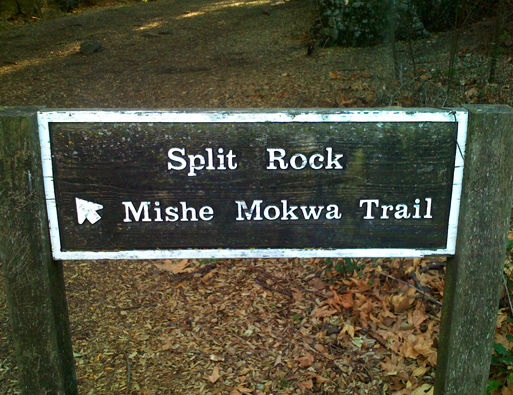
I usually start off at the Mishe Mokwa parking lot. Cross the road to get to the trailhead, don’t take the one that starts in the lot you’re in, since that’s a different section of the Backbone. Head along the trail about half a mile, and you’ll see a side trail join Mishe Mokwa. This is a short connector trail that leads to the other side of the loop. You’ll be taking that on the way back to get from the Sandstone Peak fire road back to this parking lot. For now, just keep going straight up the trail.

Echo Cliffs and Balanced Rock

The trail will lead you along the side of a steep value. On the opposite side are some great climbing cliffs, nicknames Echo Cliffs for the acoustics. Keep an eye out for a large rock the trail crosses with ‘echo’ faintly painted on it. A shout or clap from there should get some great reverberations, and hopefully won’t startle the climbers too much!

Echorock

Take a look at the trees around Echo Rock and breathe in deeply. You’re in the middle of a large group of Bay Trees, with a wonderful smell. On the top of the cliffs is a large rock that seems ready to fall at any moment, Balanced Rock.

Balancedrock

A little further on is a short section of very steep downhill, headed towards a creek. This is an area me and Liz have often worked on, since you used to effectively slide downhill in a trench. After adding some large boulder steps and drains, it’s still a scramble but should now be safer.

Split Rock

You’ll reach the head of the valley soon, and find yourself in a grove of oaks next to a stream which often has water even in the late summer. Another joy of this trail is the springs and greenery that flourish even when most of the hills are bone dry. It’s a great spot to rest, with a picnic table. It gets its name from the enormous boulder that rests nearby.

Splitrock_2

Walking through the gap is supposed to leave your demons behind. I always wonder if you just end up picking up the previous persons’?

Just past Split Rock is a turnoff that apparently leads to Balanced Rock. It’s signed, but unmaintained by the NPS. Me and Liz did explore it once, but it quickly became very hard to hike and unclear which route to take. It is used by a lot of climbers to get to the cliffs, so it must be possible if you know what you’re doing. There’s apparently another route to the bottom of the cliffs down the drainage at the bottom of the very steep section past Echo Rock, but it would be very rough too and I’ve never taken it.

Continue to the left up an overgrown fire road. You’ll go about half a mile, crossing below a rock formation that looks like a skull, cross a creek and then you’ll be on a clearer dirt road. This continues uphill for a while, and then emerges into a very shallow valley. In a while you’ll see a signed trail leading to Tri-Peaks. It’s about a half-mile spur trail that takes you to a beautiful set of peaks nearly as tall as Sandstone. It’s a great spot for a bit of lunch and sunbathing, with views out over the Conejo Valley on clear days.

Sandstone Peak, the misnamed mountain

Returning to the main path and ontinuing about another mile, you should see another small spur heading steeply up to Sandstone Peak. It’s only about 200 yards long, but involves a lot of rock scrambling. At the top is a visitor’s book and a plaque dedicated to a Mr Allen. The Boy Scouts who used to own all this land still know it as Mount Allen, but to everyone else it’s Sandstone Peak, even though it’s not sandstone at all.

Sandstonepeak

Sandstone Peak Fire Road

After returning to the main trial, which can be tricky because the spur trail is hard to follow going down, you’ll continue on for around two miles, winding your way down the mountain back towards Yerba Buena Road. If you parked at Mishe Mokwa, keep an eye out for the connector trail, it’s easy to miss. I prefer going up Mishe Mokwa and back along this fire road because it’s pretty steep and shadeless, which in the summer means getting very hot.