What does the BoulderTwits graph mean?

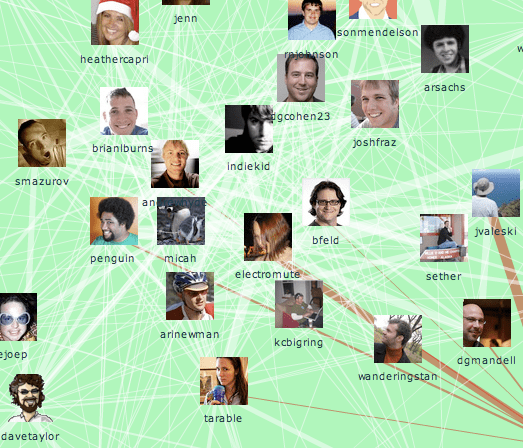
I just added a new feature to my directory of Boulder tech Twitter users; a map of the social network.

It shows who talks to who. A line between two people means that they've sent public replies to each other. The thicker the line, the more often they've exchanged tweets.

To turn this into a map, I use an automatic technique called force-directed layout to pull people with strong connections to each other closer. That means that groups of people who talk amongst themselves a lot will form clusters. So what does this map show?

Notorioushardcore

There's a central cluster of people who have a lot of connections with other people in Boulder. Many of these people I've met, and they do all seem influential in the community. If you wanted to get the ball rolling on a local project, these would be the folks to talk to.

Close teams

Imulusgraph

There's a noticeable side-group outside the main cluster. These are all Imulus employees, and it's clear they're using Twitter to talk with each other, but only Bruce and George have strong connections with other Boulder twitterers. The graph algorithm doesn't know anything about their employment, what's cool is it automatically spots they're a team just based on their communications.

Hubs

Davetaylorgraph

Dave Taylor is a great example of a network hub. He has conversations with a lot of people from different groups who don't know each other well. For example he talks to both brettfromtibet and bruce, but they don't talk to each other. People like Dave are vital in social networks because they link otherwise unconnected groups. If you need an introduction to someone you don't know, Dave is a good person to help, because he's got such a diverse range of friends.

In my next post, I'll show how I uncovered some new people I'll be adding to the Boulder Twits list, thanks to graph analysis. If you're interested in learning more about the fun you can have with these sort of networks, check out Valdis Krebs' awesome gallery of case studies.

How to grow a karass

Frogs

Photo by Thomas Hawk

In Cat's Cradle, Kurt Vonnegut invents a couple of terms I really like. A karass is a community of people without formal links but who work together to get things done, whereas a granfalloon is a grouping who imagine they have something in common, but the association is actually meaningless and unproductive.

As David Cohen put it to me, a big company's marketing department is a granfalloon, your personal network is a karass. This resonated with me because that's how we made things happen in Apple. My term at the time was "a conspiracy of engineers", but the idea was to discover curious and motivated people outside my immediate team (and sometimes even in suppliers like ATI or NVidia) who wanted to see Apple achieve some goal. We'd informally talk, figure out an approach that might work, often code up a prototype, and then approach our respective managers with a joint proposal.

This is the only way I've seen innovative things get done in big firms, but it's immensely difficult to create those informal networks. It took me years of water-cooler chats, lunches, popping into people's offices and general nosiness to get as far as I did. As I thought about the expertise and external contact location technology I'm working on, I realized that Mailana is all about building tools to enable karasses. I want somebody in my old position to be able to find collaborators far more easily, and so help companies get a lot more done with the same resources.

Tools alone won't ensure these informal groups emerge. They can't be ordered into existence, they have to grow organically. What the technology can do is provide an environment they can thrive in.

Yahoo’s mail API

R2d2mailbox

Photo by A Hermida

Despite their rocky year, Yahoo still have a massive email user base, so I was very interested when they announced a new API for plugging in to their web client. I looked through the documentation, and unfortunately this release is pretty limited, though there's more to it than Gmail's latest interface. Google essentially just lets you embed normal iGoogle widgets into the mail side bar, there's no way to interact with the user's mail. Yahoo does let you trigger UI actions like bringing up a search window, populating an add event popup or composing a message, but there's no way to access any data on the messages, or perform any modifications without user involvement.

I'm sure these are all precautions to protect users from malicious plugins reading private data, as is keeping it in a limited beta restricted to a small group of developers. While I'm disappointed I won't get the chance to do all the interesting data analysis I'd like to offer, this is a step in the right direction. I expect that seeing the demand for the applications you can build even with this limited functionality will push the industry towards more open interfaces. Then I can really have some fun!

How Nepomuk plans to file your email

Tagdrawer

Photo by Indie Wench

Peter Mucha just pointed me in the direction of the NEPOMUK project. It's an EU funded semantic research effort, with a code name worthy of a Bond villain. It's very much part of the OWL/RDF approach to cracking the semantic problem, so it took me a while to dig down through the more abstract goals and understand what it actually did. It was worth the effort though, since it seems like their Soprano search engine for semantic data has enabled some interesting email functionality within the latest KDE release.

They seem to recognize that email is the ginger-haired stepchild of information management, left behind by the tools we take for granted for searching the web and files. A lot of their examples of using meta-data are related to messages; "Tell me which message a saved attachment file came from", "Find all the attachments related to these contacts", virtual mail folders, and even integrating calendar information with "Find all messages from people I've had meetings with in the last two weeks".

The downside is that while a lot of the underlying architecture to implement these cool features is provided by NEPOMUK, there's still the big and messy job of updating all the client applications to generate and use the meta-data. There's some work moving forward with the Akonadi mail client, and basic search support within KDE, but a lot of the really cool uses are still on the drawing board. There's no automatic tagging of emails or files based on content for example.

It's great to see them trying to tackle the challenge of email in innovative ways, they definitely have their eye on an interesting set of problems.

Why I love the US

Sneer

Photo by Zombizi

I ran across this UK newspaper column by Paul Carr on the Le Web conference. It's great, funny writing, but it also reminds me why America's the best place in the world to be an entrepreneur. Paul takes great glee in tearing down everyone involved, including the startups:

"… entrepreneurs from around the world each pay €1,500 to meet their
peers, demo their startups and generally try to pretend that their
businesses aren't completely and totally doomed."

Bob Sutton gathered a brilliant summary of the academic evidence that being negative about other people increases your status. One of the studies concluded “Only pessimism sounds profound. Optimism sounds superficial.”

What cynics like Paul don't get is that most of us in the startup world are well aware that the odds are against us, but we think it's worth doing anyway! US culture celebrates that risk-taking, but Britons tend to shake their heads and tell themselves it will all end in tears. Most of the time they're right. The trouble is, Google and Microsoft were crazy ideas in their time, and would have never made it without a lot of people supporting them despite the risk. By sneering, Britain guarantees they'll never build a world-class tech company.

How to secure your web service

Dublincastle

Photo by Karl Randay

If you're including third-party content in your web pages, you can't stop a determined attacker. Browsers weren't designed with that scenario in mind, so by default any HTML you place on your pages has access to your site and cookies. The usual workaround for this is to scrub the external HTML on the server side to remove any Javascript, before passing it to the client.

The good news is this works pretty well, with platforms like Facebook and Myspace relying on it heavily. The bad news is it's practically impossible to make it perfect, there's so many different ways of hiding scripts inside HTML. When I was implementing my own scrubber for Google Hot Keys, I relied on the Cross-site Scripting (XSS) Cheatsheet to find cunning examples to test it against. I was dismayed when I later realized that Facebook's scrubber was still vulnerable to some of these attacks.

Google itself has struggled with XSS issues, though they've been quick with fixes, so I was very pleased to see they've just published their internal security handbook. They've got the best explanation I've seen of all the rules like the same-origin policy that are designed to safeguard users from malicious scripts. There's also a great cookbook on how to build your own content scrubber. Even better, they lay out suggestions for how to truly secure the environment with future browser features.

This cheers me up a lot. I often feel like a Cassandra when I'm pointing out how insecure the status quo is, but it reminds me a lot like the early days of Windows when security was considered a low priority, and we're still watching the repercussions of that mistake. I don't want the public to lose trust in our services because of constant exploits once we start moving more valuable data into the reach of malicious third-parties.

It looks like the evolutionary model that's served web standards so well before may come to the rescue with smart ideas like fine-grained script blocking in the browser and content security policies. Until then, learn Google's handbook by heart and keep a constant eye out for new exploits!

Look at your mail from a whole new angle with Unblab

Unblab

David Cohen recently gave the heads-up on Unblab, an intriguing new web service giving you a new interface to your email. One of the first innovations you see is their newspaper-style layout:

Unblabscreenshot

I like this way of displaying message summaries, it’s a blend of the popular preview pane and the more concise list view. I could see this translating to a search interface very well too, looking something like ManagedQ’s web service.

They’re still in private beta, so I’m not clear on how everything works, but they’re trying out some fascinating innovations, like machine learning approaches for automatically organizing your mail, “Umm-brella” which forces senders to keep it brief, and access to parts of your account for assistants.

They support a wide variety of the most popular mail services, including some like Hotmail and Yahoo that don’t offer IMAP or POP access by default. I’ll be interested to see how they’ve managed this, and how well it works. I’ve run across screen-scraping tools like Web Mail Retriever, and Yahoo now uses a nerfed version of IMAP to support the Zimbra client, but there’s been no reliable and easy way to access all the main services.

I look forward to trying Unblab out once I get my invite, it looks like a very thoughtful and daring new approach to email interfaces. If you want to follow their progress, check them out on twitter.

More ways to find the top Boulder twits

Dogolympics

Photo by Geckoam

Jeremy Tanner passed along a couple of great automatic lists of top Boulder twitterers. Twitterholic uses raw follower numbers to rank its list of over 400 locals, and Twitter Grader (by one of my favorite bloggers, Dharmesh Shah) has a more nuanced list sorted by influence. When I was building my first draft, I also used Twitter's own advanced search to look at all the updates within 15 miles of Boulder, which helped me discover some interesting people.

I've been digging through all these looking for accounts run by individuals rather than groups, and for people that have a technology connection. Together with some of the Imulus folks, BoulderTwits is up to 50 people, and I'll add more over the next few days.

Want a radically new information tool?

Radar

Photo by Compound Eye

Even common knowledge worker tasks like agreeing on meeting times are painfully difficult to accomplish with standard software. There are specialized commercial solutions like TimeBridge that offer new work flows for particular problems, but the SRI/CMU Radar research project is the first attempt at inventing a whole new approach to interacting with your information.

It uses machine-learning to bridge the gap between the unstructured information that flows through your inbox, and the rigid data needed by CRM and other systems you interact with. For example, their Virtual Information Officer acts like an expanded version of I Want Sandy's virtual assistant; you email it "Change John Doe's phone number to 555 313 7172" and it sends back an updated contact profile for you to approve. This natural language interface is designed to work across all kinds of databases, learning as it goes from which updates are rejected or accepted.

Another interesting module is the Briefing Assistant, which takes collections of emails and produces a draft summary report from them. Initially using a set of generic rules, it observes how each user edits the draft and uses that information to produce a better first draft in the future. There's a whole series of other agents, all improving the way we work with mail information.

What makes the Radar project stand out is its sheer ambition. I was lucky enough to meet up two of the team at Defrag, Dr Michael Freed and Teri Elniski. They gave me the rundown on the rigorous user testing they use to ensure that the redesigned workflows and tools allow people to do their jobs faster. One of the scenarios is actually planning a conference, trying to take over at the last minute from an organizer and sort out all the travel, room, equipment, speaker and expense planning. Having frequent and rigorous testing of all their changes has obviously let them experiment with some pretty radical approaches, without the fear that they're heading wildly off the right track.

I haven't been able to play with the tools myself, but the screenshots and documentation are tantalising. It's inspiring to see such a bold effort to reinvent the whole way we interact with our computers, I'm looking forward to seeing this technology develop into something that's on all our desktops.

How to create a one-click Twitter follow button

Conga

Photo by Pilipala9

When I was putting together my list of Boulder twits, I really wanted to make it easy to follow anyone who looked interesting. The whole rigmarole of having to go to their home page and find the correct button seems really awkward and very web 1.0. I wanted to create a web-page button that would let you follow someone with a single click, without leaving the current page.

I was a bit surprised I couldn't already find one, it seemed like it would be very useful for people to embed on their blogs and other profiles. Looking at the Twitter API, I discovered that all you need is a REST request to http://twitter.com/friendships/create/<user name>.xml to follow that user. I created a test link, tried it and got a 404 error. With a bit more digging, I realized that it required a POST request instead, even though no data is sent. That's a bit harder to embed in a web page, but you can do it if you create a hidden iframe, and have a form that's targeted on it. Clicking on the submit button navigates that frame to the right URL. Here's the code:

<form target="hidden_frame" action="http://twitter.com/friendships/create/petewarden.xml&quot; method="POST">
<a href="http://twitter.com/petewarden">Pete Warden on Twitter</a>
<br/>
<input type="submit" value="Follow" onclick="this.value='Following'; return true">
</form>
<div style="display:none;visible:hidden;">

</div>

You can download a full example, or try the button below:

To use this yourself, you'll need to change petewarden.xml to the actual name you'd like to follow. If I have time I'll whip up some blog widgets for Typepad, etc, so let me know if you're interested. One disadvantage of this technique is that you can't get the result of the call, but it will prompt you for your username and password if your Twitter website session has timed-out.

After doing this, I also realized that a 'zero click' follow button is possible. In other words, a malicious web page could silently force you to follow someone if you were still logged in to Twitter, just by navigating to that URL! That's a big security hole, but it would also be pretty easy to catch anyone who accumulated followers like that. They ran into a similar bug with status updating, but fixed that by checking the referer, which is hard to fake if you're calling from Javascript in a web page.