How to report bugs

Ladybird
Photo by Nutmeg66

One of Apple’s secret weapons is its fantastic bug-tracking process. There’s whole systems and departments devoted to crash reports (yes, we do read all those comments, including the swearing in obscure languages), external and internal bug reports. What really made the whole thing work was the quality of the descriptions, thanks to the training we all received. It’s important because a well-described bug will be given the right priority, go to the right engineer, be understood quickly, and can be tested easily to be sure it really is fixed.

If you’re looking for an effective way of improving your own software, it’s hard to beat filing good bugs. Here’s what you need:

Title: Make it short but specific and descriptive. "Crash when closing save dialog" is better than "Save error".

Summary: This should be two or three sentences that cover the information that the person who has to assign the bug needs to know. Usually there’s someone non-technical or semi-technical who works out which engineer should look at it. A good summary will give them the information they need to get it to the person who can fix it first time.

Reproduction Steps: Probably the hardest part to get right is describing what someone has to do to see the problem on their machine. If possible you should try to recreate the problem yourself, noting the steps you take as you do it. If it doesn’t happen again, then that’s important information for the report too, and you should try to describe what you remember doing before the first occurrence.
If you do have luck getting it to happen again, note down in numbered, explicit steps exactly what it takes, eg:

  1. Open up the application
  2. Go to the File main menu, then choose Save
  3. Click on the close icon

It’s tempting to put something like "Try to save, and then close the dialog" for a process that seems as simple as this, but I guarantee that the recepient will use Command+S instead of the menu command, or the keystroke for closing a window, or not use a fresh start of the application, or will have some other variation that happens to avoid the crash.
For really tricky problems, sometimes even doing a screen capture of yourself reproducing the bug can be invaluable, in case there’s something subtle about your actions that triggers the issue. One of the hardest I hit turned out to only occur when the sub-windows of the application were arranged in a certain pattern! Even a saved file that prebakes a lot of the steps can save a lot of time.

Results: In this case it’s pretty obvious, but a lot of bugs may take some domain knowledge to understand what the expected result is, and it’s also helpful to spell out exactly what you’re seeing. Screenshots can be your friend here, it’s often easier to show the bad results than describe them in words.

Regression
: If you’ve tried other versions of the application or service, or run it on other operating systems, the results can be an important clue to the engineer about where in the code it’s going wrong.

Notes: Anything else you think is useful should be in here, such as links to similar bugs or your contact information. It’s good to keep this at the end so that the final engineer assigned to the problem can get some in-depth information, but it’s easy for the people routing the bug through the system to get a clear overview from just the first few sections.

As a lazy programmer, I use other people’s code whenever possible. That means I spend a lot of time filing bugs myself, so if you want to see me eating my own dog food, here’s an example of one I filed against OpenCalais:


PHP demo rendering glitch in Firefox, Safari Javascript error

Summary:
Running the PHP demo in Firefox on OS X draws an extra frame over part
of the results. The results page suffers a Javascript error and only
displays an error message in Safari.

Reproduction steps:

  1. Download CalaisPHPDemo_08May29.zip
  2. Unzip onto a folder on your server
  3. Copy JSON.php from src/pear/ to src/public
  4. Navigate to src/public/CalaisPHPDemo.html in Firefox 2.0.15 or Safari Version 3.1.1 on OS X 10.5.3 (I have a version online at http://funhousepicture.com/calaisdemo_original/src/public/CalaisPHPDemo…. )
  5. Copy and past the text from the example file test/text1.txt (asteroid news story) into the main text box
  6. Leave the format pulldown on Document Viewer Style
  7. Click on the Show Results button

Results:
On Firefox the document text shows up, but there’s a pair of scroll
bars partially obscuring the top portion. I’ve uploaded a screenshot as
http://funhousepicture.com/calais_firefox_result.png
On Safari, the result page is just the logo and a message stating ‘Unsupported Document’. The screenshot is http://funhousepicture.com/calais_safari_result.png
I’d expect to see the results page rendered as it does in Internet Explorer.

Regression:
I was able to run the demo with no problems on Internet Explorer 7 on
Windows Vista. I don’t see the scroll-bar issue on Firefox 2.0.14 on
Vista either.

Notes:
By poking around with Firebug, I determined that the bogus scrollbars
came from the CalaisJSONInfo element with its style set to ‘visibility:
hidden;’, which still affects layout, whereas ‘display:none;’ makes it
truly vanish. This may or may not be the correct fix depending on your
intent, but it does remove the rendering glitch.
The Safari error was a bit more involved. The immediate cause was an
exception in the initHighlight() Javascript, but it was unclear why
that was happening. After some debugging with Drosera I found a couple
of places where the code didn’t sit well with Safari’s JS host that
caused errors, notably a use of insertAdjacentText() which is
unsupported in webkit, and a null check that for some reason caused an
error. After working around those I was able to see the result document
successfully.



How to debug Javascript in Safari

Monkeys
Photo by smthpal

While I was working on my OpenCalais demo, I found that the original code didn’t work in Safari. The project contains a lot of client-side Javascript, so my guess was that it was choking because of differences in the WebKit implementation of JS, since it worked in both Internet Explorer and Firefox, albeit with some rendering glitches in the latter. I was filled with dread, since last time I had to do any major Javascript debugging in Safari, I’d had trouble even displaying the error messages. Thankfully things have got a whole lot better in the last couple of years!

The first thing you’ll need to do is enable the debug menu in Safari. To do this, go to Safari->PreferencesAdvanced in the main menu, and choose the  tab. In there, enable Show Develop menu in menu bar:

Safariscreenshot1

Now you see a new option appear on the top menu, Develop. Choose Show error console, and you’ll see a window appear that displays any Javascript errors. There’s also some other handy tools like the Web Inspector, which gives you a very Firebug-like way of exploring a page’s source dynamically.

With the Console selected, you should see details of any Javascript problems that came up.

Safariscreenshot2

Safariscreenshot3

Click on the arrow icon to the right of the message, and you’ll be taken to the exact source line in the script where the problem occurred. This is a very straightforward interface to track down a lot of common problems, much better integrated than Microsoft’s Script Debugger. In my case it wasn’t enough though, the error happened in the middle of some very complex code, and it seemed like the result of a logic error that happened much earlier. That meant I needed a debugger that I could use to step through the code.

Happily, I discovered Drosera. This is a fully-featured debugger that’s part of the WebKit project. In recent versions of the open source project it’s been integrated into the Web Inspector, but for shipping versions of Safari 3 you can still download it as a separate application.

Once you’ve downloaded it, you need to run the following line on the terminal and restart Safari:

defaults write com.apple.Safari WebKitScriptDebuggerEnabled -bool true

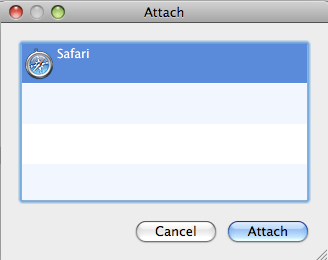
Then, run the Drosera application, and select Safari from the attachment window:

Safariscreenshot4

Now just load the page you want to debug. Whenever there’s an exception or an error the debugger will pause Safari and let you inspect the script and all its variables. To see the value of any variable, open up the Console section of the debugger and type the name into the bottom pane. If you want a breakpoint, just select the script file in the debugger’s side pane and click on the number just to the left of the line you want to stop at.

For the OpenCalais problem, it turned out to be an exception that was thrown and caught early in the script was causing the later problem. Drosera paused on the exception automatically the first time I loaded the page, and after a little bit of inspection I was able to figure out that it was using a function that wasn’t supported in Safari. I’m glad I took the time to download the debugger, I could have spent hours trying to figure that out from inspecting the code otherwise.

Try out OpenCalais’s semantic analysis for yourself

Calaisferry
Photo by graphistolage.com

I’ve been intrigued by the promise of automatically extracting information from raw text using semantic analysis, but I’ve never found a publicly-available component I could integrate into my own work that was good enough to get excited about. When OpenCalais was released I wanted to give it a spin, but there wasn’t a demo page available to run tests with. I’ve taken some of the PHP demo code they’ve released, added some robot-deterrent and put it online at http://funhousepicture.com/calaisdemo/

To use it, copy-and-paste some text, answer the CAPTCHA test, and click on Show Results. You should see some of the places, people and technical terms highlighted. If you mouse over, it shows what kind of object it is. You can download the source to my version of the demo here, though you’ll need to grab your own reCAPTCHA keys before it will run.

Give it a try for yourself and let me know what you think. I’m primarily interested in automatically tagging business emails, and from my tests it’s got some promise. It didn’t seem to mistakenly identify many items in my material, but there were a lot of nouns its not designed to handle. I’d love to see something that understood dates, addresses and locations, but it doesn’t do a great job with these yet.

I’ll be running some more bake-offs figuring out what off-the-shelf semantic technology can do these days, so stay tuned.

Are you human?

Robotsindisguise
Photo by That_James

I hate having to ask my users to prove they’re human, so I wanted to make the process as painless as possible. I was only looking for a free, easy and usable way of adding spam-blocking images to my site, but ended up with one that does good too.

reCAPTCHA is a project by the inventors of the original CAPTCHA. As a web service it’s simple to add to your site, and it uses real words rather than random strings of characters, which makes it a lot easier for users. There’s no charge, and my favorite part is that every use helps decipher scanned books from the Internet Archive. One of the two words displayed is from an old book, and couldn’t be understood by the character recognition software that’s used to turn them into computer documents. Every correct answer identifies a hard-to-read word and helps to release that book to the public.

I’ve got an example online, with the source code here. There’s prepackaged plugins for dozens of website systems like WordPress and MovableType. If you have a custom site, it only takes a few lines of code and 5 minutes to get going. Here’s what you do:

Go to http://recaptcha.net
Sign up for an account
Enter the name of your website and get an API key
Download the library for PHP and put it on your website
Open up the example-captcha.php file and type in your key

Now if you navigate to that PHP file in your browser, you should see a working CAPTCHA test. All you need to do then is put it where you need it in your own pages.


Update – I did get some feedback from someone else who’s fanatical about CAPTCHA usability. They were fond of the idea of reCAPTCHA too, but ended up switching to a custom solution because they were still seeing problems where users couldn’t understand the words. I was disappointed to hear that, but so far it’s the most usable component I’ve found.

Independence Day

Utahsunset
Utah Sunset by Tim Hamilton

I love America. That’s a phrase that’s used so much, it’s hard to hear it fresh, or say with feeling. I first came here when I was 18, for a three-month vacation in Juneau, Alaska. The landscape seeped into my soul, and once I returned home it became a constant day-dream. I knew I had to go back. 7 years later, I moved over here, but was resigned to living in a concrete jungle since my job was in LA. Then I discovered the vast wildernesses that surround the city, and realized how much beauty there was almost anywhere in America.

I miss my family and friends back in the UK, but on a deep level I know this is where I belong. I feel at peace when I’m out in the mountains. I’m at home surrounded by Americans all determined to Do Something About It, whatever It is for them. It’s hard to talk about loving something abstract, but when I look out of a plane at the land below, I feel connected to it and everyone down there. I’ve so many reasons to be grateful for the chances America has given me, but it’s that raw feeling that keeps me here.

One of my favorite recent articles is The War over Patriotism, on the political struggles to claim patriotism for one side or another. The key insight was that the root of patriotism has to be an emotional bond to the place and people, not just an intellectual belief in our ideals. We’re always going to fall short of perfection, but that attachment keeps us trying again until we get it right.

Happy 4th of July to everyone! Now it’s time to get changed into my red coat and start trotting up and down clutching my musket while the neighbors take pot-shots at me…

Goodbye Apple

Applebadge

Yesterday was my last day as an Apple engineer. Deciding to leave was one of the toughest choices I’ve ever had to make, I’ve never seen such a dedicated and motivated team, and I’m certain that the hits will keep on coming. More than that, I’ll miss sharing my daily life with all the colleagues who became friends over the last 5 years. I have to single out my boss, Guido Hucking. He contacted me initially based purely on my open-source image processing work, hired me despite the hassles of sorting out a work visa, gave me the independence and support I needed to get things done, and then arranged for the office to close at 3:00pm on my last day so we could all head down the local British pub!

Kingshead

I’m looking forward to the future, I’m going to be building my email ideas into a real product, but I’m always going to look back very fondly on my time at Apple. You can be sure I’ll be cheering on the Apple crew as they keep up their tradition of excellence. Here’s what I’m leaving behind:

I’ll miss bumping into Nathalie holding her tea, killing kobolds with JF P, debugging memory leaks with JF D, hearing tales of the OS world from JP, sitting in Martin’s comfy chair while we tried to find a nice fix to a nasty bug, thinking ‘What would Greg N do?’ on design questions, biking up hell hill with Angus, Richard S’s non-stop chatter, Fernando’s heroic wrestling with the build system, Brian’s willingness to dive into scary parts of the build system, Darrin for being so relentless with the filter bugs, Sid’s tube map and other great test footage, Bob’s ability to explain any C++ question, Charles’ tales of his bike commute across LA, Stephen’s calmness in the face of any bug, Greg A’s ability to skewer my thinking when I got sloppy, chatting with Eric B about hiking , having a fellow game refugee in Jed, Gavin’s desk-pounding and loud swearing late at night, Doug’s wizardry with model helicopters, Jake’s powered bike, Omid’s ability to rip out the nastiest code and turn it into a unit test, talking with Richard P about the Illuminati, the way Gilbert’s projects could always break my code, Nigel’s emergency tea stash, (even though I never used it, it comforted me that it was there), Eric’s hair, Jayson and Pam’s pony-sized dog, the feeling of dread whenever I got a bug from Shin, because I knew she would have narrowed it down so precisely there was no escape, Steve’s patience as he tried to track me down to ask questions, Pete W’s ability to thrive in 3-hour-long spec meetings, Amanda’s knowledge of Better Off Dead, Enrique’s own CSI movie, Johanne’s literary adventures, Chris N’s encyclopedic knowledge of OpenGL that helped him to tell us exactly how we were messing it up as clients, Mike L’s Red Setters and WoW, Ken’s incisive questions, Gio’s drive to Get Things Done, Garret’s explanations of color science that even I could understand, running into Andrew in the garage, Steph M’s cat-herding with the schedule, Steph’s keeping the whole office purring along smoothly, Jeffy’s incredible PvP tales, Chris Bentley persuading ATI to take us out to a Red Sox game, Paul S being able to make progress even with my cruftiest filter code, Robin’s patience when doing the same with the templates, Sheila’s cheer-leading for the team, hearing Greg W’s stories of biking across the US, and David A for taking the time to give me the low-down on funding as an ex-VC.

There’s hundreds more people there who’ve touched my life, I’m sorry if I missed you out. I just want to say a big thank you to everyone, especially for being amazingly supportive of my decision to strike out on my own and leave them to deal with all my bugs!

How do you use the new Exchange documentation?

Filingcabinets
Photo by Curious Yellow

Yesterday, Microsoft released a new series of their Open Specification documents, many of them related to Exchange and email. There are in-depth descriptions of all the APIs and protocols that connect the various parts of the mail ecosystem together, so it’s essential reading for anyone working in the Exchange ecosystem. When you first start looking through them, it’s rather opaque, using a lot of internal code names and DOS-style filenames like [MS-OXCFOLD].pdf, so here’s some tips I found handy.

First, download the whole Exchange archive of documents as a zip file. You’ll be doing a lot of referring back and forth between specifications, and that’s a lot easier when they’re local files.

Second, bookmark the official Exchange specification forum, or subscribe to its RSS feed. Microsoft have traditionally been very good at supporting developers, and they’re active answering questions here. It’s useful both if you end up with your own queries, and to learn from what other people are hitting.

Now the tricky part is understanding what documents to look at. There’s a few conventions in the file names that help. They all start with MS-OX, but the next letter sometimes gives an idea of what category the file covers. C stands for communication protocols, O for object definitions, so MS-OXCMSG covers how to transmit a message between machines, and MS-OXOMSG defines the properties of an email object. Interestingly, MS-OXMSG has all the details of the .msg file format, though there’s already some information available on it from reverse engineering.

I didn’t find the main MS-OXDOCO file that was supposed to explain what was included very useful. The MS-OXPROTO overview was a useful description of the overall architecture, but didn’t give me much of a clue where to start either. Since I was especially interested in the Outlook Exchange Transport Protocol (formerly known as MAPI/RPC), I started by examining the MS-OXCMSG message communication document.

Like most API documentation, it’s pretty dry and detailed, but I find the best place to start is actually at the end, by looking through the examples. These don’t have any code unfortunately, but they are pretty good at taking you through the steps of doing something useful with the protocols. It’s also a good idea to look closely at the references to other protocols in each document, since most of them work by building on top of other APIs. For the message transport, the key underlying protocol is Microsoft’s remote operation API, or ROP, defined in MS-OXCROP.

All-in-all, this new release of information looks like good news for anyone who has to make their product work with Exchange. You’ll still need a lot of patience and some packet sniffing tools, but this makes implementing your own services that replace parts of the mail ecosystem a lot less daunting. I’m also hoping this helps the development of interoperability libraries like Moonrug’s, that would open the door to a lot of innovative new products.

Should startups care about security?

Padlock
Photo by MSH*

Is worrying about security early in your startup just like worrying about scaling, a distraction that will eat up valuable time and increase the chances you’ll fail? That’s something that’s on my mind as I watch the looming issue of Facebook App security. Once there’s a richer set of targets like the Paypal App, there will be a lot more malicious people trying to exploit any holes, and it’s practically impossible to prevent cross-site scripting. It feels like the period when every engineer knew that Windows was horribly insecure, but there hadn’t been enough of a user impact for anyone to care.

That analogy is interesting because Microsoft crushed the competition for over a decade, thanks in part to their fast development process, enabled by reusing old, insecure components as a foundation. It’s a classic worse-is-better scenario, where the unobserved lack of security meant less to the customers than improved features. The very long-term outcome wasn’t so good, the lack of security mauled their reputation and opened the door to a lot more competitors, but their strategy still created an immense amount of value.

If you could go back in time to the early 90’s, I think it would have been possible to avoid a lot of the security holes with some comparatively simple changes to the code that was written then. From the 386 onwards, there was enough processor support to start partitioning user level code from the OS, but there was never a strictly enforced model for security.

I’ve tried to learn from that in my own work. Security planning can easily turn into a tar-pit of architecture astronautics, but it is possible to have some simple principles that don’t get in the way. Most of the exploits that The Harmony Guy and others uncover with Facebook could be fixed if every operation required an authentication token, like a session ID. Make sure you escape all your user input before including it in an SQL query. Drop a feature or technology if there’s a high security risk. There’s no such thing as absolute security, but a little bit of paranoia at the outset will go a long way to safeguarding your customer’s information. Know what the vulnerable areas outside your control are, and make sure they’re on a list somewhere, for once you’re rich and famous enough to get something done about them.

Now Facebook’s in that position, I really hope they’re lobbying hard for a secure foundation for browser-based apps. For example, an expanded and standardized version of the IE-only "security=’restricted’" attribute could prevent a script in one element from touching anything outside itself in the document. They’re trying to build a sandbox through script-scrubbing, but the only sure-fire way to do that is within the browser. They have a window now before they start suffering from bad publicity, I hope they’re able to use it.

LA’s secret nuclear meltdown

Mushroomcloud
Photo by Michael Helleman

The world’s first nuclear meltdown happened 30 miles from downtown Los Angeles, and released hundreds of times as much radiation as Three Mile Island. And I’m betting you’ve never heard of it.

I was at the SMMTC board meeting on Thursday night, and two of the parks representatives were arguing about whether Runkle Canyon was owned by the National Park Service or another agency. I pulled out my iPhone to check it out on Google, but was surprised to see that most of the links mentioned a nuclear disaster. I’ve lived in Simi Valley for 5 years, Runkle Canyon is only a few miles from my house, and that was news to me.

Digging in deeper, I discovered that the world’s first commercial nuclear reactor was opened at Rocketdyne’s Santa Susana Laboratory in 1957, powering 1100 homes in nearby Moorpark. As an experimental facility, it had no concrete containment shell, and it was using the highly reactive element sodium as a cooling agent, rather than water. In 1959, the cooling system failed, 13 out of 43 fuel rods melted, and a large amount of radioactive gas was leaked into the air. No measurements were taken at the time, but the Santa Susana Field Laboratory Advisory Panel report estimates that the total radiation released could have been up to 500 times that of Three Mile Island.

For 20 years the accident was kept secret, with a small report stating that only one fuel rod had melted and no radiation was released. In 1979 a UCLA professor uncovered documents showing the true extent of the accident, and since then there’s been a struggle to reconstruct exactly how much contamination there was, and how to clean it up. Home developers were recently been pushing to buy the site from Boeing and build a residential housing development! Luckily there was a recent agreement to keep the area as open space as a new state park.

I’m still happy here in Simi Valley, but now I’ll be keeping a careful count to catch any newly sprouted fingers or toes. For more information on the accident itself, check out this History Channel excerpt:

What does the Anglo-Saxon Chronicle mean for email?

Manuscript
Photo by Vlasta2

Towards the end of the Dark Ages in England, monks collected the known history of the world into a manuscript, and then updated it with short notes every year. It’s hard to truly know what the motivations of the people who wrote the Anglo-Saxon Chronicle were, but it’s fascinating to read through and think about what drove them to write it.

There’s a strong human urge to write about your world for an audience, to make a connection with other people, to understand it better by organizing your thoughts on paper, to grab a little bit of permanence in posterity, to influence events and to spread the word about good or bad news. It’s always been a minority activity, but as literacy and free time spread, more and more people kept first diaries, then blogs and other time-based chronicles like Twitter or Tumblr.

Only a tiny fraction of people online keep a blog or tweet, but almost everyone creates content that would attract some audience if it was shared, it’s just locked in emails. The writers of the Chronicle had to overcome massive obstacles to see their work distributed, now we’ve got a massive selection of free and easy services to do the job, so why is there comparatively little take-up? Life-streaming services like Friendfeed and Facebook’s own feed are the closest to mass-market self-publishing we’ve got, but even those don’t have much of what we write every day.

Part of the reason is the comfort of privacy. Emails can go to a small trusted set of people, and you can have confidence that your frankness won’t come back to haunt you. Blogs are the other end of the spectrum, absolutely anybody can see what you’re saying. Social networks and services like Twitter are somewhere in-between, with the idea of a limited set of friends who can see your content, but without the fine-grained control of email.

I have a vision of being able to right-click in your inbox, and publish the content of a message, either to one of several groups you’ve set up (close work colleagues, the whole company, friends), or the original recipients, or to the whole world. A lot of my email could be shared, there’s technical explanations, status updates and interesting discussion threads that would be safe and useful to make available. Imagine a company where that sort of publication internally was routine, you’d have a valuable resource to search for solutions for so many problems. The really appealing part for me is that its not requiring anyone to change their routine, they’ve already got that content, they just need to unlock it.

The results sure wouldn’t be as polished or organized as most blog posts, but getting a lot more people publishing by lowering the barrier to entry would unlock so much juicy information that’s currently gathering dust. People have shown that they’re a lot more willing to post on web forums and comment on blogs than they are to create their own formal posts. I think the future has to be in gathering together all those fragments into a centralized identity (something folks like Intense Debate and Lijit have recognized) but what’s missing is any way to make email content be a part of that conglomeration.