How to bake cookies your friends will beg for

Cookies

These are my secret weapon for keeping people coming back to my trail work days. The butter and heavy mixing are the keys to getting the perfect consistency, and I’ve got the science to back that up! The taste comes from the real butter and using good chocolate chips, not the generic ones packed with vegetable oil. Makes 20 to 30 cookies.

Ingredients

  • 3/4 cup white sugar
  • 3/4 cup real cane brown sugar (not the fake dyed white stuff, doesn’t have the moistness)
  • 2 sticks of butter
  • 2 eggs
  • 1 teaspoon vanilla extract
  • 1 teaspoon salt
  • 1 teaspoon baking soda
  • 2 1/4 cups white flour
  • 12 oz Ghirardelli semi-sweet chocolate chips
  1. Preheat the oven to 350 degrees farenheit.
  2. Put the sugar and butter in a bowl, and mix thoroughly. The initial mixing is crucial, you should get a mixture that seems almost whipped by the end, that will form peaks when you lift the beaters. Start off with the butter cold, straight from the fridge, and mix for longer than seems necessary, it makes a big difference.
  3. Add one egg, and the vanilla, and mix thoroughly again. Though for a much shorter time than the initial mix.
  4. Add the final egg and mix again.
  5. In a measuring cup, combine the salt, soda and flour, giving them a stir.
  6. Add the flour to the dough, about a third or a quarter of it at a time, mixing well between each.
  7. Pour in the chocolate chips, and mix them in with a spoon.
  8. Take a baking tray and place lumps of dough a little smaller than golf balls on it. Line it with foil first if you want to make cleaning up easier.
  9. Place in the oven, and cook for 11 to 13 minutes, depending on how gooey you like them.
  10. Use a spatula to take them off the tray, and put them on a rack to dry. Don’t worry if they’re still a bit soft, they continue baking and firm up as they cool off.

If blog comments are dark matter, then what’s the dark energy?

800pxwmap_2003
Brad called blog comments as the dark matter of the net. They’re really hard to search, and so there’s a lot of useful information that’s effectively lost to the world. What’s driving a lot of my work is my belief that email is the dark energy.

Dark energy makes up 74% of the universe, versus  22% for dark matter. There’s an estimated 200 billion emails sent every day, whereas the number of active blogs is in the low millions. I’m wandering dangerously close to Chinese math, but even assuming the vast majority of emails are low in information content, that’s a lot of untapped data that people are entering into computers.

The reason nobody’s taking advantage of this is that emails are a very personal and private medium, not intended for public consumption, unlike blog posts or comments which are explicitly published to the world. My hypothesis is that there’s a category of people for whom exposing partial information about their email, possibly to a limited audience, will solve some painful problems. JP Rangaswami is my poster child; he opened up his inbox to all his direct reports, as a way of mentoring and sharing information with them, as well as ensuring he doesn’t hear much complaining about each other! I wouldn’t go that far, but I do wish I could easily expose all of my technical discussion email threads to the rest of my team.

There’s practical steps that can be taken within a business setting to make a lot more information available, since that’s one place where you have access to a whole set of interacting email messages. I want to find subject matter experts within the organization, or people who have been in contact with an external group or person you want information on. Doing social graph analysis on an exchange server full of messages will help with that, as will statistical analysis for picking out keywords. I’m excited to see what tools I can build on these foundations. Stay tuned…

Want the average frequencies of 13 million words?

Graph
Last year, Google released a list of how frequently single words and combinations appeared, based on analyzing over a trillion words on public web pages. It has over 13 million individual words, and the frequencies of combinations of up to 5 words. It’s available on 6 DVDs for just $180 from the Linguistic Data Consortium at the University of Pennsylvania.

If, like me, you use statistical analysis to pick out unusual words or phrases from documents, this is a god-send. It should be a great base-line to compare the document’s text against, and eliminate the common phrases, leaving just the distinctive parts. I’m hoping to at least use it as an uber-stop-word file. The main down-side is the restrictive license, that forbids "commercially exploiting" the data. It shouldn’t be rocket-science to reproduce similar data by crawling the web when that becomes an issue, so I’ll work within those limits for now.

The LDC has a great collection of other raw data sets too. It’s worth checking out their English Gigaword archive of millions of news stories if you want some more baseline data. Thanks to Ionut at Google Operating System for leading me to the article in the official Google Research blog covering this release.

Inboxer – An easy way to spy on your employee’s emails?

Inboxer
I first ran across Inboxer through their excellent Enron email exploration site. They offer a server appliance that sits inside a company’s firewall, analyzes all internal email, and offers a GUI interface to explore the messages. They have some sophisticated tools that let you see some common types of emails that management would be interested in, such as objectionable content, recruitment-related or by external contacts. They also let you set up alerts and triggers if particular conditions are met, such as unauthorized employees emailing messages that appear to contain contracts to external addresses. You can experiment with their UI through the Enron site, it seems to be pretty well laid out, and simple enough for non-technical people to use.

Inboxertimegraph

They offer graphs of important statistics over time.

Inboxerscreenshot

There’s a set of pre-packaged searches for things management are commonly concerned about. You can drag and drop any of them onto the main pane, and you’ll get a view of all the relevant emails.

They’ve done a great job technically with Inboxer, it seems like a well-rounded service. I’m a bit disturbed that the this is what the market is demanding though. Despite it being pretty clear from a legal standpoint that the company has no duty of privacy, most people don’t treat their work emails as public documents. Some of the searches, such as those for recruitment terms, are clearly aimed at catching employees doing something they don’t want management to know about, but that aren’t aimed at harming the company. I get worried that it would be incredibly tempting to use this as a technical fix for a management problem. Instead of focusing on keeping employees from job-hunting by keeping them happy, just try and punish anyone who makes the mistake of using the company system in their search.

I believe the Inboxer team has done their homework, they’ve clearly tried a lot of different tools, and this is the one that seems most successful. There’s a lot of legitimate uses, especially in regulated industries and government organizations, where there’s liability issues that require some email controls. I just wish that a less command-and-control, top-down approach was more popular. If Inboxer also offered a client-side version, I’d much rather work for a company that required that. It could make it clear which emails would be flagged and looked at, before they were sent, and help employees understand how public their work emails really are.

Roger Matus, the CEO of Inboxer, has collected a lot of useful email and messaging news in his blog, Death by Email. I’d recommend a visit if you’re interested in their work.

How to handle file dragging in a Firefox web app

Drag

One of the things I miss most when moving from a desktop app to the web is the ability to drag and drop documents between programs. The default file open dialog within a form is definitely not an adequate substitute. The best you can manage with a plain web app is dragging elements within the same page.

To add the full functionality to a web application, you need to install some client-side code. In Firefox, the easiest way to do this is with an extension, though a signed JAR file containing the script is also a possibility. I haven’t tried to do it in IE yet, so that will have to wait for another post.

Here’s an example extension, with full source code and a test page demonstrating how to use it. To try it out:

  • Install draganddrop.xpi in Firefox
  • Load testpage.html
  • Try dragging some files onto the different text areas on the page

You should see an alert pop up with the file path and the element’s text when you do this. The extension adds a new event type to FireFox; "PeteDragDropEvent". When a file is dragged onto a web page, it sets the element underneath the mouse’s ‘dragdropfilepath’ attribute, and then fires the event on that element. If the element has called addEventListener for that event previously, then its defined handler function will be called, and the script can do what it needs to.

The main drawback is that you only get access to the local file path for the dragged object, and there’s not much an external web script can do with that. I’ll cover the options you have to do something interesting, like uploading a file to a server, in a future post.

This page was invaluable when I was developing the extension, it has a great discussion with examples of the mechanics of Firefox’s drag and drop events. One thing to watch out for if you reuse this extension for your own projects is that you don’t want to open up dragging-and-dropping for all pages. That would be a possible security problem if malicious sites lured users into dragging onto them. Instead you should do some URL white-listing to make sure only trusted locations are allowed, being careful to properly parse the address so that spoofing with @, etc, won’t fool the test.

What I learnt from following walls

Brickwall

When I was 16, I got a copy of The New Hacker’s Dictionary, aka The Jargon File. An entry that stuck in my head was for the AI term Wall Follower. Harvey Wallbanger was an entry in an early AI contest, where the contestants had to solve a maze. The other robots all had sophisticated algorithms with 1000’s of lines of code; all Harvey did was keep moving forward and turning so that his finger was always on the left wall. Of course, he beat them all.

Whenever I fall too deeply in love with the technology I’m building, I try to remember Harvey. Often a little Brute Force and Cunning will produce better results than something more intellectually challenging.

I was thinking of that when I read this paper, on email categorization using statistics. The authors are clearly off-the-charts smart, and they present some promising techniques, but it feels like their goal is unrealistic. Nobody will accept their incoming email being unreliably placed into folders, even if it’s right 90% of the time. I think it’s much more interesting to use the same techniques to present information to the user, by applying a bunch of approximate tags based on the content that aid the user’s email searching and browsing. They’re trying to build something like Yahoo’s web directory; I’d much rather have an imperfect but useful and scalable service like Google’s web search for email.

How to access the Enron data painlessly

Enronicscreenshot

Yesterday I gave an overview of the Enron email corpus, but since then I’ve discovered a lot more resources. A whole academic ecosystem has grown up around it, and it’s led me to some really interesting research projects. Even better, the raw data has been put up online in several easy to use formats.

The best place to start is William Cohen’s page, which has a direct download link for the text of the messages in a tar, as well as a brief history of the data and links to some of the projects using it. Another great resource is a mysql database containing a cleaned-up version of the complete set, which could be very handy for a web-based demo.

Berkeley has done a lot of interesting work using the emails. Enronic is an email graph viewer, similar in concept to Outlook Graph but with a lot of interesting search and timeline view features. Jeffrey Heer’s produced a lot of other interesting visualization work too. He’s produced several toolkits, and some compelling work on collaborating through visualization, like the sense.us demographic viewer and annotator.

Equally interesting was this paper on automatically categorizing emails based on their content, comparing some of the popular techniques with the categorization reflected in the email folders that the recipients had used to organize them. Ron Bekkerman has some other interesting papers too, like this one on building a social network from a user’s mailbox, and then expanding it by locating the member’s home pages on the web.

Which corporation generously donated all their emails to the public domain?

Enronlogo
One of the challenges of trying to build a tool that does something useful with a corporation’s emails is finding a good data set to experiment on. No company is going to give a random developer access to all of their internal emails. That’s where Enron comes to the rescue. The Federal Energy Regulation Commission released over 16,000 emails to the public as part of its investigation into the 2001 energy crisis.

They’re theoretically available online, but through a database interface that seems designed to make it hard to access, and throws up server errors whenever I try to use it. Luckily, they do promise to send you full copies of their .pst databases through the postal system if you pay a fee. If only there were some kind of global electronic network that you could use to transmit files… I will check the license and try to make it available online myself if I can, once I receive the data.

I first became aware of this data through Trampoline Systems’s Enron Explorer, which demonstrates their email analysis using this data set. Since then, I also ran across a paper analyzing the human response times to emails that also builds on this information.

The secret to showing time in tag clouds…

Animatedtags

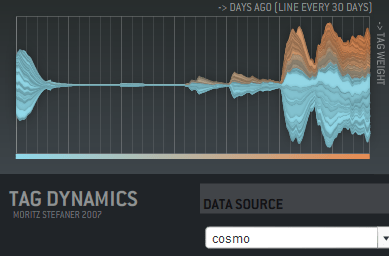
… is animation! I haven’t seen this used in any commercial sites, but Moritz Stefaner has a flash example of an animated cloud from his thesis. You should check out his other work there too, it includes some really innovative ways of displaying tags over time, like this graph showing tag usage:

Taggraph

His thesis title is "Visual tools for the socio-semantic web", and he really delivers 9 completely new ways of displaying the data, most of them time-based. Even better, he has interactive and animated examples online for almost all of them. Somebody needs to hire him to develop them further.

Moritz has his own discussion on the motivations and problems with animated tag clouds. For my purposes, I want to give people a way to spot changes in the importance of email topics over time. Static tag clouds are great for showing the relative importance of a large number of keywords at a glance, and animation is a way of bringing to life the rise and decline of topics in an easy to absorb way. Intuitively, a tag cloud of words in the subjects of emails would show ‘tax’ suddenly blinking larger in the US in April. On a more subtle level, you could track product names in customer support emails, and get an idea of which were taking the most resources over time. Trying to pull that same information from the data arranged as a line graph is a lot harder.

There’s some practical problems with animating tag clouds. Static clouds are traditionally arranged with words abutting each other. This means when one changes size, it affects the position of all the words after it. This gives a very distracting effect. One way to avoid this is to accept some level of overlap between the words as they change size, which makes the result visually a lot more cluttered and hard to read. You can increase the average separation between terms, which cuts down the overlap, but does result in a lot sparser cloud.

I’m interested in trying out some other arrangement approaches. For example, I’m fond of the OS X dock animation model, where large icons do squeeze out their neighbors, but in a very unobtrusive way. I’m also hopeful there’s some non-flash ways to do this just with JavaScript.

How to write a graph visualizer and create beautiful layouts

Mattnetwork

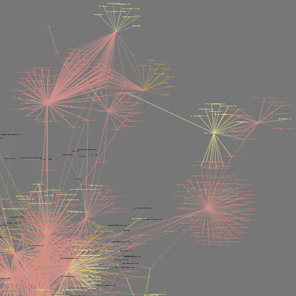
If your application needs a large graph, as I did with my Outlook mail viewer, the first thing you should do is check for an existing library that will work for you. Matt Hurst has a great checklist for how to evaluate packages against your needs. If you can find one off-the-shelf, it’ll save a lot of time.

If you need to write your own, the best way to start is absorbing this wikipedia article on force-based layout algorithms. It has pseudo-code describing the basic process you’ll need to run to arrange your graph. It boils down to doing a physics-based simulation of a bunch of particles connected by springs, that repel each other when they get close. If you’ve ever written a simple particle system, you should be able to handle the needed code.

It’s pretty easy to get something that works well for small numbers of nodes, since the calculations needed aren’t very intensive. For larger graphs, the tricky part is handling the repulsion, since in theory every node can be repelled by every other node in the graph. This means the naive algorithm loops over every particle every time when calculating the repulsion for each in the graph, which gives O(N-squared) performance. The key to optimizing this is taking advantage of the fact that most nodes are only close enough to be repelled by a few other nodes, and creating a spatial data structure before each pass so you can quickly tell which nodes to look at in any particular region.

I ended up using a 2D array of buckets, each about the size of a particle’s repulsion fall-off distance. That meant I could just check the immediately neighboring buckets that a particle was in to find others that would affect it. The biggest problem was keeping the repulsion distance small enough that the number of particles to check was low.

In general, tuning the physics-based parameters to get a particular look is extremely hard. The basic parameters you can alter are the stiffness of the springs, the repulsion force, and the system’s friction. Unfortunately, it’s hard to know what visual effect changing one of them will have, they’re only indirectly linked to desirable properties like an even scattering of nodes. I would recommend implementing an interface that allows you to tweak them as the simulation is running, to try and find a good set for your particular data. I attempted to find some that worked well for my public release, but I do wish there was a different algorithm that was based on satisfying some visually-pleasing constraints as well as the physics-based ones. I did end up implementing a variant on the spring equation that repelled when the connection was too short, which seemed to help reduce the required repulsion distance, and is a lot cheaper to calculate.

A fundamental issue I hit is that all of my nodes are heavily interconnected, which makes positioning nodes so that they are equally separated an insoluble problem. They often end up in very tight clumps in the center, since many of them want to be close to many others.

Another problem I hit was numerical explosions in velocities, because the time-step I was integrating over was too large. This is an old problem in physics simulations, with some very robust solutions, but I was able to get decent behavior with a combination of shorter fixed time steps, and a ‘light-speed’ maximum velocity. I also considered dynamically reducing the time-step when large velocities were present, but I didn’t want to slow the simulation.

I wrote my library in C++, but I’ve seen good ones running in Java, and I’d imagine any non-interpreted language could handle the computations. All of the display was done through OpenGL, and I actually used GLUT for the interface, since my needs were fairly basic. For profiling, Intel’s VTune was very helpful in identifying where my cycles were going. I’d also recommend planning on implementing threading in your simulation code from the start, since you’ll almost certainly want to allow user interaction at a higher frequency than the simulation can run with large sets of data.