Two ways you can easily find interesting phrases from an email

D20
Maybe it was my weekly D&D game last night, but probability is on my mind. One thing I’ve learnt from working in games is that accuracy is overrated in AI. Most problems in that domain have no perfect solution. The trick is to find a technique that’s right often enough to be useful, and then make it part of a workflow that makes coping with the incorrect guesses painless for the user.

A lot of Amazon’s algorithms work like this. They recommend other books based on rough statistical measures which bring up mostly uninteresting items, but it’s right often enough to justify me spending a few seconds looking at what they found. The same goes for their statistically improbable phrases. They’re odd and random most of the time but usually one or two of them do give me an insight into the book’s contents.

This is interesting for email because when I’m searching through a lot of messages I need a quick way to understand something about what they contain without reading the whole text. One of the key features of Google’s search results is the summary they extract surrounding the keywords for each hit. This gives you a pretty good idea of what the page is actually discussing. In a similar way I want to present some key phrases from an email that very quickly give you a sense of what it’s about.

The main approach I’m using is vanilla SIPs, but there’s a couple of other interesting heuristics (sounds so much more technical than ‘ways of guessing’). The first is looking for capitalized phrases within sentences. These are usually proper nouns, so you’ll get a rough idea of what people or places are discussed in a document. The second is to find sentences that end with a question mark, so you can see what questions are asked in an email.

These are fun because they’re both reliant on easily-parsed quirks of the language, rather than deep semantic processing. This means they’re quick and easy to implement. It also means that they’re not very portable to other languages, German capitalizes all nouns for example, but one problem at a time!

How to use corporate data to identify experts

Yoda

Nick over at the Disruptor Monkey blog talks about how their FindaYoda feature has proved a surprise hit. This is a way of seeing who else has a lot of material with a keyword you’re looking for, and its success backs up one of the hunches that’s driving my work. I know from my own experience of working in a large tech company that there’s an immense amount of wheel-reinventing going on just because it’s so hard to find the right person to talk to.

As a practical example I know of at least four different image comparison tools that were written by different teams for use with automated testing, with pretty much identical requirements. One of the biggest ways I helped productivity was simply by being curious about what other people were working on and making connections when I heard about overlap.

One of the tools I’d love to have is a way to map keywords to people. It’s one of the selling points of Krugle’s enterprise code search engine. Once you can easily search the whole company’s code you can see who else has worked with an API or algorithm. Trampoline systems aim to do something similar using a whole company’s email store, they describe it as letting you discover knowledge assets. I’m trying to do something similar with my automatic tag generation for email.

It’s not only useful for the people on the coal face, it’s also a benefit that seems to resonate with managers. The amount and cost of the redundant effort is often clearer to them than to the folks doing the work. Since the executives are the ones who make the purchasing decisions, that should help the sales process.

How to write a socket server VI

Wallsockets

Once you’ve got a socket server running locally on a web-hosting machine, you need to expose it to the outside world. Luckily this is quite easy using PHP. Sockets are well-supported and already heavily used to communicate with MySQL.

Take the source from the previous article, and build the server part on the machine you’ll be hosting the service on. You’ll want this service to run even if you’re logged off, so for now use the command

nohup ./wcserver /tmp/myservicesocket &

This will keep the server process running even if you exit the current terminal window. On a production system you’ll actually want to start the server when the system reboots, but this approach is simpler for testing purposes.

The next hurdle to overcome is making sure that your Apache httpd process, which runs PHP, has the right permissions to access that socket file. This will depend on the user setup on your machine, but typically you’ll have a special apache user account that you’ll need to add to the file access list. For testing purposes you can always grant everyone on the machine access to the socket file, though it would be preferable for security reasons to be a bit more picky in production. Run this command to grant everyone permission to access it:

chmod a+rw /tmp/myservicesocket

Now the server is running and available, you need to write an equivalent to the command-line client in PHP. Here’s the source and I’ll go over the details below.

$fp = stream_socket_client("unix:///tmp/myservicesocket", 
$errno, $errstr, 30);

PHP takes care of a lot of the socket setup code for you. The only bit I found tricky was specifying a local file socket, it turns out you do that using the special ‘unix’ protocol specification in the URL, followed by the file path.

    fwrite($fp, "Some Message\n");
    while (!feof($fp)) {
        echo fgets($fp, 1024);
    }
    fclose($fp);

The connect call returns a file handle that you can use with the standard file access functions. As you can see, it looks pretty similar to the C version of the same code. You can see the results running on one of my servers here.

The example service isn’t doing very much so far. What’s really exciting about this approach is that it offers a completely language-independent way for any interesting computational service to be integrated into the standard LAMP stack. A lot of my work involves processor-heavy work on hard problems like laying out large graphs and statistical analysis. This should let me move them from the client to become online services.

Try a secret new search engine

Mqlogo

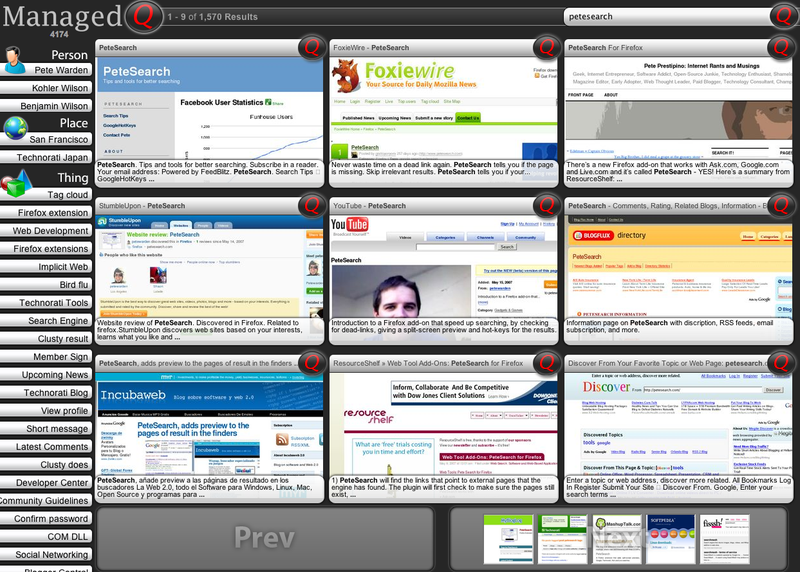
Well, I’m not sure about secret, but it sure is mysterious. http://alpha.managedq.com/ showed up in my visitor logs, and visiting the site it looks like rather a nifty visual search interface. It’s got thumbnails of the top results, and automatically generated keywords sorted by type down the left side:

Mqscreenshot

The interesting part is that most of the site is returning 404 or authorization errors, which makes me wonder if they might still be in stealth mode? Unfortunately email messages to their public inquiries@managedq.com address bounce, they’ve got a private domain registration so I can get any contact details from that, and Google searches don’t get me any more information, so I can’t check with them before mentioning it here.

They’re using snap for the thumbnails, and I’m not sure how they’re pulling out the tags. The keywords definitely look automatically generated, rather than user driven. I’d love to know more about their work, so if anyone has more details or a way to contact them, email me or add a comment.

How to write a socket server V

File

As I mentioned in my previous post on security, it’s much better if you can confine your connections to clients on the current machine and completely block external attackers. Since my service is going to fit in the same slot as MySQL in the LAMP ecology, confining it to the local machine and having an external interface provided through PHP is reasonable for my purposes. A bonus is that I should get better performance thanks to skipping several layers of network code.

To restrict connections, you need to use a different family of sockets based on the file system rather than TCP/IP network connections. Instead of a port number, the client and server collaborate by agreeing on a file name they’ll use to contact each other. There are potential security issues involved in choosing the location of the file, but if you trust all processes on the local machine then using something like /tmp/myservicesocket should be fine.

The code itself looks pretty similar to the internet socket example, with the main change being that we use a sockaddr_un structure to specify the file name of the socket rather than a sockaddr_in to define the IP address and port number. Here’s the new source, and I’ll describe the server changes below.

	struct sockaddr_un listenAddress;
if (listenFileNameLength>=sizeof(listenAddress.sun_path))
error("ERROR, the filename must be shorter
than the maximum path length (normally around a hundred chararacters)\n");

const int listenSocketFile = socket(AF_UNIX,
SOCK_STREAM, 0);
if (listenSocketFile < 0)
error("ERROR opening server socket");

bzero((char *) &listenAddress, sizeof(listenAddress));
listenAddress.sun_family = AF_UNIX;
strncpy(listenAddress.sun_path, listenFileName,
sizeof(listenAddress.sun_path));

const int connectResult = connect(transferSocketFile,
(struct sockaddr*)&serverAddress,
sizeof(serverAddress));

We’re taking a single filename as an argument to both the client and server now, so you’ll need to run them as "./wcserver /tmp/yourfilename" and "./wcclient /tmp/yourfilename" . The structure the filename is stored is an odd one, it’s basically a char to specify the family, sometimes preceded by another byte for a string length on some systems, immediately followed in memory by a stream of bytes representing the string for the file name, eg:

|sun_family byte|p|a|t|h|b|y|t|e|s|…

There’s a lot of confusion about this structure, whether it’s NULL terminated, if you can dynamically allocate a large than provided path string, and lots of other behavior that seems to vary between the *nixes.

You specify it’s total size as arguments to bind() or connect(). So, in theory you can duplicate this layout with a string of any length. In practice the default sockaddr_un structure defines a fixed-length array of chars after the family, and in most implementations this is at least 100 (104 on OS X, 108 on Red Hat). In practice, I experimented with dynamic sizing and found myself in a scary wood full of underdocumented questions, so I decided to go with using the default structure layout. This limits me to file names less than 100 characters, but it also means I’m using the same code as 99% of the other local socket programs out there. This should make it a lot more portable and less prone to strange OS bugs.

All the articles in the simple server series

How to write a socket server IV

Lock
If you’re going to be writing a socket server, you need to be thinking about security right from the start. You’re opening a new door for hackers to attack your host computers, and you’re responsible for making sure that you’re not making your users vulnerable.

The first option for securing your service is deciding whether you need a TCP/IP based socket open to external machines, or whether an AF_UNIX style socket that is only accessible by other programs on the local computer is good enough. You not only prevent external hackers from connecting, it’s also a lot faster to skip the network code that AF_INET sockets involve. I’ll provide a modified example that demonstrates this in a later post.

If you do need an internet socket, then your top priority must be to avoid writing code that external attackers can hack using buffer overflows. When you’re writing code that accepts user inputs, never use plain C functions like sprintf() or gets() that don’t allow you to specify a length for the buffer you’re writing into. If the user has set things up so they send input that overflows your buffer, they could write to the stack and start executing arbitrary code. The existing example just uses read() with a fixed length, so there’s no chance of a client exploit, but as soon as you have to start accepting more arbitrary inputs it’s something you need to think about. This is one great reason to use an established library like Java which doesn’t suffer from the same sort of vulnerabilities as C. If you are using C, look at newer functions that take a buffer length argument like snprintf.

Another problem that’s tough to find a solution for, but is hopefully not a problem as long as your host isn’t compromised, is local port hijacking. This is where another process on the same machine tries to grab your socket. In certain cases they can get priority over your service, and fool the outside world into connecting to them instead. You can try to avoid it by binding your service to a specific IP address of the host instead of INADDR_ANY, but it can be hard to do this for all the IPs a server may have.

Firewalls are another issue. It’s tempting to view them as an obstruction, and try to work around them by piggy-backing on a well-known port like 80, but from a security point of view you’re much better off if you can work in concert with them. It will take a little bit more effort sometimes to persuade the firewall owner to authorize your service, but there are some rules that make life easier.

  • Make your port number configurable. This is good in general, there may be another service running on your default port, and it allows you to fit into any firewall policies about which port ranges are open.
  • Only use a single port. Fewer ports mean fewer rules in the firewall, which means less maintenance, lighter processing load and better performance. You can use your own light-weight protocol to distinguish different types of data you’re sending across a single connection, rather than using multiple connections to do the same job.
  • Don’t connect back to the client with a new socket. FTP does this, and it means that the firewalls on both ends need to be set up correctly, and opens up the possibility that an attacker could connect to a client listening for your incoming connection. It’s much better to leave the connection initiation to the client, and then just use that for two-way communication.

These are some of the socket-specific issues, but now you’re writing code that’s open to external attack, you need to ask yourself about the security implications of every design and implementation decision you make. For more information, here’s one of my favorite guides. It’s actually from Microsoft, but most of the content is applicable on any platform.

All the articles in the simple server series

Feedburner or Feedblitz subscriber count problems?

Feedblitzlogo
A couple of weeks ago I added a Feedblitz option (the box on the top left) for people who wanted to subscribe by email. I haven’t seen much takeup, but yesterday’s Feedburner subscriber stats show 69 new people using it! That seemed suspicious to say the least, but it looks like I‘m not the only person seeing the same issue. I’m jealous though, he got 16,000 imaginary subscribers whereas the glitch still left my total in triple digits.

Are your emails too robotic?

Postbox

I love the random email conversations my blogging spawns, which have involved everything from why hedgehogs hibernate to arcane technical details of COM dll registration. I recently received an email from a young entrepreneur asking me to check out their site. Then, a few days later I had a another email saying basically "I noticed you read the last email we sent you, why didn’t you reply?". Checking the source of the original mail, he’d embedded an image bug to work like a read receipt.

I had to admire his enthusiasm and drive, but was definitely creeped out by the way he was tracking me. I wish I understood why my marketing sometimes fails, so to try and turn this into something positive, I thought I’d discuss what didn’t work for me with his original message:

——

Subject: Blog Question

I came across your blog and thought you might be interested in trying out my product X.  We help you solve common problems with creating your blog from placing in text links, placing pictures and videos, and more.

Check us out at http://X.com , use the invite code: X

If you have problems understanding what we do on the site please let me know, we are a young company with a great product.  We have a new site coming out in the next few days that will make everything more clear.
Thanks for your time, I look forward to hearing what you have to say.
Thanks,

Robert X

X@X.com
Forward email
This email was sent to searchbrowser@gmail.com, by X@X.com
Update Profile/Email Address | Instant removal with SafeUnsubscribe™ | Privacy Policy.

Email Marketing by
X | 142 South X | San Francisco | CA | 94103

——-

I came across your blog and thought you might be interested in
trying out my product X.

For a start, there’s no "Hi Pete", or any other personalization that demonstrates he’s an actual reader of my blog. Mentioning a recent article is a quick way to show you’ve spent a little time learning about your recipient.

We help you solve common problems with
creating your blog from placing in text links, placing pictures and
videos, and more.

This sentence is pretty vague and unclear. You have a few seconds of someone’s attention, you need to make a clear and concrete promise about the benefit to them of investing more time on your proposal.

If you have problems understanding what we do on the site please let me know, we are a young company with a great product.

I actually quite like this part, it’s projecting a good attitude and wanting to start a conversation.

We have a new site coming out in the next few days that will make everything more clear.

This, not so much. That made me think, "well, maybe I’ll just wait a few days and look then, rather than spending time now on something unclear".

Thanks for your time, I look forward to hearing what you have to say.
Thanks,

The double thanks adds to the assembled-by-robots feel.

Bugredacted
This is a screenshot of the actual footer to the message. The mentions of email marketing and unsubscribe options made it seem even more like this was a mass-mailing. The tracking bug is hidden in there too, though I didn’t know it until I checked.

I will now be replying to Robert, and I hope he takes this in the spirit it’s intended. I spend plenty of time trying to get people interested in my projects, so I know it’s not easy. One thing I have learnt is that there’s no short-cut to getting someone’s attention. You have to put in the time to understand what your recipient wants, and highlight what you’re offering that fits in with that. A form letter like this is unlikely to get the response you want.

How to write a socket server III

Dishes

So far, we’ve created a server program that will accept a single client connection and then exit. The next step is to handle more than one client. Have a look at the final code that does this, and then I’ll explain how it works.

The most obvious way to handle multiple requests is to loop on accept() inside main. You could pull a client socket for every new connection and then having the client conversation inside the loop. The flaw with this plan is that transferring data back and forth between the server and the client might take a comparatively long time, and there might be other clients trying to connect who will be blocked until the first client is completely done.

What we need is a way to split up the work so we can have multiple conversations in progress at the same time. This is efficient because networks are a lot slower at transferring data than processors are, so in the gaps where the server is waiting for a client response there’s lots of CPU time to handle other connections, especially on multi-core machines.

There’s three main techniques for spliting up the work. Probably the most complex but also the most flexible is using non-blocking sockets and select() to run a single loop that pulls chunks of data from multiple connections. This pattern does a small amount of work for each chunk before looping around and dealing with another conversation in the next iteration. thttpd is an excellent example of this approach. The complexity comes because it takes careful design to make sure that the work you’re doing every time you deal with a chunk of data always runs quickly enough for other conversations to be dealt with responsively. It’s also hard to make this event-based model run well on more than one processor.

The other two approaches are a lot simpler to write. You can create a new process to deal with every client conversation, either using fork() or even explicitly calling a command line like inetd does. This has the advantage of being incredibly simple to write, but on some OS’s (though not Linux) creating a new process can be time-consuming and inefficient. For my purposes I also need to share resources between the conversations. since the goal of my server is to allow fast access to preloaded word frequency data. There are mechanisms to communicate between processes that would allow this, but the simplest way to do this is using threads.

Threads are similar to lightweight processes, but they share full access to all the same memory as the parent. This is both a blessing and a curse, thanks to all the variations that timing and resource-locking introduces, threading bugs can be incredibly time-consuming to track down and there can often be subtle bugs in even simple threading code.

The basic idea for threading the server is that we’ll create a new worker thread for every client connection. This thread will carry on the conversation, but it will actually be paused and control passed to a different thread every so often, so that both the main listener and other worker threads get a chance to do the work they need to. The beauty of the thread model is that the actual data transfer code looks purely procedural just like the original single connection version, there’s no alteration to the internal logic needed to deal with the multi-tasking.

The most common threading library is the Posix standard, though Windows has its own libraries for this. I’ve implemented the new server code using pthread, adding –lpthread to the compile flags to ensure the library is linked in. There’s a new function to deal with each client:

void* handleClientRequestThreadFunction(void* threadArgumentPointer)
{
threadArgumentStruct* threadArgument = (threadArgumentStruct*)(threadArgumentPointer);

const int transferSocketFile = threadArgument->_transferSocketFile;

free(threadArgument);
...

The rest of the function is exactly the same data transfer code that was in the old server’s main loop. The main subtlety here is that we need to pass in the file descriptor for the connection, but thread functions always take a void pointer as input, not an integer as we need. Instead, we create a structure that holds all the data we want to pass in, since in the future we’ll need to pass more arguments. This structure can’t live on the stack as a local variable in the calling function, since the main thread may have moved out of that function by the time we get here. Instead, we create an area of memory in the heap using malloc to hold the data, and pass a pointer to this into the function, relying on the client thread to free it.

You can get away with simpler techniques for basic data types, such as casting an int directly to a void pointer and back, but these will throw up warnings when the size of those types doesn’t match on a 64 bit machine, so this is generally a cleaner approach at the cost of some extra heap allocations.

The main function now contains a loop that spawns a thread for every client connection, and then goes back to listening:


	do
{
int transferSocketFile = accept(listenSocketFile,
(struct sockaddr *) &transferAddress,
&sizeofTransferAddress);

if (transferSocketFile<0)
break;

// It's the thread's responsibility to free this memory
threadArgumentStruct* threadArgument = malloc(sizeof(threadArgumentStruct));
threadArgument->_transferSocketFile = transferSocketFile;
void* threadArgumentPointer = (void*)(threadArgument);

pthread_t clientRequestThread;
pthread_create(&clientRequestThread,
NULL,
handleClientRequestThreadFunction,
threadArgumentPointer);

} while (1);

This loop does very little work other than setting up the data structure for the function arguments and starting off the thread. pthread_create() is the key function here, it’s kicking off the execution of the client request handling function. One key thing to understand is that once that’s called, you really don’t know when the function is getting executed, or when it’s done. It may even be happening at the same time as the main loop if you’re on a multi-processor machine.

This means we need to be very careful about making sure that different threads don’t step on each others toes by altering data that another thread might also be working with. I’ll cover how to handle that sort of synchronization next.

All the articles in the simple server series