What puzzles can company-wide email solve?

Puzzle

My intuition is that a company’s collection of email messages is a rich source of useful information, and people will pay for a service that gives them access to it. What could users do in practice though?

Discover experts.
By analyzing each person’s sent messages, it’s possible to figure out some good tags to describe them. These would need to be approved and tweaked by the subject before being published, but then you’d have a deep company directory that anyone could query. So many times I’ve ended up reinventing the wheel because I didn’t know that somebody in another department had already tackled a particular problem.

Uncover expertise. Email is the most heavily used content-generation system, hands-down. There’s lots of valuable information in messages that never makes it to a wiki or internal blog. The trouble is, that information quickly vanishes, emails are ephemeral. Any mail that’s sent to an internally public mailing list should be automatically included on an intranet page that’s searchable by keyword, or by person or team. You should also have a button in Outlook that lets you publish any mail thread on that same page. Those published messages produce something very like a blog for each person, effortlessly.

Work together.
People collaborate by emailing each other attachments. Rather than trying to change that, put in a tool that by default uploads the attachment to Sharepoint, accessible only by the email recipients, and rewrites the message so it links to that instead. You’ll need a safety-valve that allows people to override that if they really do need it as an attachment, but this method should retain most of the advantages of email collaboration (clear access control, ease-of-use) and add the collaboration benefits of change tracking and a single version of the file.

Can you automatically generate good tags?

Tag
One interesting feature of Disruptor Monkey’s Unifyr is their automatic generation of tags from web pages. Good tags are the basis of a folksonomy, and with them I could do some very useful classification and organization of data. With an organization’s email, I’d be able to show people’s areas of expertise if I knew which subjects they sent messages about. This could be the answer to the painful problem of ‘Who can I ask about X?’.

Creating true human-quality tags would require an AI that could understand the content to the same level a human could, so any automatic process will fall short of that. Is there anything out there that will produce good enough results to use?

There are two main approaches to this problem, which is sometimes known as keyword extraction, since it’s very similar to that search engine task. The first is to use statistical analysis to work out which words are significant, with no knowledge of what the words actually mean. This is fundamentally how Google’s search works. The second is to use rules about language and information about the meanings of words to pick out the right words. As an example, knowing that notebook means the same as laptop, and so having both words count for the same concept. Powerset is going to be using this approach to search. Danny Sullivan has a thought-provoking piece on why he doesn’t think that the method will ever live up to its promise.

KEA is an open-source package for keyword extraction, and is towards the rules-based end of the spectrum, though it sets up those rules using training and some standard thesauruses, rather than manually. I was initially very interested, because it’s designed to do exactly what I need, pulling descriptive keywords from a text. Unfortunately, I’d still have to set up a thesaurus and some manually tagged documents for the system to learn from before running it on any information. I would like to start off with something completely unsupervised, so it can be deployed without a skilled operator or any involved setup.

The other alternative is using statistical analysis to identify words that are uncommonly used in most texts, but which are common in the particular one you’re looking at. The simplest example I’ve seen is the PHP automatic keyword generation class. You’ll need to register to see the code, but all it does is exclude all stop words, and  then returns the remaining words, and two and three-word phrases, in descending order of frequency. The results are a long way from human tagging, but just good enough to make me think it’s worth expanding.

An obvious next step is to expand the stop word concept, and keep track of the general frequency of a lot more words, so you can exclude other common terms, and focus on the unusual ones. The standard way to do this is to take the frequencies from a large corpus of text, often a general one like the Brown corpus that includes hundreds of articles from a variety of sources. For my purposes, it would also be interesting to use the organization’s overall email store as the corpus, and identify the words a particular employee uses that most others in the company don’t. This would prevent things like the company name from appearing too often.

You’ll never get human-grade tags from this sort of system, but you can get keywords that are good enough for some tasks. I hope it will be good enough to identify subject-matter experts within a company, but only battle-testing will answer that.

Why should I be proper?

Griswaldlights

There’s no equivalent to the British concept of ‘proper’ in the US. It’s the adjective you use to describe something that’s correct against the implicit standard, as in a proper cup of tea, or a proper job. The funny thing is, it’s not the same as good, or enjoyable, instead it just implies that the subject complies with the natural order of the universe, as if beverages or careers had some platonic ideal they could be measured against.

What I love about this country is we get to set our own standards, there isn’t some cultural ether that everything’s defined in reference to. Most people I knew in the UK sneered at gaudy holiday house decorations, but I secretly loved them. Now I can decorate my house with multi-colored Christmas lights, and people respect that it’s my business, rather than trying to force me to conform. If anybody has an issue, it’s treated as a matter debate between us, and doesn’t rely on an appeal to some faceless ‘proper’ standard of behavior.

I have a lot more fun now I’m leading an improper life!

Camping in the Santa Monicas – Topanga

Musch

Previously I’ve covered camping in La Jolla Valley, Sycamore Canyon, Circle X and Santa Cruz Island. I thought that La Jolla Valley was the only place in the Santa Monicas where you didn’t need a reservation to camp, with a first-come, first-served hike-in campground, but I was wrong!

Musch trail camp is another small hike-in campground like La Jolla’s, and it’s in the east end of the mountains at Topanga State Park. It’s about a mile from Trippet Ranch, the park entrance off Entrada Road, near Topanga Canyon Boulevard. Here’s a Google map showing the campground, trail and parking lot:

View Larger Map

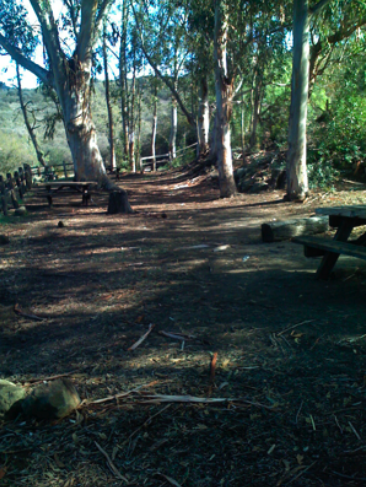
The campground is fairly small, and looks like it would hold 6 to 8 tents maximum. There’s water available, and restrooms. You’re allowed to camp in a fenced-in area under some eucalyptus trees, and there are some picnic benches provided, as you can see in the photo above. It’s a fairly open spot next to the trail, without much of a view. It costs $3 a night, per person, and you can stay a maximum of 3 nights. You’re not allowed to smoke or have any fires except for propane stoves, for reasons that are obvious after the last few months.

There is no reservations system, and it doesn’t seem heavily used, but I would recommend phoning the park before-hand on 310 455 2465 to check on conditions. Talking to a ranger at Trippet Ranch when you get to the park so they know you’re there is a good idea too.

The campground is halfway along the Musch trail. The easiest way to get there is to start off at Trippet Ranch, and head along the northerly fire road from the parking lot. After a few hundred feet, the Musch trail branches off to the east. It’s well sign-posted, in pretty good shape and easy to follow. After roughly a mile, you’ll come across a small building and a paved road. The corral next to this is the camp site, and there’s an iron ranger where you can pay your fee.

If you’re ambitious, you could also get here along the Backbone trail from Will Rogers State Park, along the Rogers Road initial section, but that’s 9 mile hike. Milt McAuley’s Guide to the Backbone Trail is the best resource if you want more information on that alternative, since there’s a lot of junctions to navigate taking that route.