Complaints are the best measure of success

Complainingcat

I enjoyed Mitchell Ashley’s post about his joy when QA found the first bug in a new product. It’s an unfakeable sign that your software is far enough along to be testable and that you’ve got a system in place for testing it. As he says, there’s always bugs, and if you aren’t finding them early then you’re not looking right. That always leads to a very nasty time at the end of the development cycle.

Along similar lines, the best way to tell if released software has potential is whether anyone complains. I’m not advocating deliberately annoying your customers, but all software has problems. If nobody complains, it doesn’t mean it’s perfect, it just means nobody sees enough value in the software to want to see it fixed. It’s a serious investment of time to complain, almost everybody will just keep quiet and stop using an application that has a serious flaw. Someone who complains must really care and believe in what you’re trying to do. I love being at the point where you get complaints, it means you’ve created something people feel passionately about. Most software never gets that far.

It’s also great motivation for the team when they know that there’s a real person out there who will be delighted by the latest bug fix because it addresses their problem. Anything you can do to reinforce a relationship between engineers and passionate users pays massive dividends in innovation. User groups and site visits are great for this. Otherwise it’s too easy to lose sight of the goal of what you’re doing in the fog of technical details. Looking at which complaints you’re addressing with your engineering is a great way of ensuring you’re actually doing something that will be useful for your customers.

How to stop reinventing the wheel

Tacitlogo

Someone recently pointed me towards Tacit Software as a company I’d be interested in. Their team has created a system to automatically catalog expertise within an organization. The question they’re trying to answer is ‘Who can I ask about X?’, and the goal is to prevent redundant work within an organization. They have an interface where employees can ask a question, and the software will try to identify the best people to answer it.

They offer two different products, Illumio which is based on a desktop client and ActiveNet, which is centrally deployed. Illumio works a lot like a desktop search system, analysing all the files on a user’s computer including documents, emails and contacts, to identify areas of expertise. ActiveNet is similar, but looks at the data stored globally on the organization’s servers to figure out who knows about what.

One interesting approach they’re using to demonstrate Illumio’s potential are the public web groups they’ve set up. To join, you download Illumio and it analyzes your interests. You can then participate in their groups to ask and answer questions on topics ranging from sports to business.

An area they’ve obviously spent a lot of time on is safeguarding users’ privacy. The process they use for answering questions involves getting permission from the people it decides are experts on the topic before any identifying information is returned to the questioner. Privacy is a big concern, but this does seem a bit unwieldy compared to the Knowledge Network approach where experts pre-approve what information is going to be exposed, and it’s then available for easy browsing and searching by other employees.

Their case studies show they’ve deployed in some large organizations and report some impressive satisfaction figures. Their descriptions of hotspots where they see a lot of redundant work are illuminating too, they’ve focused on procurement, research and new project proposals. This definitely fits with my experiences, though I’ve spent most of my time on the research side.

Thor, Dog of Thunder

Thor

A few weeks ago, me and Liz decided to dip our toes in the water of dog ownership, and temporarily foster a dog for a local rescue charity. As our friends gleefully predicted, we didn’t have the willpower to hand over our first case and ended permanently adopting him!

Thor is a 13 pound half Chihuahua, half maybe-Pinscher. We don’t know much of his history, but he’s about four years old, seems to have been well brought up judging from his behavior, and is very affectionate. Though I’ve been surrounded by cats for the last ten years, I grew up with dogs but this is Liz’s first exposure. She’s smitten, helped by Thor’s surprising fastidiousness, as the only dog I’ve met who avoids muddy puddles. He’s also a very strong hiker, still pulling at the end of a 5 mile loop with serious elevation gain.

I have no idea where his name came from, I’d love to know how a half-Chihuahua ended up named after a Norse god. To my mind he’s more of a Loki, but no point in giving him an identity crisis now. My parents are overjoyed, understandably they always preferred the dogs to us children, and now they have a furry grandson.

The only downside is the cats’ reaction, they are decidedly unimpressed by this new interloper. He’s very terrier-like, so we’ve had to train him not to chase the fun furry toys as they scamper away. Luckily they all seem to slowly be reaching an understanding, maybe in a few more weeks they’ll relax a bit more.

A couple of tips if you’re setting up a new Dell server

Dellscreenshot
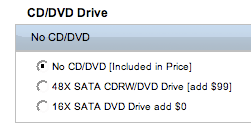
If you’re buying from Dell, make sure you check the default configuration. I ended up with no CD or DVD drive, since I failed to spot that wasn’t included. Funnily enough, a basic DVD drive is actually no extra if you are more observant. Instead, I ended up making a quick trip to Best Buy and $50 poorer.

The default user name for a Windows Small Business Server installation is ‘Administrator’, with a capital A. Since there’s no name hints, I spent longer than you’d believe trying to figure that out. Ironically I had the password I set up carefully written down.

That, together with some Javascript DOM brainteasers, trailwork on the Garapito Trail, helping a friend with Dire Maul and a hike around Towsley, was my weekend!

Why is web search so popular and mail mining so rare?

Acorns
Looked at from a high level, they both take unstructured data and try to understand its meaning. A big practical difference is that web search tools are designed for the masses to use, whereas email mining is only used by a small number of professionals either doing litigation discovery or business intelligence work. Why is this?

There’s no obvious painful problem. With web search, the problem is "I need to find authoritative information on X". With mail, the question is more like "I need to find the discussion I was involved in on X", which can be solved locally by searching your inbox. This doesn’t need mining, just a search on your drive or personal webmail repository.

Email is private. Whilst technically your work email belongs to the company and they’re free to do whatever they like with it, a lot of people have sensitive personal infomation or discussions over their work account. Even leaving aside the ethical issues, you won’t get adoption unless employees feel comfortable about their privacy. A mass-use mining system needs to have privacy policies built-in from the start, which is a tricky balancing act because you also want to make as much available as possible.

Messages have no hyperlinks to each other.
PageRank works because there’s a network of links between web pages. The closest equivalent to this for mail is the graph of who emails whom, and how often and quickly an email is replied to or forwarded. This is still a research topic though, it’s not a widely used or understood metric.

This all sounds fairly downbeat, but what really excites me is that I think there are plenty of painful problems that can be solved with mail mining (eg find an expert, find contacts, collaboration), they’re just not as obvious. There’s a lot of smart ideas on web search that can be applied to mail too. I also think there’s some big advantages to email.

You know who your users are. Inside a company something like Active Directory gives you a wealth of information about who everyone is, what their formal relationship is, and allows you to easily authenticate identity to control access. The web is struggling towards this, but it’s still a long way off. Even for people outside the company, an email address is a good proxy for identity and usually comes with an alternate readable name too. Knowing about your users ahead of time also opens the door to doing a lot of pre-processing before they even try the service, so you can present them with useful information immediately, for example pre-building their social graph.

Time. Another great feature of email is that you’ve got data from a whole range of time, not just a snapshot of how the content looks right now. This opens up the door to a lot of time-based analysis techniques, such as measuring how metrics change over a year. The web has the wayback machine, which is an amazing feat but still a long way from the depth of mail.

Due diligence for startups

Signs

Here’s some of my favorite articles on due diligence, all obviously written from painful experience.

Rick Segal writes about The Due Diligence Dipsey Doodle. He’s great at providing concrete examples of what he’s talking about, and emphasizing ‘obvious’ points (like documenting everything) that everyone theoretically knows, but are still commonly ignored in practice. He’s also got an older post covering the actual list his firms goes through at Kicking the tires: A due diligence checklist.

Nivi and Naval at VentureHacks try to answer How much diligence should we do before we sign a term sheet? I like their relentless focus on giving entrepreneurs tools to put together good deals, with good coverage of what can go wrong to back up their advice.

Suzanne Dingwall Williams is a lawyer with a lot of experience working with startups. She gives some cautionary advice on what can go wrong with the disclosure process in Selling the startup: Due diligence disasters.

Furqan Narziri has some useful tips on the process in Due diligence: What to expect. I like his suggestion of using Sharepoint to manage the documents being worked on, especially since that ties in with a lot of what I’ve been working on.

Finally, Mark Peter Davis has an ambitious series  covering the whole process of raising capital, and is just starting on the due diligence phase in Sharing your cap table. I’m really interested in following the whole series, he’s doing a great job.

Defrag: OpenSocial vs ClosedPrivate

Keepout

In response to the looming threat of ClosedPrivate, Kevin Marks of Google dropped in for a surprise talk on OpenSocial. He’s part of the NSA (Not Search or Apps) team, and wanted to give us an idea of what OS is all about. He started off by quickly running through the campfire presentation, and stressing that the aim was a common social api across many sites. The goal is to bring a social context to applications, to personalize them based on social graphs. He wants to bring media, filtered by the apps logic, so you can see what your friends are reading and you might be interested in.

Talking about the problems of bad actors in social networks, he quoted Douglas Adams; "Of course you can’t ‘trust’ what people tell you on the web anymore than you can ‘trust’ what people tell you on megaphones, postcards or in restaurants. Working out the social politics of who you can trust and why is, quite literally, what a very large part of our brain has evolved to do."

There was an API overview, which Eric hurried him through to get to the meaty non-technical discussion. The first question was about where OpenSocial came from? Kevin’s answer was that it came from two sources; the desire to easily add features to Orkut without having the pain of changing server code, and being inspired by what was possible in Google Gadgets.

The next was how mature Kevin thought the API was? His answer was that you can do things with it, but only just!

Another tough question was about how the security model worked? Kevin replied that this was currently defined by the container, but agreed this was non-ideal. He explained the dilemma Google has with sites asking users for their mail names and passwords, it’s a big security headache. The only solution going forward is to make sure that the secure method is easier to use than the unsecure, but it’s not clear how this will be done.

When asked about possible container services, such as message sending or common UI elements, Kevin thought they’d be a nice feature, but was noncommittal.

One of the audience wondered why any other social networks would want to sign up for OpenSocial? His reply was that supporting it would make it easier for users to get interesting features.

He was asked if the friends model extended IM, and he thought it was simplistic enough at the moment to map. He also suggested avoiding an email address as a primary key, since most people have multiple email addresses. When asked about adding friends through the API, he replied that it was just a query mechanism on top of the other networks, since that was a lot easier to figure out. He agreed that security was an even bigger issue than normal, since you’re giving access to your friend’s personal information to any malicious code too.

The question came up of what objections he’d had to overcome from the social networks, and whether fears of their whole graphs being downloaded were a problem? The biggest problem they’d run into was the user id namespaces filling up. On that topic, he suggested an important use might be the delegation of user registration and authentication to a third party social network, for services that don’t want to implement that infrastructure.

As a final point, Ross Mayfield brought up the question of the possibility of malicious containers made the problem of bad actors an order of magnitude worse?