
Just last week I discovered Hoegee’s campground in the mountains above Altadena, and now the whole area is being swept by the Sierra Madre wildfire. I know that the Chantry Flats buildings, and the cabins in the canyon must be at serious risk, though from this map the trail to the campground has burnt, but not the area we stayed in.
The area was full of extremely dense brush when we hiked through, I’ve heard this is the first fire in 30 years, and the hillsides are very steep. The hot, dry Santa Ana winds kicked in on Saturday too, giving us temperatures over a hundred while we were working on the trails. That makes this a very tough fire to fight, and my thoughts go out to the wildland firefighters who are in the middle of it. So far they’ve protected the city at the base of the mountains, but the hills themselves are so hard to access I hope they’re being very careful as they go deeper.
If you want more information, Jae, a city employee in the thick of it has been blogging about the situation. Moondabor has put up a chilling series of photos of the approaching fire, and Flickr has better coverage than any newspaper I’ve seen. Altadenablog gave me some links to other sites with information, like the Crime Scene Blog and the USGS online maps at GeoMac.
Author Archives: Pete Warden
Is email dying?

Technologies die pretty frequently. When I first logged on in 1992, Usenet was the place to be, with thousands of high-quality, high-traffic discussions groups hosted on an open system. It’s very openness destroyed it as a mainstream technology, with first the Eternal September when AOL allowed access to a large group of people unfamiliar with the voluntary netiquette required to keep it functioning, and then the first Green Card Lottery spam that signalled the start of the battle against unsolicited ads on open networks. Usenet retains some bright spots, I still love rec.arts.sf.written for its quality and depth, but the vast majority of discussions now happen on website forums, and most users have never heard of newsgroups.
It’s tempting to see an analogy with internet mail. It’s another open system that suffers from bad actors abusing its lack of restrictions. Even with Gmail’s spam filter I still end up with about an email a month incorrectly marked as spam, and there’s no way to verify anyone’s identity, easily guarantee security or prioritize messages from people you know. This makes Facebook’s system very alluring if everyone you want to talk to is on there. Twitter is in an interesting space between IM and email too, with the potential for interesting consequences as people adapt to its rules.
A lot of the commenters on Seth’s post argue that traditional email isn’t ever going away because it has such a massive network effect advantage over any closed system. I don’t agree. I think that it will remain as the lowest common denominator of internet communication, but a new service like Facebooks that had a large user base could offer a high quality experience for proprietary communications but also fall back to internet mail for talking to anyone who’s not signed up. Even today most company’s Exchange setups offer extra features for internal communications, like a global address book allowing you to just type in a name rather than a full address.
The big reason I’m working in the email area is that writing notes to other people is never going away, but the existing options are very limited. Internet email is by social convention a private medium, and it’s non-realtime. IM is also private but real-time. Twittering is public and real-time. Blogging is public and non-realtime. At their heart they’re all about writing down your thoughts and communicating them to other people. So why can’t I take an interesting email discussion and add it to my blog? Email an IM discussion to someone else who might be interested, and seamlessly continue the conversation through both email and IM?
The need for private, non-realtime electronic messages isn’t going away, and internet mail will remain alive as part of that, but there will be an increasing number of services that offer a higher quality experience.
New version of the Constellation Roamer Flash network visualizer

I came across Constellation Roamer a few days ago, and was impressed with what Daniel Mclaren had produced. His responsiveness since then has been great, he immediately addressed some of the minor points in my review, like the missing price on the site and expanded documentation. Now he’s released a new version with a lot of extra features. The Javascript support he offers could be very useful for some of my work, it will allow the display of extra information in the main page whenever the user selects a node for example.
It’s great to see him offering this Flash component, and the level of service he’s shown so far makes me very confident you’ll get strong support from him after the purchase. I’m looking forward to using it myself, and I’m sure it will be useful for a lot of other sites too.
Crossloop launches their marketplace

A couple of years ago I first ran across Crossloop, a free and easy-to-use PC screen sharing tool. I liked it so much I wrote up a review, and ended up spending a lot of time talking with and eventually meeting Mrinal Desai, the man with the vision behind the product.
Technically there’s a lot that attracted me to the application. They’ve done a great job of simplifying the user experience to the bare minimum, rather than overwhelming them with the space shuttle control panel like most previous sharing tools. They also run their business with a heavy focus on user statistics, so they can tell you exactly how many minutes have been spent on Crossloop, 31 million at the last count with 600,000 users!
Another thing I liked was that they always had a business model in mind that wasn’t advertising. Today they’ve finally gone live with their help marketplace. This allows people in search of technical help to connect with someone who can give them a hand. It’s initially free, but the plan is to charge a fee to thos who need help, and pass that on to the helpers. This makes a lot of sense to me, there’s a big pool of people out there with time and technical know-how who can answer questions, and a lot of people with simple computer problems who’d be willing to pay a small amount for help. If the system takes off, the world will end up with a lot of poor but tech-savvy folks (eg students) having a new income, and a lot of users with problems solved. There’s already a lot of companies using Crossloop for technical support, this seems a good way to make it easy for individuals to get involved, rather like eBay for services.
How to visualize networks through Flash
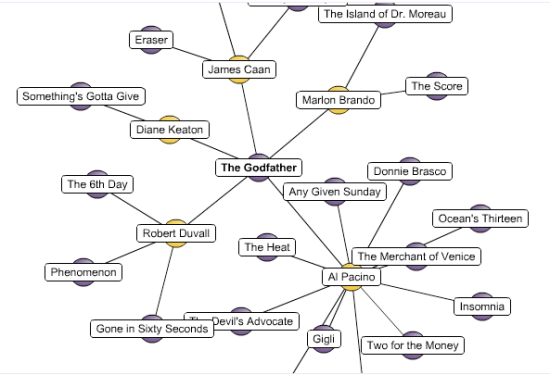
I recently came across Constellation Roamer by Asterisq, written by Daniel Mclaren. It’s a very interesting flash-based tool for visualizing connected graphs within a browser. There’s a demo here if you’re interested in checking it out yourself.
I’ve not used it in any real world tests so far, but from my exploration it seems pretty good for getting a visualization up and running. It doesn’t compare with the hard-core scientific graph layout packages obviously, and it probably won’t scale to thousands of connections, but as long as you keep the data sets limited it performs well. There doesn’t seem to be much customization possible, the focus is on simplicity, and I couldn’t find any reference documentation. For example I couldn’t see a way to alter individual edge weights, or tweak the overall simulation parameters like friction and time-steps. That means I can’t use it for the massive simulations of Outlook Graph, but I am able to display a small social network painlessly.
The Asterisq site was a bit vague on the total cost for a single site license, so I had to go through most of the purchase steps to find out the $550 total. All-in-all could be a real time-saver if you want to build a small graph visualization into your site.
Camping in LA: Hoegees Campground

I just got back from an overnight camping trip in the Angeles mountains north of Pasadena. We stayed in a small hike-in campground called Hoegees, about three miles in from the parking lot. I’d never been there before, but we were looking for somewhere that would allow dogs so Thor could come, and locally that means National Forest land since both State Parks and National Parks are very restrictive about pets.
It turned out to be a real find. The trail up to the campground is in really good shape, with around a 1000 foot gain over the 3 miles, and some great views down the canyons. It’s placed at the bottom of a small gully alongside a seasonal creek, in the middle of a grove of bay trees. For most local camping there’s a lot of fire restrictions, with only small gas stoves allowed. Here they not only had fire pits and stoves at each site, they even let you burn fallen wood so you didn’t have to pack in your fuel. We had a wonderful evening around the roaring fire, and some fun hunting down extra wood in the dark when we ran low.
The area used to be a hiking resort, and there’s still a whole lot of cabins nearby that people lease from the Forest Service. These are pretty interesting places, with no power or water, mostly dating back to the 30’s. There’s even a ruin in the campground you can pitch your tent in if you want a spooky experience.
It’s first-come, first-served with 15 sites and no reservations or fees at all. We were there on a Saturday night, and though there was a group of Boy Scouts, most of the sites were empty. You’ll need a Forest Adventure Pass to park at the Chantry Flats trailhead parking lot, but since that was full we used the nearby Adams Pack Station lot for $5 a day. We stopped and chatted to the owner Rich Conforti on the way out, and he told us about the work they’d been involved in to keep the trails maintained, which explained the great shape they’re in.
If you want to do this hike and camping, I’d recommend getting both Tom Harrison’s Angeles Front Country map, and John Robinson’s Trails of the Angeles which describes the hike in along Upper Winter Creek trail, and an alternate lower route we took out which went alongside the creek.
Need a custom Internet Explorer or Outlook plugin?

Wisconsin photo by James Jordan
I recently came across Gigasoft Development, a small firm that specializes in writing IE and Outlook plugins. This is the first group I’ve come across that is solely focused on these, and whilst I’ve never used them myself, their work seems impressive.
If there’s any part of your software development you’d want to contract out, it’s writing extensions for Microsoft products. I know from my own explorations that it’s an incredibly deep field, with undocumented gotchas everywhere you turn. It’s a waste to devote months of your own engineering schedule relearning all those lessons if it’s not part of your core technology. It’s pretty rare to have good web developers who can also handle the hard-core Win32 hacking too. Contracting out to a good team of people who already know where the booby-traps are means much quicker and cheaper development.
You can often follow a pattern where the plugin itself is just a thin shim that fetches and renders HTML from a URL you control. That gives you the flexibility and ease of web development for the UI aspects, and means you can update the application logic without touching all those installed plugins.
I also have a soft spot for Gigasoft after looking through their site and spotting that Tom’s a Packers fan from Wisconsin, and they’re based in Illinois. I always love visiting Chicago and Wisconsin when we fly back to see Liz’s family.
You can create beautiful charts with PHP/SWF
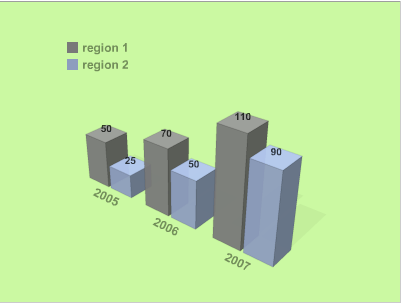


I’m getting to the point where I need to display some of the information I’m analysing visually, as part of a web service. I’d looked at jpgraph, which seems to be the best known server-side graph creation tool, and their gallery of example charts made me feel very sad. Here’s an example:
I knew there had to be other alternatives out there, and I was over the moon when I discovered PHP/SWF charts. It’s a flash-based charting system, and it’s got antialiasing, good-looking fonts, transparency, 3D, shadows, animation, interactivity and a very simple API. You can see three examples from their gallery above. It’s letting me create visuals that I can be proud of. The only downside is that it requires a browser capable of running flash, which excludes my iPhone. It’s free for the basic version, and you can get a single-domain license for $45 which lets you do a bit more customization. It’s designed for PHP, but actually internally converts the PHP array arguments to XML before handing them to the flash movie, so you can use it with any scripting language.
How to set up Linux for web development through Parallels on OS X

I wanted a setup for web development that matched my production server, but let me do local development on my MacBook Pro. I’m a big fan of Parallels running Windows, so I set out to get Red Hat Fedora server running too. My requirements were that I should easily be able to install extensions that aren’t standard on OS X PHP like IMAP and GD, and that I could save files to my local drive and immediately run them through the server without having to copy anything.
Getting started with Fedora was painless thanks to this ready-made Parallels disk image. I downloaded that and it loaded immediately with no setup required. I then ran yum to update the system to the latest patches, and I was in business. I had to remove yum-updatesd before I could open any of the desktop software installer applications, but once that was working I could run the Add Software application. There I chose the parts I needed, like mysql PHP and other random web development additions.
After that was going, I created a test.php file containing <?php phpinfo(); ?> and placed it in /var/www/html/. Loading up Firefox inside Fedora and pointing it to http://localhost/test.php gave me the expected information dump. Everything was going smoothly, so I should have known there was trouble in store.
The only remaining part was adding a link back to my OS X filesystem within Linux, so that Apache could access my files without having to do any copying. Parallels offers a great bridge between the Windows and mac file stores, but I couldn’t find anything that easy for Fedora. What I did run across was sshfs, which uses fuse and ssh to create a virtual folder inside Linux that points back to a directory on a system accessed through the network.
I went through all the steps to get that set up, but spent a very long time getting 403 Permission Denied errors every time I tried to access OS X files through Apache. After a lot of hair-pulling, I figured out how to make everything play nicely together. It involves loosening the permissions model, so I don’t recommend doing this on a production server for security reasons, but it should be fine for local development. Here’s the steps:
- On Linux, make sure you have sshfs, and you’ve added your current Linux user to the fuse group with su -c ‘gpasswd -a <username> fuse’
- Again on Fedora, get fuse running with service fuse start and add it to the startup sequence with echo ‘service fuse start’ >> /etc/rc.local
- On OS X, go to Preferences->Sharing and turn on remote login. Make a note of the IP number it displays on that window.
- To test the remote login, in a Linux terminal window do ssh <mac user name>@<mac IP number>, eg ssh petewarden@10.0.1.196 . If this doesn’t work, you’ll need to stop and check the IP number and your Parallels network setup.
- Now you can try to set up the filesystem connection through SSH. On your Fedora terminal, type sshfs -o allow_other,default_permissions <mac user name>@<mac IP number>:<Path to your mac folder> /var/www/html/testbed , eg sshfs -o allow_other,default_permissions petewarden@10.0.1.196:/Users/petewarden/Sites/testbed /var/www/html/testbed . The magic bit here are the extra options for allowing other users to access the folder. Without these, the apache user won’t be able to read the files and you’ll get the 403 errors. Be warned though, this is necessary to fix them, but you’ll need to follow the steps below to remove all the permission problems.
- Because the files show up with a user ID and group ID that’s unknown to the Linux filesystem, Apache’s strict security settings will refuse to display them. To get around this, you need to make the security settings less restrictive. First you’ll need to disable Security Enhanced Linux, aka SELinux. To do this through the GUI, go to the Security preferences and click the SELinux tab. Then choose "Disabled" from the dropdown menu. You could also do this on a per-program basis, but I wanted to keep it simple.
- Next you need to remove suEXEC, another security feature of Apache. To do this just move the file itself, on my system at /usr/sbin/suexec to another location eg mv /usr/sbin/suexec /usr/bin/suexec_disabled
- Finally restart apache with service restart httpd and try navigating to one of your pages. With any luck you’ll now be able to save from OS X and immediately see them in Firefox within Fedora.
One of my main reasons for this setup was to easily install extensions. After going through these steps I was able to just run yum install php-gd to get the gd graphics library, a project that had previously taken me hours of fiddling on OS X even with fink.
Update: I’m now using the Parallels Linux instance directly from OS X. To do that I had to enable HTTP in the firewall settings on Fedora, and then ran ifconfig to work out the IP address that it had acquired. After that I can navigate to http://x.x.x.x/ in my OS X copy of Firefox and access my files, without having to ever switch to the Linux desktop.
Kinesis Keyboards – I wish I could quit you

I’m stuck in an abusive relationship with my keyboard. The Kinesis model I use is an RSI sufferers dream, and I’ve been using one for the last 4 years. Unfortunately, I’ve just had to order my fourth, since they’re built to shop class project standards.
The design is perfect, with an amazing amount of programmability and a QWERTY layout where you never need to stretch or strain your fingers from their home positions. There’s even a programmable foot switch, which I have mapped to shift, control and command, since pressing my little fingers for the modifiers seemed to be at the root of a lot of my pain.
They’re pricey, starting at around $300, but look and feel cheap. The silver paint rubs off pretty easily, the cut plastic is uneven and they use a telephone connector to join up the pedal with the main unit. More seriously the lack of quality shows up in the number of times they go wrong. I’ve had to open up and fiddle with all of my keyboards and footswitches. They’re surprisingly low-tech inside, with a small PCB and chips for the keyboard and old-school analog sensors for the foot switch. Because of this I’ve sometimes had luck when the problem turned out to be a loose connector or dirty contacts, but I’ve never had one last more than 18 months before it’s declared dead. Before you blame the victim, I’m pretty careful with my equipment, so I don’t think I’m putting them through anything unusual. They have a 2 year warranty, but I’ve not wanted to lose my keyboard
for the time that would take, and have usually hacked mine so much by
the time I give up that I don’t feel like I could return it.
I still recommend them to anyone who wants a hand-friendly keyboard, Liz now has two, but go into the relationship with your eyes open. I’d love to hear alternative suggestions too from anyone who’s found something better.
 Pete Warden's blog