The decline and fall of enterprise relationship management

Palmyraruins
Photo by Hanadi Traifeh

For the first year of Mailana's life, I was focused on building a system that large companies could use to identify internal experts, based on the content of email messages that their employees sent. What I built was effectively an auto-generated LinkedIn, and you can see a demo of it here. There was a lot of interest in the idea, but it floundered on both privacy concerns and the fact that only a small percentage of people in a company spend time looking outside their immediate team. I had plenty of mechanisms to ensure people's information stayed under their control, but it still felt a bit creepy, and definitely freaked out legal and compliance folks. The real killer was that the people who drooled over it, the internal entrepreneurs and the uber-salesmen, were not the people writing the checks.

After I switched to applying the same technology to the consumer world, I still kept an eye on my competitors' progress. I've been pretty sad to see a lot of ERMs flounder, though there are still a few fighting on:

Tacit

Tacit was a big, late 90's traditional enterprise software company that received a lot of investment. They were building on a very similar concept to mine, finding experts on technical topics based on mail messages. I heard some good reports from their users, but was also told their interface for contacting experts was extremely clunky, apparently because they had a lot of mechanisms to preserve privacy that got in the way of the user experience. The company closed and the technology was sold in a fire sale to Oracle a couple of years ago.

Visible Path

Another well-funded startup, VP spent six years in the '00's focused more on the connection side of corporate social networks, trying to offer value through identifying strong relationships both inside and outside the company. It was an interesting contrast with LinkedIn's approach of capturing any connections you have, with no way to differentiate between childhood friends and people you met once at a trade show. Unfortunately they hit the same sort of issues I did when trying to sell enterprise-wide systems, and were moving to a more individually-based product when they were bought out by Hoovers. I was very sad to see that the product has now been discontinued, it had some rabid fans.

Contact Networks

Bought out by Thomson/Reuters a couple of years ago, Contact Networks was also focused on mining the contact information that lives within an organization, but without worrying too much about the strengths of any connections. They still appear to be going strong with some recent updates on their site.

Trampoline Systems

A firm I discovered when they attended the first Defrag, Trampoline were looking both at identifying experts and internal relationships. They used to have a great demonstration of their Sonar platform using the Enron email data set, but unfortunately that seems to have been taken down. They're still pushing ahead with their work, and recently have been looking to an innovative way of raising money that they've dubbed crowdfunding.

Microsoft's Knowledge Network

This was an innovative experiment by MS a few years back, rolling a lot of these expertise and relationship mining ideas into a prototype Outlook plugin. The add-in was removed after a few months, but I hear some of the same technology is finally making it into the latest versions of Sharepoint and Outlook.

So what does the future hold? I think Microsoft's moves are a good indicator. We've now got a world where more and more social network features are being accepted within the enterprise, and internal services like Sharepoint or Jive are the natural distribution channels for this sort of work. There's always been people who love having this sort of information to help them in their jobs, the problem's been getting it to them and then getting revenue back in return!

Blocked from accessing Gmail using OAuth and IMAP

Brickwall
Photo by Vizzzual

I was pretty excited to see Google rolling out an extension to IMAP that lets you authenticate using OAuth. That all sounds incredibly geeky, but it means you won't have to share your password with a site that wants to work with your inbox. Before this, any innovative services working with your messages had to request and store user's passwords in plain text!

I went ahead and implemented the new extension, and wrote a simple example showing how to use OAuth to log in to IMAP. It's all available in the Handmade IMAP library at http://github.com/petewarden/handmadeimap/ with a live version running at http://web.mailana.com/labs/handmadeimap/gmailoauthexample/

Unfortunately it looks like Google have blocked access to this feature to most developers. The awesome etacts service is able to use it, but they seem to have disabled it for all other sites. I've sent out some emails to Google folks asking for help, but no response so far.

This is a real shame, since this is a great opportunity to close a big security hole, and remove any reason to share passwords with third-party sites. I hope it gets sorted out soon, I'll let you know if I make any progress.

[Update – I got a reply from Eric Sachs at Google: "We ended up having much higher interest then was expected in that API,
so we have decided that instead of answering questions about the current
test version, we are going to focus on trying to get it fully launched
in the next few weeks."]

How to implement the Twitter oAuth UI in PHP

Passwordpants
Photo by Richard Parmiter

There's some great PHP libraries out there for handling OAuth and the Twitter API, but I never found a simple example showing how to handle the user interface side. It's a bit of a pain because you have to send the user away from your site and then deal with their return at some later time.

After I implemented my own workflow for this (on top of Abraham William's Twitter library), I thought it would be useful to strip it down to a template that other people could reuse. I've put the code up as github.com/petewarden/twitteroauthexample and you can try it for yourself at web.mailana.com/labs/twitteroauthexample.

It creates an authorization link for users to click on, and handles retrieving their access tokens when they return from Twitter. In a real application you'd want to store all the information in a database, but to simplify the code I'm keeping the tokens in session variables. To get it running on your own server:

Twitteroauthscreenshot
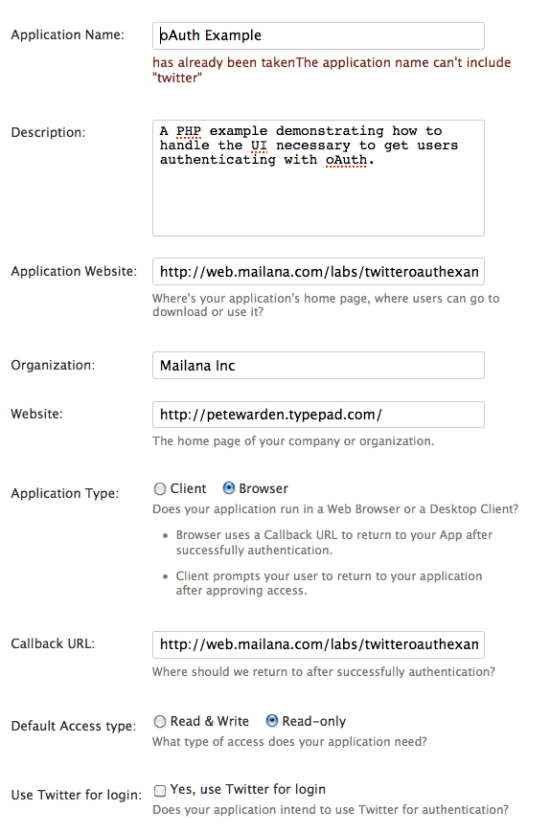
Go to http://twitter.com/oauth_clients, click on 'Register an application' and fill out the form. You'll need to make sure the Callback URL field points back to the place you're going to put the example code. In my case, this is http://web.mailana.com/labs/twitteroauthexample/

The next screen will give you the API keys you need. Open up config.php in an editor, and put the value from the heading 'Consumer key' into TWITTER_API_KEY_PUBLIC and the value from 'Consumer secret' into TWITTER_API_KEY_PRIVATE.

Copy the code up to your web server, and then you should have a working process for authorizing access to the Twitter API.

Why you should visit Santa Cruz Island

Cavernpoint

Liz and I just got back from a four day trip to Santa Cruz Island, helping to maintain the hiking trails. We drove all the way from Colorado to California for the opportunity, and we've been so many times we've lost count. On the drive, I was thinking about what keeps us coming back, and why I recommend it to anyone who loves the outdoors.

Dolphins

The trip over

To get to Santa Cruz Island you need to take an Island Packers boat from Ventura harbor. The trip only takes about an hour, but it packs in an amazing range of sea-life. Just yesterday we had a humpback whale leap out of the water and do a 180 degree twist only 200 feet from the boat, there's always hundreds of dolphins, and I've even had Orcas approach close enough to bite me.

Morningview

Solitude on LA's doorstep

That's the view I wake up to every morning on the island. With no permanent inhabitants or cell reception, the only vehicles a few ranger trucks, and a hundred square miles to lose yourself in, Santa Cruz is heaven for anyone looking to get away from it all. Even better, you can be there in just a couple of hours from the center of LA, whether you want a quick day trip or a longer camp out.

There's no commercial presence there at all, no food stands, not even a soda machine, so you'll need to be prepared for a trip back to the 19th century, but it's worth it for the tranquility.

Islandfox

Watch a world recover

When we first started visiting almost a decade ago, the sheep had only just been removed and there were still wild pigs roaming everywhere. Ecologically it was a mess, the sheep had devoured almost all the native vegetation, leaving nothing but brown grass to cover the hills in the summer; the pigs were digging up the dirt in search of roots and causing the hillsides to erode, and with no predators the mice were everywhere. Now they've eradicated all the pigs, deported the golden eagles that lived on them and reintroduced bald eagles, and got rid of the fennel thickets that choked the trails. The difference over just a few years has been astonishing, with clumps of buckwheat, coreopsis and the unique island oaks popping up over previously bare hillsides. Even better, the indigenous island foxes have gone from being endangered to pests in the campground in record time, with numbers up from a few hundred to 1,200 in just two years now the golden eagles are no longer picking them off.

You'll never get another chance to see a whole National Park turn itself from a barren wasteland into a natural garden packed with plants and animals you'll find nowhere else. Get out there now while it's still in progress, and I guarantee you'll be amazed at the changes as you keep coming back.

Railing

Experience a dark history

I don't know if the island attracts crazy people, or if it turns normally sane people a little nuts, but you'll be surprised at how many of the people you'll meet there have ended up with a borderline obsession with the place. I'm one to talk, driving 1200 miles to visit, but its recorded history is a long succession of feuds, disputes and dreams of private empires. The one man who built a successful ranching venture on the island left behind a family that squabbled for over a century, with lawsuits ricocheting so long that finally most of it was sold to pay the legal bills, with the final parcel taken over after a dawn helicopter raid by a SWAT team in 1997! Long before that there's evidence of over 13,000 years of Chumash habitation, possibly the earliest in the Americas, before the population was taken to the mainland for easier control. There's so much archaeology, it's hard to walk anywhere that doesn't show evidence of a midden or worked chert fragments.

You'll need to be a big donor or volunteer with the Nature Conservancy before you can visit the main ranch situated on their land (their acquisition of that property was more fallout of legal feuding; the previous owner was determined to avoid being forced to sell to the NPS) but you can explore the smaller stations such as Scorpion and Smugglers, with century-old groves of olive and cypress trees to shelter under. There's also a new visitor's center at Scorpion, with some amazing work by Exhibitology giving a fascinating look into the island's past.

I haven't even touched on the breathtaking hikes, secluded campgrounds like del Norte or diving so spectacular that Jacques Costeau considered it the best in the temperate world. If you need to refresh your soul (and are willing to risk developing a lifetime obsession) visit Santa Cruz Island.

Facebook data destruction

I'm sorry to say that I won't be releasing the Facebook data I'd hoped to share with the research community. In fact I've destroyed my own copies of the information, under threat of a lawsuit from Facebook.

As you can imagine I'm not very happy about this, especially since nobody ever alleged that my data gathering was outside the rules the web has operated by since crawlers existed. I followed their robots.txt directions, and was even helped by microformatting in the public profile pages. Literally hundreds of commercial search engines have followed the same path and have the same data. You can even pull identical information from Google's cache if you don't want to hit Facebook's servers. So why am I destroying the data? This area has never been litigated and I don't have enough money to be a test case.

Despite the bad taste left in my mouth by the legal pressure, I actually have some sympathy for Facebook. I put them on the spot by planning to release data they weren't aware was available. I know from my time at Apple that reaching for the lawyers is a tempting first option when there's a nasty surprise like that. If I had to do it all over again, I'd try harder not to catch them off-guard.

So what's the good news? From my conversations with technical folks at Facebook, there seems to be a real commitment to figuring out safeguards around the widespread availability of this data. They have a lot of interest in helping researchers find ways of doing worthwhile work without exposing private information.

To the many researchers I've disappointed, there's a whole world of similar data available from other sources too. By downloading the Google Profile crawling code you can build your own data set, and it's easy enough to build something similar for Twitter. I'm already in the middle of some new research based on public Buzz information, so this won't be stopping my work, and I still plan to share my source data with the research community in the future.

Flexible access to Gmail, Yahoo and Hotmail in PHP

Knittedmask
Photo by Poppalina

I've been a heavy user of the php-imap extension, but last year I was driven to reimplement the protocol in native PHP by its limitations. Because it was a compiled extension implementing a thin wrapper on top of the standard UW IMAP library, any changes meant working in C code and propagating them through several API layers. A couple of problems in particular forced me to resort to my own implementation:

– Yahoo uses a strange variant of IMAP on their basic accounts, where you need to send an extra undocumented command before you can login.

– Accessing message headers only gives you the first recipient of an email, and getting any more requires a full message download. This is a design decision by the library, not a limitation of the protocol, and severely slowed down access to the information Mailana needed.

I've now open-sourced my code as HandmadeIMAP. I chose the name to reflect the hand-crafted and somewhat idiosyncratic nature of the project. It's all pulled from production code, so while it works for my purposes it isn't particularly pretty, only implements the parts I need and focuses on supporting Gmail, Yahoo and Hotmail. On the plus side, it's been used pretty heavily and works well for my purposes, so hopefully it will prove useful to you too.

I'm also hoping to use it as a testing-ground for Gmail's new oAuth extension to IMAP that makes it possible to give mailbox access without handing over your password. Because new commands can easily be inserted, it should be possible to follow the new specification once the correct tokens have been received, but I will let you know how that progresses.

To give it a try for yourself, just download the code and run the test script, eg:

php handmadeimaptest.php -u youremail@gmail.com -p yourpasswordhere -a list -d

Thinking by Coding

Thinker
Photo by Sidereal

David Mandell took me under his wing at Techstars last summer, and we ended up spending a lot of time together. One day towards the end of the program he told me "Pete, you think by coding". That phrase stuck with me because it felt true, and summed up a lot of both my strengths and weaknesses.

I choose my projects by finding general areas that have interesting possibilities for fun and profit, but then almost immediately start hacking on code to figure out the details of the technical landscape. I find it intensely frustrating to sit and discuss the theory of what we should be building before we have a good idea of what's technically possible. Just as no battle plan survives contact with the enemy, so no feature list on a technically innovative product survives the realities of the platform's limitations.

I've never been a straight-A student, and I'm not a deep abstract thinker, but I have spent decades obsessed with solving engineering problems. I think at this point that's probably affected the wiring of my brain, or at least given me a good mental toolkit to apply to those sort of puzzles. I find myself putting almost any issue in programming terms if I want to get a handle on it. For example, the path to sorting out my finances suddenly became clear when I realized I could treat it as a code optimization problem.

It also helps explain why I'm so comfortable open-sourcing my code. For me, the value I get out of creating any code is the deep understanding I have to achieve to reach a solution. The model remains in my head, the actual lines of code are comparatively easy to recreate once I've built the original version. If I give away the code, anyone else still needs to make a lot of effort to reach the level of understanding where they can confidently make changes, so the odds are good they'll turn to me and my mental model. My open-source projects act as an unfakeable signal that I really understand these domains.

This approach has served me well in the past, but it can be my Achilles heel. Most internet businesses these days don't require technical innovation. They're much more likely to die because no potential customers are interested than because they couldn't get the engineering working. Market risk used to be an alien concept to me, but the dawning realization that I kept building solutions to non-existent problems drove me into the arms of Customer Development.

I feel like I've now been punched in the face often enough by that issue that I've (mostly) learned to duck, but I'm also aware that I'm still driven by techno-lust. I love working in areas where the fundamental engineering rules are still being figured out, where every day I have the chance to experiment and discover something nobody else had known before. I can already feel most of the investors I've met shaking their heads sadly. I'm well aware that starting a revenue-generating business is almost impossible anyway, let alone exposing yourself to the risk and pain of relying on bleeding-edge technology. The trouble is, that's what my startup dream has always been. I want to do something genuinely fresh and new with the technology, and hope to be smart and fast enough to build a business before the engineering barriers to entry crumble.

I don't know if I'd recommend my approach to anyone else, but it seems baked in to who I am. Oddly enough, I didn't fully understand that until I wrote this post. Perhaps there's some thinking that I can only do by writing too?

How to gather the Google Profiles data set

Beebody
Photo by Max Xx

With the launch of Buzz, millions of people have created Google public profiles. These contain detailed personal information, including name, a portrait, location, your job title and employer, where you were born, where you've lived since, links to any blogs and other sites associated with you, and some public buzz comments. All of this information is public by default, and Google micro-formats the page to make it easier for crawlers to understand, allows crawling in robots.txt and even provides a directory listing to help robots find all the profiles (which is actually their recommended way to build a firehose of Buzz messages).

This sort of information is obviously a gold-mine for researchers interested in things like migration and employment patterns, but I've been treading very carefully since this is people's personal information. I've spent the last week emailing people I know at Google, posting on the public Buzz API list, even contacting the various government privacy agencies who've been in touch, but with no replies from anyone.

Since it's now clear that there's a bunch of other people using this technique, I'm open-sourcing my implementation as BuzzProfileCrawl. As you can tell from looking at the code this is not rocket-science, just running some simple regular expressions on each page as it's crawled.

We need to have a debate on how much of this information we want exposed, on how to balance innovation against privacy, but the first step is making it clear how much is already out there. There's a tremendous mis-match between what's technologically possible, and ordinary people's expectations. I hope this example helps spark an actual debate on this, rather than the current indifference.

How I removed spyware from a 1000 miles away with Crossloop

Eyespy
Picture by Ocular Invasion

Way back in '06 one of my first blog posts was a review of Crossloop, a free and awesomely user-friendly remote desktop application for Windows. Ever since then I've made sure to install it on any Windows machine I might ever have to provide support for, and today it saved my bacon yet again.

A few years ago, we bought a new laptop for Liz's mom. She's pretty computer-savvy, but since she was used to Outlook Express and Word we didn't want to switch her over to OS X, so it was an XP machine. I did the standard things to secure it; made certain automatic updates were running, bought McAfee, made Firefox the default browser. It doesn't look like that's enough any more, since yesterday a trojan slipped through and she was bombarded with bogus anti-spyware popups whenever she did anything on the machine. She knew something wasn't kosher and gave us a call to find out what she should do.

The description made my heart sink. In the past I'd ended up spending 12 hours straight getting a stubborn piece of spyware off Liz's old laptop, and her mom lives over 1000 miles away in Wisconsin. Since my Windows knowledge is way out-of-date I put a call out to Twitter for software suggestions, and got the usual high quality of advice. The top pick was Spybot Search and Destroy, with 'nuke the machine and reinstall' a strong second! I tend to do the latter for my personal machines, since even OS X gets pretty unpredictable if you keep doing incremental updates over multiple OS revisions, but I didn't relish doing that remotely and getting the software she needs re-setup as well.

This afternoon I bit the bullet, got on a phone call to Wisconsin and started on the process. The first step was getting the remote desktop sharing working. It took about 15 minutes to figure out that the old version of Crossloop on her machine wouldn't allow a connection to my newer one, but once that was clear I talked her through downloading the latest from the website, and we were up-and-running. Incidentally one of the killer features of Crossloop is the complete lack of configuration, all she had to do was read off a 12 digit number and I was able to connect and take control.

Next, I set out to squash the spyware. I downloaded Spybot, did a little bit of head-scratching over the options, and started the scan. It was pretty slow, taking about 30 minutes to complete. Once that completed, I clicked on the fix problems button, and things got confusing. The Spybot registry watcher kept asking for confirmation about registry changes the Spybot scanner was making, and since there were several hundred this rapidly became a problem. I turned off the registry watcher, and it claimed to have fixed the issues it had uncovered. Unfortunately the spyware popup windows still kept appearing, so I made sure that the definitions were updated and ran another scan. After another 30 minute scan, it detected a different set of problems, fixed them, but still didn't squash the spyware.

At that point I did the research I should have done at the start, figured out this particular malware was named XP Internet Security 2010, and found a good blog post explaining how to remove it manually. I created and ran the suggested .reg file, and then downloaded the free version of Malwarebytes Anti-Malware. It took about 8 minutes to run a quick scan, and then it successfully removed
the spyware!

After doing a little dance of joy, I looked through the settings to see if there was anything else I could do to protect the machine in the future. With McAfee, auto-updates and now Spybot's running protection, the only other recommendation I could think of was manually running Anti-Malware's scan every week.

As depressing as the spyware problem is (and yes, we'll be getting her a Mac next time), I'm amazed by the quality and workmanship of the free solutions out there. For all the black hats who waste our time and try to steal our money, there's dedicated folks like the Crossloop, Spybot and Malwarebytes teams offering free tools to help us fight back. Thanks to them all, I guess it's time to show my appreciation in the most sincere way, by upgrading to the paid versions!

How to prevent emails revealing your location

Wrestlingmask
Photo by Upeslases

Today I received an email from a person who announced they wished to be anonymous, and didn't want to reveal which organization they worked for. They used Hotmail and a pseudonym to avoid revealing their identity, and asked some detailed questions. That left me very curious to know how I was replying to, so I checked the message headers and they contained the IP address of the computer they were on. Running whois on that IP gave me the company they worked for, since they were apparently logged in from a work machine.

I'm not going to go into details on exactly how to do this sort of detective work, instead I want to focus how to fix prevent information about your location leaking into your email headers. The main culprit are headers that show the IP address of the original machine that the email came from. Here's an example that came from someone logged into Yahoo through a browser:

Received: from [76.95.184.187] by web50009.mail.re2.yahoo.com

And here's someone who emailed from Hotmail's website:

X-Originating-IP: [76.95.184.187]

If you use a desktop program like Outlook or Apple Mail with any account, the IP address of your machine is almost always included in a header that looks like the Yahoo example.

Why should you care? That IP address will pinpoint your organization if you're within a company, or your ISP and a rough location if you're using broadband from home. If you're working on a side-project you want to keep separate from your employer, and they get hold of your sent emails, that header is proof that you were using work equipment on your idea and potentially gives them ownership when your startup becomes the next Google. And if your email with a doctor's note has an IP address in Cancun, you may have some questions to answer! (I actually ran across this flaw when I was looking at matching email contacts with other accounts, using geolocation on the IP address to figure out if it was the John Smith in Denver or LA, but I decided that was too creepy)

What should you do? The simplest fix is to use Gmail. As far as I can tell they're the one mainstream provider that doesn't include the IP address in the headers. The Chinese hacking incidents show they're not a panacea for all your security problems, but they definitely seem to have got this right. There's a lot of other more complex techniques that could safeguard your privacy, but if I was recommending something to a family member, I'd go with Google. You do need to be careful that you log into the website interface when you want to send an anonymous email though, since desktop programs tend to add the IP address anyway.