
Enterprise email is boring

Boredbusiness

After chatting some more with Nat Torkington of O’Reilly, the source for my previous article, he pointed out I misquoted him. He actually said "enterprise email is boring", and then outlined a few examples of the huge number of exciting things that are waiting to happen with mail:

  • Forms in email for seamless interactivity with web applications … Ajax even?
  • People you send email to form your contacts, why doesn’t your mail client automatically update your address book and buddy list when you’ve exchanged more than a few emails?
  • NLP-based clustering of mails into topical and thematic groups (pre-/auto- filtering)
  • Better indexing of old mail and visualizations of those indexes
  • Integrated GTD/productivity systems

Xobni does a good job with automatic contact extraction and ranking, but I’ve seen very little work done on the remaining areas. I Want Sandy is a great email-based scheduling tool that could grow into a full productivity system, and there’s been research on automatic mail categorization, but that’s about it.

He also questioned why I am so focused on the server side, since it looks to him like most of the interesting stuff should happen on the client. I’m building a server-based system because that’s where the data is. There’s patterns that emerge from a whole organization’s communications that you can’t see when you’re just looking at a single person’s inbox. There’s companies like Trampoline Systems that offer business intelligence based on this, and lots of forensic analysis work’s been done to discover patterns after the fact, but nobody’s trying to build tools to give this information to users.

Another reason driving me is ease of use. It’s much simpler to build indices and do other pre-processing work ahead of time in a server and offer the user an immediate experience through a web app, than requiring a client-side install and then spending time and storage space creating that data locally.

Probably the biggest stumbling block with this plan is a final point he brings up, that the pace of change in corporate IT departments is painfully slow. The most successful products in this area have been driven by an urgent and painful problem like spam, where someone will be fired if a solution isn’t found. I’ll need a very compelling application to get traction.

Email is boring

Bored

I had a great conversation on Friday night with a very savvy technology journalist. I gave him the pitch on my email work, he threw in a lot of smart and incisive questions, and he discussed some of the similar projects he’d covered. At the end though he threw out the line "but anyway, email is boring".

That’s what I find so interesting about it! Here’s a content-creation technology that’s used by billions of people every day, far more than will ever write anything that ends up on the web, and almost no ones doing anything innovative with it. Here’s why the web is hopping and email is languishing:

Closed technology. Email is scattered across different web services, in-house Exchange servers, social sites like Facebook and using a plethora of both web-based and PC clients. Most of these have no API you can use to programatically access the messages, and the few that do have a very steep learning curve. That all makes it orders of magnitude easier to get to the "hello world" stage of a web app than it is to get started doing something interesting with mail.

Closed data. When you’re working with the web, there’s an enormous public corpus of data available just by spidering. Email is private, and it’s very hard to find large collections of email to work with. The Enron set is the only one I know of. That means even if you do have a brilliant idea for working with email, it’s very hard to prototype and test it.

Solve these two problems, even partially, and there’s a world of possibilities. That’s why I’m building a platform and API to let you work with email in a simple way. Write native importers that feed Exchange, Gmail, etc data into a standard XML pipeline, and then you can cheaply and quickly create interesting tools to work with that information. Social networks, content analysis, collaboration tools, personal assistants, trend spotting, that’s when it all gets really exciting.

A secret open-source MAPI example, from Microsoft!

Mapiscreen

Microsoft’s Messaging API has been the core interface to data held on their mail systems since the early 90’s. For Exchange 2007, it’s deprecated in favor of their new web service protocol but it’s still the language that Outlook speaks, and is the most comprehensive interface even for Exchange.

The underlying technology holding the mail data has changed massively over the years, and so the API has grown to be massive, inconsistent and obscure. It can’t be used with .Net, it requires C++ or a similar old-school language, and its behavior varies significantly between different versions of Outlook and Exchange. There’s some documentation and examples available, but what you really need is the source to a complete, battle-tested application. Surprisingly, that’s where a grassroots effort from Microsoft’s Stephen Griffin comes in!

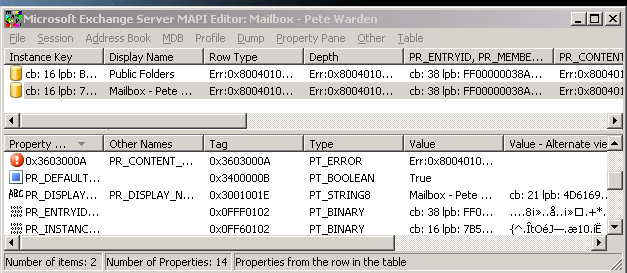
He’s the author of MAPI Editor, an administrator tool for Exchange that lets you view the complete contents and properties of your mail store. It also offers a wealth of other features, like the ability to export individual messages or entire folders as XML. Even better, he’s made it a personal mission to keep the source available. I know how tricky getting that sort of approval can be in a large company and I’m very glad he succeeded, it’s been an invaluable reference for my work. I just wish it was given more prominence in the official Microsoft documentation, I had been working with the API for some time before I heard about it. That might be a reflection of it’s history, since it started off as a learning project, and evolved from being used as ad-hoc example code, to being documented in an official technical note, to shipping as part of the Exchange tools.

Another resource Stephen led me to is the MAPI mailing list. The archives are very useful, packed full of answers to both frequently and infrequently asked questions. It’s not often that you see an active technical mailing list that’s been going since 1994 either.

How do you access Exchange server data?

Files

Like standards, the wonderful thing about Exchange APIs is that there’s so many to choose from. This page from Microsoft is designed to help you figure out which one you should use, and I count over 20 alternatives!

I need something that’s server based, not a client API, so that does help narrow down the selection a little. MAPI is a venerable interface, and still used by Outlook to communicate with the server, but unfortunately MS has dropped server-side support for it on Exchange 2007. It is possible to download an extension to enable it, but using a deprecated technology doesn’t feel like a long-term solution. CDOEx is another interface that’s been around for a while, and it’s designed for server code, but it too is deprecated.

Microsoft’s current recommendation is to switch all development to their new web service API. This looks intriguing, since it makes the physical location of the code that interfaces with the server irrelevant, but I’m wary that it will hit performance problems when accessing the large amounts of data that I typically work with. It seems mostly designed with clients in mind, and they typically have an incremental access pattern where they’re only touching small amounts of data at a time. Another issue is adoption of Exchange 2007. My anecdotal evidence is that many organizations are still running with older versions, and even Microsoft’s Small Business Server package still uses 2003. Since it’s likely that the old Exchange versions will be around for a while, that makes it tricky to rely on an interface that’s only supported in the very latest update.

What can an externally-facing social network do for a business?

Haystack

The Haystack system from Cerado is a social network tool for businesses with a twist. The audience for the network is people outside the company who want to talk about something, and would like to find the right person within the business to approach. Cerado have published a short ebook explaining the uses of this, from sales to m&a, but for me the key insight is that there’s a big difference between using an anonymous email address or phone number as the initial way of contacting a business, and having a named person to talk to.

People don’t have relationships with organizations, they have relationships with individuals. Organizations don’t have any memory, ability to trade favors, or pictures of grandchildren to swap. In my professional life, I’m able to get information and assistance from large companies through the individuals I know who work at them. It’s rare that I’m able to get help through the public forums or mailing lists because the questions I’m stuck on tend to be complex and tricky. Since developer support is bombarded with questions from inexperienced developers, you have to go through the dance of proving that the machine is plugged in to the wall socket and caps lock is off before they’ll dig into your issue. With individuals, I have the credibility for them to assume I’ve done the obvious stuff, and cut to the chase of looking at the issue I’m presenting. They remember the context of the larger system I’m working in, so I don’t have to explain that every time. And since I’ve reciprocated and helped them in the past with issues related to my company, they’re willing to spend some time assisting me.

Haystack is about making it easier to build these sort of relationships with individuals inside companies, for sales contacts, business partnerships and anything else that requires communication with an organization. They publish profiles of employees, with photos, tags indicating their areas of expertise and contact details. From a customer perspective, I like this a lot more than the usual bland contact page, it adds a human face to the organization and lowers the barrier for me to contact them. I’d have more confidence I’d reach someone who’d be able and willing to answer my questions, rather than a random intern I’d have to persuade to escalate me. I could see this being useful if I wanted to buy from a company, get a job there, sell something to them, ask a technical question or talk about a business partnership.

It does require a change in the way most organizations operate though. The usual practice is that there’s designated people who are gatekeepers to the outside world, both to control the flow of information to make sure nothing outside of policy is leaked, and to protect employees from being distracted from their internal work. The gatekeepers also derive a lot of power and prestige from their control of the communication channels, so they tend to have a vested interest in keeping them limited. I think that organizations would be better off relaxing the current systems, but the spectre of lawsuits and information leakage makes it a tough sell in any group where avoiding blame is the top priority.

Cerado also run a great blog, another great way to add a human face to a company, and one that runs into the same worries.

Do you know about Microsoft’s social network for businesses?

Holdinghands

Last year Microsoft released a ‘technical preview’ of their Knowledge Network add-on for Sharepoint. It aims to solve two problems; finding other employees who can help me with a particular subject (expertise search) and locating colleagues who have contacts with someone I’m trying to reach (connection search). It works by analyzing email to identify both the social network, based on who emails whom, and figures out expertise by looking at the contents of emails.

Unfortunately their preview period is now closed, and you can’t download the beta version any more. I assume it’s been promoted to a feature in an upcoming Sharepoint release. It is very interesting to read the customer comments they release in their blog. "I thirst for more information, quality information, about the people in my company", "identifying
and accessing expertise within the organization and uncovering
connections across the supply chain are critical elements of
competitive advantage
", "
Knowledge in modern organizations isn’t just 80% undocumented, it’s 95% invisible". This all fits with my experience of working in large companies, and backs up my instinct that there’s real unsatisfied demand for solutions that offer ‘people search’ within an organization. It’s also extremely interesting to look through their solutions for privacy control, which boil down to some fine-grained control of what’s exposed to whom, a bit like Facebook’s privacy settings.

It’s also surprising that even Microsoft are relying heavily on a client-side component for this, which makes sense from a ‘get up and running quickly’ point of view, but is a massive barrier for adoption. I’ll be keeping a careful eye for any news on future developments.

An XML format for email

Mailarchitecture

To build a system that pulls information from large email stores, I need three processing stages. Capture to pull the information from the source, whether it’s using Exchange APIs to pull from a server, libgmailer or plain screen scraping. Analysis takes that data, and pulls out things like the social network and tags the content. Presentation takes the information that the analysis produces, and displays it to the end users in a compelling form.

Most of the innovation is going to be in the analysis and presentation, but getting the capture right, whilst not ground-breaking, will be a lot of code. I need to decouple the analysis implementation from the capture technology, so the same code could be used for both web mail and Exchange for example. That requires a common interchange format for the capture stage to output and the analysis to read. I want a human-readable, text-based format for easy debugging and implementation in a variety of languages, something that will be flexible enough to cope with a lot of changes in structure and that has a lot of existing tool support. Those all argue for something XML based. Luckily there’s already a draft email XML standard I can build on.

Unfortunately it’s looking like it never made it past the draft stage and now seems abandoned, but it’s a good starting point for me to use. RFC822 is the source of most of the tag names, so it’s an easy conversion from either raw message text or the MAPI functions. It only deals with individual messages, rather than large sets as I need, but it’s possible to logically extend it to have a hierarchical folder structure.

More resources on mining information from plain text

Cursebubble
In my previous post, I presented some regular expressions you can use to spot dates, times, prices, email addresses and web links, along with a test page to see them in practice. REs can be pretty daunting when you’re first working with them, so I wanted to recommend a few resources that have helped me in the past.

The best overall guide on the web is regular-expressions.info, and I used some of Jan’s suggestions for email address matching. He has also written a very clever regular expressions assistant that breaks down any cryptic RE into a human-readable description. I also liked this python tutorial on REs, it’s focused on a good practical example and shows how you’d build up the expression step by step.

As I mentioned yesterday, to demonstrate the power of regular expressions on a web page I had to write my own library for handling search and replace on a web page in Javascript. This is a surprisingly tricky problem to solve. First you have to actually get the text for the web-page, which involves walking the DOM, extracting all the text nodes and then concatenating them back together. That lets you search on the full text, but if you want to change anything you have to remember which parts came from which elements. Then since only part of an element’s text may match, and the matching text may spread across several DOM elements, you have to do some awkward node splitting and reparenting to get nodes that just contain the match.

I’ve included some documentation in the library as comments, but the main entry point is the searchAndProcess() function. This takes three arguments, a regular expression to search for, a callback function you supply to create a new node to be the parent of the element that contains the matching text, and a cookie value that’s passed to the callback function so you can customize its behavior easily.

The callback function itself receives three arguments, the current document so it can create a new element, the results of the RE match, and the client-supplied cookie. The RE results are the most interesting part of this, since they’re the same format that’s returned from the JS RegExp.exec() function. They’re an array where the first entry is the full text that’s matched by the expression, but then subsequent entries contain the text that was matched by each sub-set contained with parentheses. This means I can use the second, third and fourth array entries in the phone number callback to create a number that excludes any spaces or separator characters. Here’s an example of that in practice from the test page. View the entire page’s source to see more examples of how to use it. The cookie is used to pass in the protocol to use for phone number links, usually ‘callto:’.

function makePhoneElement(currentDoc, matchResults, cookie)
{
var anchor = currentDoc.createElement("a");

anchor.href = cookie+matchResults[1]+matchResults[2]+matchResults[3];

return anchor;
}

Mining information from text using regular expressions

Mininghat

I had so much fun playing with the regular expressions for this one, that I ended up building a fairly elaborate testbed and missed my usual morning-cup-of-tea posting deadline. The page demonstrates using REs to pull out phone numbers, emails, urls, dates, times and prices from unstructured text, and uses a JS library I’m making freely available to search and replace within an HTML document. There’s some sample text to show it off, and you can put it through its paces by inputting your own strings to really test it.

If you want to see the power of this approach, try grabbing some of your own emails and pasting them into the custom box (it’s all client-side so I’ll never see any of them). You’ll be surprised at how much these expressions will pick up. Imagine how much useful information you could get from a whole company’s mailstore.

Here’s the exact REs I’m using, you may need to escape the back-slashes depending on your language:

Phone numbers (10 digit US format, with any separators)
([0-9]{3})[^0-9]*([0-9]{3})[^0-9]*([0-9]{4})

Email addresses
[a-z0-9._%+-]+@[a-z0-9.-]+\.[a-z]{2,4}

URLs with protocols
https?://[a-z0-9\./%+_\-\?=&#]+

Naked URLs (this will also pick up non-URLs like document.body)
[a-z0-9\./%+_-]+\\.[a-z]{2,4}[a-z0-9\./%+_\\-\\?=&#]*

Dollar amounts
\$\s?[0-9,]+(\.[0-9]{1,2})?(\s(thousand|m[^a-z]|mm[^a-z]|million|b[^a-z]|billion))?

Numerical times
[012]?[0-9]:[0-5][0-9]((\.|:)[0-5][0-9])?(\s?(a|p)m)?

Dates
(January|Jan|February|Feb|March|Mar|April|Apr|May|June|Jun|July|Jul|August|Aug|September|Sept|October|Oct|November|Nov|December|Dec)[^0-9a-z]+([0-9]{1,2})(st|nd|rd|th)?[^0-9a-z]+((19|20)?[0-9]{2})

Numerical dates

([0-9]{1,2})[/-]([0-9]{1,2})[/-]((19|20)?[0-9]{1,2})

These handle the common cases I’m interested in at the moment. There’s no end to how elaborate you could make them to handle all the possible different formats, but these cover a lot of ground. Now I have to resist the temptation to build these into a Firefox extension. IE’s RE engine does seem to want to overmatch with the email expression, sometimes pulling in characters past the end, but that seems to be an implementation quirk since I don’t notice that in the other environments like Firefox, Safari or grep.

A few easy ways to spot dates, times, phone numbers and prices I

Cards

As I mentioned in my review of ManagedQ, you can do some really interesting things with regular expressions. Roger Matus talked about IBM’s Personal Email Search tool back in December, and the core of that appears to be using REs to recognise phone numbers, email addresses and URLs in the body of messages. Skype and other companies have been working pretty intensively on phone number recognition, taking things a bit further with knowledge about possible dialing codes to help them reformat the numbers in a standard way. I won’t be taking things that far, but in the next article I’ll be showing you the expressions you need to recognize simple dates, times, phone numbers, email addresses, prices and URLs from a text document. You’ll be able to pick out all of these examples using a few simple expressions:

805 277 3606, 8052773606, 805 277-3606
pete@petewarden.com
http://foo.com , foo.com, http://www.foo.com
$10, $10.99, $10 million
10:30
June 1st, 2008, 6/1/08, 6/1/2008