Kicked in the nuts by Facebook

Down

I had a really low moment yesterday. I’d just finished the request-sending part of Funhouse Photo, and it was working like a dream. The request contained a picture of the recipient that the sender had put through Funhouse, along with a short message. I sent a few test messages, and everything looked good.

Then, it stopped working. Instead of the app-supplied image, the request now showed the plain photo of the sender. This completely killed the effectiveness of the request! Before it was really compelling because you actually saw a photo of yourself run through the software right there in the message, now it was unclear what Funhouse Photo actually offered.

I discovered that Facebook had decided to start ignoring the app-supplied image. They didn’t explain why in their announcement, but I can only guess there were some security concerns, though I’m having a hard time picturing the problems. This is why I hate, hate, hate having platform dependencies, especially on something that is so new and fluid. They can make a decision that has a devastating impact on your product, and you’ve got no way out but trying to work around it.

Anyway, I sucked it up, and completed an alternative implementation that uses notifications instead of app requests. There’s still no photo visible until you click, so it’s definitely not as good as my original setup, but should still provide a fun service for my users.

Talking of users, I’m now up to a grand total of 7! The app is still waiting in the queue for the directory, but the interesting thing is that two of my users aren’t in my friends network, which means they must have spotted it on one of my friends’ profiles and decided to add it. That’s very encouraging.

Security hole in Facebook Footprints example

Blackhat
As I was working on Funhouse Photo last night, I ran into a bug where a database insertion operation was failing. I realized that this was because I had copied the Footprints example, and created the query using string concatenation, eg:

$res = mysql_query('SELECT `from`, `to`, `time` FROM footprints WHERE `to`=' . $user . ' ORDER BY `time` DESC', $conn);

In my case, it was an internally generated string that was causing the problem, because it contained an unescaped single quote. I realized that I was also passing in strings I’d received from the user via POST. This means that someone could easily run an SQL injection attack, and get full access to my database!

An injection attack works by passing a user input string that contains a quote and semi-colon to prematurely finish the query command the host thinks they’re running. The rest of the string contains some other arbitrary command that the attacker wants to run. In the query above, if $user was actually passed as

12345'; DROP TABLE footprints; --

then the complete query would read

SELECT `from`, `to`, `time` FROM footprints WHERE `to`='12345'; DROP TABLE footprints; --'ORDER BY `time` DESC

In this example a table’s deleted, but you could insert almost any SQL statement.

(Edit – PatMan pointed out in the comments that mysql actually has a nice security feature that only allows a single statement in a PHP mysql execute. This is reassuring, it definitely makes it harder to do any damage, though it still leaves the door open to plenty of data-access exploits)

There are two main ways to avoid this. In PHP4 and earlier, magic quotes is turned on by default, which means all posted strings have their quotes auto-magically prefixed with backslashes. This turned out to be a dodgy solution for a lot of reasons, and it was turned off by default in PHP5, which is what I’m running.

A better fix, and the one I ended up using, is to call mysql_real_escape_string() on any strings before you concatenate them into a query. You could also use something other than concatenation to create your query.

Now, I’m a PHP/mysql newbie, but it seems like a pretty Bad Thing that Facebook’s example app contains this security hole. Newbies like me are also the ones least likely to already know that it’s a security problem, and so will copy it blindly into their own apps.

Hopefully the guys over at Facebook will be able to update the example, before it infects too many other apps, and gives hackers access to all the personal data that’s being stored. I have posted on the developer discussion board, but it’s unclear if there’s any other way to alert the team.

Funhouse Photo User Count : 5. I worked on the ‘send a photo to a friend’ feature last night, that’s still not working (a story for another post) so I’ve held off publicizing it. It is in the queue for the directory now though.

Facebook app statistics

Chart

One of the things I really like about having an app on Facebook is that I can easily see how many people are using it. This may sound trivial, but for my Firefox and IE extensions, I’m stuck trying to estimate usage based on downloads. Now I’m on the main Firefox add-on site, I can get stats on downloads from there, but they’re a bit opaque:
Firefoxstats

It’s good to see I’m approaching 4000 downloads in the past few weeks, but until recently that total had stayed at 867 for a long time. And that per-week total has always shown 1. So I’m not convinced they’re very up-to-date, though I’m pretty sure they aren’t over-counting downloads, just slow in showing them.

As an aside, these stats indicate that focusing my message really paid off. PeteSearch had only around 200 downloads after several weeks, on the same site.

For my IE plugin, I have to go off my web site logs. I’ve used some of the built-in traffic-monitoring tools, but they all seem geared towards overall site statistics rather than the particular measure I want: "How many people with agents you recognize (eg not robots) downloaded this file over a particular period of time? How many since the beginning of time, and were they repeat customers (ie upgrading)?"

What I end up doing is just looking at the raw latest visitors log, and getting a qualitative impression of downloads. What I see is that Firefox users outnumber IE by at least ten to one. There are several possible explanations for this:

  • My promotion’s been a lot more effective in the Firefox market.
  • People who are early-adopters interested in something like GoogleHotKeys are also more likely to have adopted Firefox.
  • IE users don’t have much of an add-on selection, so they’re unused to installing extensions, and are probably more wary of the security risks.

Even once you know the download totals, unless you build in an unpopular phoning-home capability, it’s hard to know how many people are actually using it. I have a help link added to every Google page that users are free to click on, so that is at least an existence proof for usage; if I see it showing up, I know somebody’s gone ahead and installed it.

Facebook gives both the developer and the rest of the world a simple and up-to-date view of how many people are using an app. This should help me understand what’s working and what isn’t, and learn from my customers very quickly. It’s also a good motivating score-card!

To provide some edutainment, I’ll include the current number of Funhouse Photo users in every post, along with a short explanation of anything that’s happened to explain them. Here’s the first report:

5 users – This includes my sister! I’ve sent out links to a few people to test it, but it’s not in the directory, and I haven’t tried to promote it in any other ways yet, since there’s still some bugs to iron out.

Funhouse Photo launched

Clown

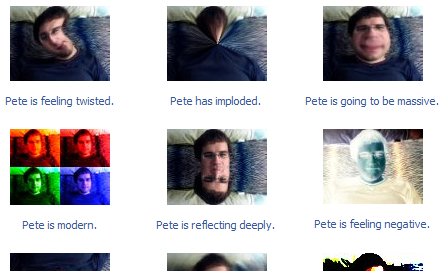
As I mentioned yesterday, I’ve been interested in doing server-side image processing using ImageMagick. After a couple of evenings of hacking, I’ve now created my first Facebook app, Funhouse Photo!

It allows you to apply fun effects to your portrait, along with a caption, and have that show up in your profile. There’s currently twenty effects, with some preset captions that you can customize.

Funhousescreenshot

I’m also planning on adding the ability to play with your friend’s pictures, and send them on. I’m keeping it out of the public directory until it’s had a bit of testing, but if you’re on Facebook, give it a whirl!

Here’s roughly how it works:

  • The current user portrait URL is retrieved from the facebook API
  • wget is used to pull that image down to my server
  • I then run the presets, stored as command-line ImageMagick scripts, with the portrait as the input image
  • Both the retrieved portrait and the processed images are cached on-disk, so subsequent calls won’t involve any processing
  • The user picks one of the effects, and the choice is stored in a mysql database
  • If they then customize the caption, that’s also stored
  • When both choices have been made, the FBML of the profile frame is set to point to the processed image’s URL

One of the things I’m most interested to see is how the performance holds up with multiple users. I can make a rough estimate of its CPU usage, but there’s also a lot of other key factors in overall performance. In particular, pulling down the original image using wget seems like an unusual use of a hosting server, and I assume they’re set up for serving data, rather than pulling it, so I’ll be curious to see how that works out. The image processing itself is obviously CPU intensive, but I’m hoping with such small images (100×75), it won’t be too bad.

Facebook API documentation continued

Face2

In the first half, I covered the initial steps to getting your first facebook app running, and got as far as unpacking the standard sample app onto the server.

The next step is to customize the sample app with the technical information about what SQL database you’re using, and how to uniquely identify your app to facebook. To make these changes, you’ll need to edit the config.php file in the facebook-platform/footprints/ folder. I did this by logging into the server with ssh, and then loading the file in emacs within the shell.

To get the values for the $api_key and $secret variables in your config.php, you’ll need to go to http://www.facebook.com/developers/ (not developers.facebook.com as it says in the file), specifically the setup new application link. Once you’ve followed the setup process, you should see the two values you need in the My Applications section of the developer application.

Next, you’ll need to create an sql database for the sample app to store its information. Most hosting companies offer some number of mysql databases, and have a control panel to add them. In dreamhost’s case, they’re held on a different servers than the file system, so I had to create a subdomain and wait for the DNS propagation again.

Once you’ve created a database, you’ll need to create a table to hold the sample app’s data. Luckily the SQL code is included in the config.php file, so you should just be able to locate a console or mysql shell in your control panel, or through running mysql after ssh-ing into the server, and paste the code right in there.

You’ll also need to create a user, and make a note of the database name, user name and password so you can add them to config.php. The last thing you’ll need is an ip address for your database. This was problematic for me, since on dreamhost the sql server is on a different machine than the PHP is running on, so I couldn’t just use the local host address, 127.0.0.1. The IP address of the SQL machine is not guaranteed, so I should probably use DNS lookup to resolve it dynamically, but for testing I just checked what the current IP address of it was using ping and then statically set it to that in config.php.

Once all of that information was set up, I then made sure I had a callback URL set up in the facebook applications settings. This should point to the public address of your application folder, so something like http://somehost.com/facebook-platform/footprints/

Now, if you type that same address into your browser, you should see a page asking you to log into facebook. Once you log in, you should then see the default footprints application page, or a descriptive error. One really nice thing about the facebook system is that they include a bunch of developer information describing the cause of an error in more detail in the HTML comments of most error pages, if you’re the developer of the application. To look at this, view the source and you should see something near the top, very handy!

Have a play around, hopefully you should be able to plant footprints on your friends, and then view your database and see entries added to the table.

Facebook API documentation

Face

Facebook’s so promising as a solution to the distribution problem, I’m learning more about the technology so to see if there’s a way I can use it. I’m a client-side guy, I’ve done very little server programming, so I’ll be documenting what I learn for the benefit of other server-side newbies.

To start with the basics, you’ll need a facebook account. Once that’s set up, go to the getting started page on developers.facebook.com. Add the developer application to your profile, that gives you access to the control panel for registering new applications with facebook.

Facebook offers a wide range of documentation, including a step-by-step tutorial, a wiki and an API reference. If you’re like me, and learn best by doing, the best place to start is their sample application, which you can download and get started with right away.

As the getting started page says, once you’ve downloaded the sample app "open your favorite development environment, and you’re ready to go". The assumption is that you’re an experienced server-side developer, but if you’re a newbie like me you’ll have to make some choices about what to go with. My recommendation is PHP, it’s probably the most common server-side language, and it’s what the official Facebook client libraries and sample application are written in, though you can download unofficial versions for most server technologies. I’ve also hacked in PHP a bit before, and I’m fairly comfortable with it since it’s very C-like.

Now, you’ll need your own server that you can host the application on. You’ll need one that you can access the unix shell on, through ssh, so you can set up the application, and one that supports PHP 5 (though 4 is also unofficially supported).

I’ve been using WebHSP for about five years, I’m fairly happy with them, event though I have an ancient hosting package they’ve been reliable and have a web interface I’m very familiar with. A few months ago they turned off ssh access by default, which I wasn’t using too much at the time for the mostly-static web pages I host on there. So, I contacted their tech support to get it re-enabled.

While I was waiting for that, I decided to check out alternative hosts, since I knew I wasn’t getting a good deal anymore with WebHSP, and they are aimed very much at non-technical hosting. I was suffering a bout of irrational exuberance, so I also wanted somewhere that could scale up if a facebook app I wrote went viral. I first ran across dreamhost when Seth Godin posted about the way they dealt with a nightmare power outage issue that took their sites down repeatedly over three weeks. This may not sound like a promising start, but I was impressed by how well they dealt with customer communication, they’re based locally in LA, and they’re obviously run by techies, for techies, so I decided to give them a go.

I got their basic plan, with bandwidth and space limits so high I didn’t even bother to remember them, for $8 a month if I paid for two years in advance. Once I’d paid, I then had to wait a couple of hours before I could try out my domain, since they only offer access through the yourname.dreamhosters.com url, and don’t have a unique IP like my last package, so I had to wait for DNS to trickle through. For some reason, I thought DNS propagation only applied to the top-level domain resolution (eg as long as it could work out what address dreamhosters.com was from the .com servers, it would fetch the sub-domain directly from a DNS server associated with dreamhosters, rather than reading from a cache somewhere else), so I complained to tech support about the delay, but they patiently explained the issue.

Once that was working, I had to turn PHP support from 4 to 5 in their control panel, and then I was ready to upload my app. I set up an ssh shell account in the control panel, and logged in to test. Then I did an scp of the sample application up to the server, using a command line like this:
scp facebook-platform.tar.tar myusername@loginserver.dreamhost.com:myhostname.dreamhosters.com/facebook-platform.tar.tar
You’ll need to replace the italics with your own details. On windows, make sure you’ve got the cygwin package installed and in your path to use some of these useful unix commands from the DOS prompt, it makes life so much easier, and on OS X of course you get them out of the box.

Then, I logged in using ssh, went to the directory where I’d uploaded the tar file and did this to extract it into a folder:
tar -xf facebook-plaform.tar.tar

This left me with a facebook-platform folder full of other folders and files. The next step involves sorting out the config files and mysql database for the sample app itself, and I’ll describe that in the next article.