The Beer Belly of America and other geographic mischief

Beerbelly

I just discovered the wonderful floatingsheep.org, home to a whole bunch of new perspectives on the US and the world. My personal favorite is the Beer Belly of America, a map highlighting parts of the country with more bars than grocery stores! I love visiting Wisconsin and can well believe that they have a bar for every 1,700 people. A neon sign in Hayward advertising "Liquor & Live Bait" particularly sticks in my mind.

Nearly as much fun is their comparison of pizza, guns and strip clubs:

Pizzamap 

Also highly recommended are Baptists, Bibliophiles and Bibles, User-generated Swine Flu and Allah vs Buddah vs Jesus. I'm so pleased to discover someone else as obsessed with these sort of random but fascinating views of the world. Great work by Matthew, Mark and Taylor!

Your chance to hire an amazing QA engineer in Austin

I was sad to hear that Apple are letting go some remote workers in their video software division, especially because that means Doyle Rockwell is leaving. He's been a driving force behind Apple's professional video products like Motion and Final Cut Pro for the last 8 years, but since he recently moved from LA to Austin to be closer to family, he's fallen prey to some job cuts focused on off-site employees.

I know the whole of my old team is going to miss him, he's truly one of the rare great testers that Joel so recently described. He's deeply interested in software, very good at both automating tests and spending days tracking awkward bugs down manually when he needed to. He actually really cared about our customers, which both made him an awesome resource in design discussions, and led him to spend many long hours of his own time building helper tools and tutorials to work around issues in the software. You can check out some of them at motionsmarts.com, as you can see he did all of this anonymously. Anyone who's asked a motion graphics question on Apple's official forum is likely to have got a reply from 'specialcase' too. This exchange from December is typical Doyle, with the user responding "Nothing short of sweet. Thanks specialcase, worked perfectly!" None of this was an official part of his job, he went above and beyond to help Apple's users.

Anyway, he's a terrible self-promoter and has a young family to support, so I wanted to thank him for all the help he's given my products over the years with a heads-up to the tech world that they have a wonderful chance to hire a great new employee. His email address is specialcase at mac.com, please drop him a line if you're interested in hearing more about how he could help you, you won't regret it!

The Facebook Whisperer

Horsewhisperer
Photo by Gerald Davison

That's Andrew Hyde's new nickname for me after reading the ReadWriteWeb article! More seriously, it's been amazing to see the reaction and support I've received from everyone. I'm so excited by the possibilities and insights we can gain by this sort of analysis, and I'm hopeful that we'll see a lot more of it coming. I'm still trying to catch up with my email and the blog comments, so my apologies for the slowness in responding, but I did want to mention a few things here about the maps.

Mercator

I want to make sure Manfred gets credit for the awesome Mercator Flash component he open-sourced, I used it as the basis for the interactive maps. I've blogged about it before, but he deserves a lot of kudos for making a great visualization building block. If you're interested in the interactive heat maps I use on fanpageanalytics.com, I've also made those available as open-source.

Twilight and Utah

I'm feeling very old and out of touch! I was unaware that Stephenie Meyer is from Utah, which explains the Mormon connection. Thanks to everyone who helped educate me, even Edward Cullen himself.

Alexandria, Georgia and ambiguous place names

Some of you spotted some mis-classification of people's locations, with people from Alexandria, Egypt showing up in Alexandria, LA, and the ex-Soviet Georgians showing up in Dixie. That looks like a bug in the location sorting I'm using, I'll investigate and get a fix in for the next version.

Data release

I was hoping to get the first release of the academic data set out today, but Facebook have asked for a little more time to check the privacy implications. I'm very keen to avoid inadvertently helping spammers and scammers, so I'm working with them to make sure the data set is useful for network research but not malicious purposes. I'll keep you up to date on how that goes.

How to harvest Facebook profiles from emails without logging in

Safe
Photo by Squacco

Max Klein recently posted a how-to on connecting a mailing list of users to their Facebook profiles, giving business owners a deep look into their customer's lives. There's one flaw with his technique, you need to be signed in to a Facebook account before you can get the information. The theoretical drawback here that you've clicked through their terms-of-service which prohibit you from these sorts of shenanigans, and thus taint the data if you wanted to sell it on. The practical problem is that Facebook claims to spot account holders doing these sort of bulk uploads, and blocks their accounts.

Recently I was surprised to discover that you don't need to be signed in to an account to search by email addresses and match them to profiles. To my mind this is a nasty hole both because it gives companies legal cover to resell the linked data, and in practice makes it tough for Facebook to crack down on firms siphoning off user data. It's a little bit more complex than Max's original approach, so I'll go through the steps below. I've met a brick wall trying to contact Facebook about previous security issues, so I'm hoping this might persuade them to close it.

1 – Create a free email account, and upload 2,000 of the addresses you want info on as contacts

2- Make sure you're logged out of Facebook, then go to http://www.facebook.com/find-friends/

3 – Enter your email account details, and answer the captcha

4 – Wait a couple of minutes, and you'll see a list of Facebook profiles for your addresses:

Findprofilesblurred
This is the sneaky bit – [Removed temporarily at Facebook's request, until they can get a fix in]

Write a script to handle the contact upload, and to [Removed temporarily] to pull out the IDs, and all you need is some Turks to handle the Captcha to have a fully functioning pipeline. You could easily be processing tens or hundreds of thousands of addresses an hour, and Facebook would have to resort to IP blocking to shut you down. I'll be watching to see how long this hole remains open…

[Update – Facebook got in touch, they've implemented a reporting system for vulnerabilities since the last time I tried to track someone down. It's at www.facebook.com/security, and it sounds like they're paying attention]

How to split up the US

Finalmap

As I’ve been digging deeper into the data I’ve gathered on 210 million public Facebook profiles, I’ve been fascinated by some of the patterns that have emerged. My latest visualization shows the information by location, with connections drawn between places that share friends. For example, a lot of people in LA have friends in San Francisco, so there’s a line between them.

Looking at the network of US cities, it’s been remarkable to see how groups of them form clusters, with strong connections locally but few contacts outside the cluster. For example Columbus, OH and Charleston WV are nearby as the crow flies, but share few connections, with Columbus clearly part of the North, and Charleston tied to the South:

Columbus   Charleston

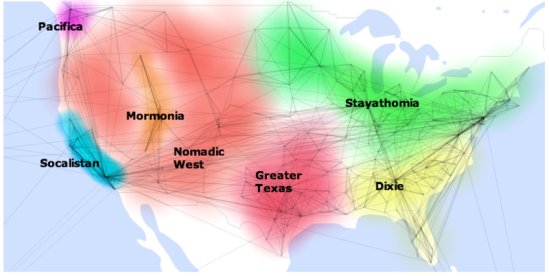
Some of these clusters are intuitive, like the old south, but there’s some surprises too, like Missouri, Louisiana and Arkansas having closer ties  to Texas than Georgia. To make sense of the patterns I’m seeing, I’ve marked and labeled the clusters, and added some notes about the properties they have in common.

Stayathomia

Stretching from New York to Minnesota, this belt’s defining feature is how near most people are to their friends, implying they don’t move far. In most cases outside the largest cities, the most common connections are with immediately neighboring cities, and even New York only has one really long-range link in its top 10. Apart from Los Angeles, all of its strong ties are comparatively local.

In contrast to further south, God tends to be low down the top 10 fan pages if she shows up at all, with a lot more sports and beer-related pages instead.

Dixie

Probably the least surprising of the groupings, the Old South is known for its strong and shared culture, and the pattern of ties I see backs that up. Like Stayathomia, Dixie towns tend to have links mostly to other nearby cities rather than spanning the country. Atlanta is definitely the hub of the network, showing up in the top 5 list of almost every town in the region. Southern Florida is an exception to the cluster, with a lot of connections to the East Coast, presumably sun-seeking refugees.

God is almost always in the top spot on the fan pages, and for some reason Ashley shows up as a popular name here, but almost nowhere else in the country.

Greater Texas

Orbiting around Dallas, the ties of the Gulf Coast towns and Oklahoma and Arkansas make them look more Texan than Southern. Unlike Stayathomia, there’s a definite central city to this cluster, otherwise most towns just connect to their immediate neighbors.

God shows up, but always comes in below the Dallas Cowboys for Texas proper, and other local sports teams outside the state. I’ve noticed a few interesting name hotspots, like Alexandria, LA boasting Ahmed and Mohamed as #2 and #3 on their top 10 names, and Laredo with Juan, Jose, Carlos and Luis as its four most popular.

Mormonia

The only region that’s completely surrounded by another cluster, Mormonia mostly consists of Utah towns that are highly connected to each other, with an offshoot in Eastern Idaho. It’s worth separating from the rest of the West because of how interwoven the communities are, and how relatively unlikely they are to have friends outside the region.

It won’t be any surprise to see that LDS-related pages like Thomas
S. Monson
, Gordon
B. Hinckley
and The Book of Mormon are at the top of the charts. I didn’t expect to see Twilight showing up quite so much though, I have no idea what to make of that! Glenn Beck makes it into the top spot for Eastern Idaho.

Nomadic West

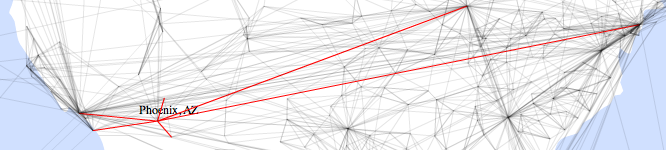
The defining feature of this area is how likely even small towns are to be strongly connected to distant cities, it looks like the inhabitants have done a lot of moving around the county. For example, Boise, ID, Bend, OR and Phoenix, AZ all have much wider connections than you’d expect for towns their size:
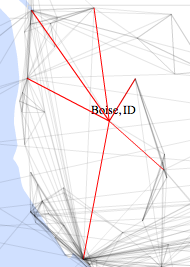

Boise Bend 

Phoenix

Starbucks is almost always the top fan page, maybe to help people stay awake on all those long car trips they must be making?

Socalistan

Sorry Bay Area folks, but LA is definitely the center of gravity for this cluster. Almost everywhere in California and Nevada has links to both LA and SF, but LA is usually first. Part of that may be due to the way the cities are split up, but in tribute to the 8 years I spent there, I christened it Socalistan. Californians outside the super-cities tend to be most connected to other Californians, making almost as tight a cluster as Greater Texas.

Keeping up with the stereotypes, God hardly makes an appearance on the fan pages, but sports aren’t that popular either. Michael Jackson is a particular favorite, and San Francisco puts Barack Obama in the top spot.

Pacifica

The most boring of the clusters, the area around Seattle is disappointingly average. Tightly connected to each other, it doesn’t look like Washingtonians are big travelers compared to the rest of the West, even though a lot of them claim to need a vacation!

So that’s my tour through the patterns that leapt out at me from the Facebook data. This is all qualitative, not quantitive, so I’m looking forward to gathering some numbers to back them up. I’d love to work out the average distance of friends for each city, and then use that as a measure of insularity for instance. If you’re a researcher interested in this data set too, do get in touch, I’ll be happy to share.

Update – I wasn’t able to make the data-set available after all, but if you liked this map, you can now build your own with my new OpenHeatMap project!

Why API providers lie about email lookups

Gardengate
Photo by Country Girl at Heart

There are some defensible reasons for not allowing developers to look up users by email addresses, but claiming that spammers will use that facility to validate email addresses is pretty weak. I was reminded of this today when I added MySpace to the services supported by FindByEmail, and came across LinkedIn using the same old justification for not opening up their API. Twitter made the same claims when they pulled their existing API.

On the surface it sounds completely reasonable, but that horse is not only out of the barn, it's been galloping so long it's over the horizon. For years, Yahoo, Amazon, MySpace and AIM have all let developers look up their users by email address, so any spammer who wanted to go that route has had plenty of opportunity.

The real reason is that companies benefit from having their users inside walled gardens, and anything that makes it easier to integrate across sites is a threat to their business model. You might notice the more open companies are those in second place, who have less to lose. This leads to ridiculous situations, like Google refusing to open up a proper Gmail API so that migration to other services is harder, and then paying TrueSwitch to enable migration from other ISPs. TrueSwitch is the de facto proprietary API that all the big ISPs use to help users switch, a market opportunity that wouldn't even exist if they just opened up access to each other, and a situation that favors big-pocketed incumbents who can afford to hire them.

As you can probably tell, I've never met a data silo I liked. I'm just an external trouble-maker who doesn't have responsibility for protecting sensitive user information, but I'm going to scream if I hear another developer relations guy claim that their business decision to keep their users in a wall garden is all about keeping them safe!

Elastic MapReduce Tips

Rubberman
Photo by Tofslie

Amazon's Elastic MapReduce service is a god-send for anyone running big data-processing jobs. It takes the pain and suffering out of configuring Hadoop, and lets you run hundreds of machines in parallel when needed, but without having to pay for them while they're idle. Unfortunately it does still have a few… quirks…, so here's a brain dump of lessons I've learnt while using the service.

Don't put underscores in bucket names. The rest of S3 is quite happy with names like mailana_data_2010_1_25 but EMR really doesn't like those underscores and will fail to run any job that references them. You also can't rename buckets, and moving the data to a new bucket involves a copy that maxes out at about 20 MB/s, so fixing this can take a while.

Invest in some good S3 tools. All your data and code has to live in S3, so you'll be spending a lot of time dealing with buckets. S3cmd is a great command-line tool for working with S3, but I'd also recommend Bucket Explorer for a GUI view.

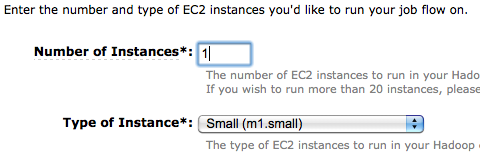
Start off small. You're charged per-machine, rounded up to the nearest hour. This means if you fire up 100 machines and the job fails in 30 seconds, you'll still be charged 100 machine hours. If you have a job you're not sure will work, start off with a single machine instead. You'll also have a lot fewer log files to sort through to figure out what went wrong!

Use the log files. It's a bit hidden, but on the third screen of the job setup process there's an 'advanced' section that you can reveal. In there, add a bucket path and you'll get your jobs' logs copied to that S3 location. These are life-savers when it comes to figuring out what went wrong. I'm mostly doing streaming work with PHP, so I often end up drilling down into the task_attempts folder. In there, each run on each machine will have a numbered sub-folder, and you'll be able to grab the stderr output from each of them. If a reduce step has gone wrong, I'll usually see a missing number in the output file sequence, and you can use that number to find the job attempt that failed and look at the errors. You can also see jobs that were repeated multiple times because they failed by looking at the final number in the folder name.

GZipped input. A lot of my input data had already been gzipped, but luckily if you pass -jobconf stream.recordreader.compression=gzip in the extra arguments section Hadoop will decompress them on the fly before passing the data to your mapper.

Multiple input folders. My source data was also scattered across a lot of different folders in S3, but happily you can specify multiple input locations by adding -input s3://<your data location> to the extra args section.

Make sure PHP has enough memory. By default PHP scripts will fail if they use more than 32MB of RAM, since it's designed for the web server world. If your input data might be memory intensive, especially on the reducer end, use something like ini_set('memory_limit', '1024M'); to ensure you have enough headroom.

How to upload your CSV data into SimpleDB at 1000 items a second

Weir
Photo by Old Onliner

With help from Sid Anand, Kevin Marshall (buy his book) and David Kavanagh, along with Brett Taylor, Siva Raghupathy and the rest of the SimpleDB team, I've managed to improve my loading performance by an order of magnitude. I've also added in support for loading from arbitrary CSV or JSON files, so you can use the simpledb_loader tool to do fast uploads of your own data too.

If you just want to dive in, grab the source, make sure you've got java, cd into the directory and run

./sdbloader help

to bring up the options and a mini-tutorial. You'll be able to setup a cluster of domains, and then either run a synthetic benchmark, or load data from a file.

The biggest performance improvement came from fixing a problem in my original code that caused my requests to get serialized rather than running in parallel. With that out of the way, I started hitting the throttling that Amazon starts applying if you send too many requests too soon. They're trying to penalize 'bursty' writers, so you need to start off with a comparatively low number of requests per-domain, per-second and ramp to your full rate over a few minutes. After some advice from the SimpleDB team followed by experimentation, I started off at 1 request per-second, and over the course of two minutes I ramp that up to 3 requests per-second, per-domain. Since each request can have 24 items inside it, that works out to a theoretical maximum of 72 items per-second for each domain. You can tune these values yourself by setting -minrps, -maxrps and -ramptime on the command line.

That led to the next change, tweaking the number of domains being used. The SimpleDB team recommended around 20 or 30 as a maximum, I'm guessing because that roughly corresponds to the actual number of machines they're hosted in. I actually see a performance increase with higher numbers than that, my 1000 item/second maximum was achieved with 100 domains. However I think this is likely to be a loophole in their throttling code, so I wouldn't recommend going that far. You can alter the number of domains used with the -domaincount argument, make sure you specify the same number for both setup and your loading.

The final important performance tip is to ensure that you're running from within Amazon's network, by running your data upload from an EC2 server. This makes a massive difference, I get half the speed when I'm running over my broadband connection at home.

To reproduce the speeds I'm seeing, run these commands

 ./sdbloader setup -a <access key> -s <secret key> -d 100

 ./sdbloader loadcsv -a <access key> -s <secret key> -d 100 -f testdata.csv

Those will set up the domains you need, and then try to upload 20,000 items from the test CSV file, each with multiple attributes, and a pretty typical representation of my workload. I see this taking around 19 seconds to complete, or just over 1000 items a second.

I know from Sid's work at NetFlix that this isn't the end of the road, he's getting over 10,000 items/second, but it's starting to become usable for the 210m item data set I need to upload. The main hurdles I'm hitting with the full data set are failed loads, either because of repeated 503 errors that exhaust the retries, or socket timeouts. If you want to dig deeper, the code is all fully available on github with no strings attached, just fork and go, and let me know if you make any improvements!

No more naked emails with Flowtown

Flowtownshot

I recently discovered a new startup in the contacts world, Flowtown, and I'm very impressed! Their starting point is a little like Gist, you upload your contact information and they match up those email addresses with people's Facebook, Twitter and other social network accounts. Incidentally, I believe they're using Rapleaf for this matching process, it's a great demonstration of the possibilities of their API.

Once that data's been matched, Flowtown's goal is to help marketers create much better targeted email campaigns for their existing mailing lists. Sadly the old tagline "Give those emails some pants and a shirt" has vanished from their home-page, but I think that idea of dressing up and personalizing your marketing emails is very valuable. You've already built up relationships with these customers, you have permission to contact them, and everybody wins if those emails are better targeted. The example in the demo video ensures that an email asking customers to follow you on Twitter only goes to people who actually have Twitter accounts. You can imagine this getting much more detailed, maybe identifying influential Twitter users who are already your customers, or using the geographic information to target only Twitter-using customers in a particular area.

I like their approach because they have a very clear value proposition and target market; if you're an email marketer who wants to improve her click-through rates, it's an obvious win. They're also up-front about asking for money; you 'll only get 50 contacts imported for free, the rest are 5 cents each, and you'll need to upgrade from the free plan to run proper campaigns. It may sound perverse to applaud them for charging early and often, but it's refreshing to see someone with enough belief in the value they're offering to do that.

Great work by Ethan and the team, I foresee a lot of success in their future!

MapReduce for Idiots

Arrowhead
Photo by Stuart Pilbrow

I'll admit it, I was intimidated by MapReduce. I'd tried to read explanations of it, but even the wonderful Joel Spolsky left me scratching my head. So I plowed ahead trying to build decent pipelines to process massive amounts of data without it. Finally my friend Andraz staged an intervention after I proudly described my latest setup: "Pete, that's Map Reduce".

Sure enough, when I looked at MR again, it was almost exactly the same as the process I'd ended up with. Using Amazon's Elastic Map Reduce implementation of Hadoop, I was literally able to change just the separator character I use on each line between the keys and the data (they use a tab, I used ':'), and run my existing PHP code as-is.

I still hate the existing explanations, none of them clicked at all, so I decided to put together a simple project and tutorial that explains in a way that makes sense to me. Here's the project code, with some sample data.

The first thing to understand is that MapReduce is just a way of taking fragments of information about an object scattered through a big input file, and collecting them so they're next to each other in the output. For example, imagine you had a massive set of files containing the results of a web crawl, and you need to understand which words are used in the links to each URL. You start with:

<a href="http://foo.com">Bananas</a&gt;
<a href="http://bar.com">Apples</a&gt;

<a href="http://foo.com">Bananas</a&gt;

<a href="http://foo.com">Mangoes</a&gt;

and you want to end up with:


foo.com 2 Bananas, 1 Mangoes
bar.com 1 Apples

How do you do it? If the data set is small enough, you loop through it all and total up the results in an associative array. Once it's too large to fit in memory, you have to try something different.

Instead, the Map function loops through the file, and for every piece of information it finds about an object, it writes a line to the output. This line starts with a key identifying the object, followed by the information. For example, for the line <a href="http://foo.com">Bananas</a&gt; it would write

foo.com Bananas

How does this help? The crucial thing I missed in every other explanation is that this collection of all the output lines is sorted, so that all the entries starting with foo.com are next to each other. This was exactly what I was doing with my sort-based pipeline that Andraz commented on. You end up with something like this:


foo.com Bananas
foo.com Bananas
foo.com Mangoes

The Reduce step happens immediately after the sort, and since all the information about an object is in adjacent lines, it's obviously pretty easy to gather it into the output we're after, no matter how large the file gets.

None of this requires any complex infrastructure. If you download the project you'll see a couple of one-page PHP files, one implementing a Map step, the other Reduce, which you can run from the command line simply using:

./mapper.php < input.txt | sort | ./reducer.php > output.txt

To prove I'm not over-simplifying, you can take the exact same PHP files, load them into Amazon's Elastic Map Reduce service as-is and run them to get the same results! I'll describe the exact Job Flow settings at the bottom so you can try this yourself.

The project itself takes 1200 Twitter messages either written by me, or mentioning me, and produces statistics on every user showing how often and when we exchanged public messages. It's basically a small-scale version of the algorithm that powers the twitter.mailana.com social graph visualization. One feature of note is the reducer. It tries to merge adjacent lines containing partial data in JSON format into a final accumulated result, and I've been using this across a lot of my projects.

Here's how to try this all out on Amazon's Elastic Map Reduce:

– First, get all your AWS accounts set up. You'll need S3, EC2 and MapReduce.

– Now, create an S3 bucket with a unique name to contain the results.

– Go to the MapReduce console and click on Create New Job Flow

– As you go through the creation panel, copy the settings shown below. Make sure you put in the path to your own output bucket, but I've made both the input data and code buckets public, so you can leave those paths as-is:

Mapreduceshot1

Mapreduceshot2 

Mapreduceshot3

Run the job, give it a few minutes to complete, and you should see a file called part-00000 in your output bucket. Congratulations, you've just run your first Hadoop MapReduce data analysis!

Now for the bad news. Google's just been awarded a patent on this technique, casting a shadow over Hadoop and pretty much every company doing serious data analysis. I personally think if a knucklehead like me can independently invent the process, it should be considered so obvious no patent should be possible!