If implicit data’s so great, why did DirectHit die?

Tombstone

DirectHit was a technology that aimed to improve search results by promoting links that people both clicked on, and spent time looking through. These days we’d probably describe it as an attention data algorithm, which places it firmly in the implicit web universe. It was launched to great excitement in the late 90’s, but it never achieved its promise. There was some talk of it lingering on in Ask’s technology, but if so it’s a very minor and unpromoted part. If the implicit web is the wave of the future, why did DirectHit fail?

Feedback loops.
People will click on the top result three or four times more often than the second one. That means that even a minor difference in the original ranking system between the top result and the others will be massively exaggerated if you weight by clicks. This is a place where the click rate is driven by the external factor of result ranking, rather than the content quality that you’re hoping to rate. This is a systematic error that’s common whenever you present the user with an ordered list of choices. For example, I’d bet that people at the top of a list of Facebook friends in a drop-down menu are more likely to be chosen than those further down. Unless you randomize the order you show lists, which is pretty user-unfriendly, it’s hard to avoid this problem.

Click fraud. Anonymous user actions are easy to fake. There’s an underground industry devoted to clever ways of pretending to be a user clicking on an ad. The same technology (random IP addresses, spoofed user agents) could easily be be redirected to create faked attention data. In my mind, the only way to avoid this is to have some kind of trusted user identification associated with the attention data. That’s why Amazon’s recommendations are so hard to fake, you need to not only be logged in securely but spend money to influence them. It’s the same reason that Facebook are pushing so hard for their Beacon project, they’re able to generate attention data that’s linked to a verified person.

It’s a bad predictor of quality. Related to the feedback loop problem, whether someone clicks on a result link and how much time they spend there don’t have a strong enough relationship to whether the page is relevant. I’ll often spend a lot of time scrolling down through the many screens of ads on Expert Exchange on the off-chance they have something relevant (though at least they no longer serve up different results to Google). If I do that first and fail to get anything, and then immediately find the information I need on the next result link I click, should the time spent there be seen as a sign of quality, or just deliberately poor page design. This is something to keep in mind when evaluating attention data algorithms everywhere. You want to use unreliable data as an indicator and helper (eg in this case you could show a small bar next to results showing the attention score, rather than affecting the ranking), not as the primary controlling metric.

SEO Theory has an in-depth article on the state of click management that I’d recommend if you’re interested in more detail on the details of the fraud that when on when DirectHit was still alive.

An easy way to create your own search plugin for any site

Mycroft
AltSearchEngines recently explained how to find over a thousand plugins that add new engines to the search box in the top right of your browser. If the one you want isn’t there, or you need one for your own site, I’m going to show how you can create your own search plugin for Firefox. You don’t have to write any code, all you need is an example URL.

I recently installed Lijit on my blog, and I’d like to offer a search box plugin for searching on my site. The first hurdle is finding an example URL to base the plugin on. Lijit usually displays its results in an overlay, with no change in the address bar, but I spotted the permalink button that goes to a normal web page.

Ligitpermalink

For the search engine you’re using, do a search for a single term (in my case "camping"), and make a note of the full URL given for the result page. In the case of my Lijit blog search, the permalink version is

http://www.lijit.com/pvs/petewarden?q=camping&pvssearchtype=site&preserved_referer=http%3A%2F%2Fpetewarden.typepad.com

To start creating your plugin, go to the Mycroft Projects Search Plugin Generator. You’ll see a form with a series of fields to fill out. Luckily you will be able to ignore most of these, and I’ll show you what you need to do for the others. Once all the right information is in there, submitting the form will write the plugin code for you!

Ligiturl

The most crucial part of the form is the top "Query URL". This tells Firefox how to generate the right address for the search engine you’re using. The generator takes an example search engine URL, and works out how to build links that search for any keywords.

The generator needs to know where the search terms are supposed to be in the URLs for this engine, so in the Query box below I tell it the term I was looking for, "camping".

Mycroftscreen2

Below that, enter a URL for the home page of the search engine you’re using.

Ligitmain

Leave the CharSet entry as None, and leave the Categories section blank. The next section, Results, is tricky. Some obscure parts of Firefox want to extract the search result links using the information from here, but all we want to do is direct the user to the right page. We should be able to leave this blank, but unfortunately the generator fails. Instead, fill in the first four boxes with "Dummy Entry", so the generator has some entries to work with.

Mycroftscreen4

You can leave the remaining entries in the Results section blank. Moving down to the Plugin part, there are three final boxes you need to fill.

Mycroftscreen5

You should enter your name and email address in angle brackets, since you’re the author. The name is what appears in the drop-down menu for the search box, and the description should be a short explanation of what the plugin is for.

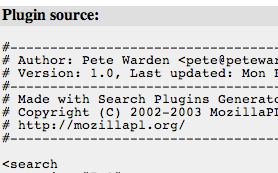
That’s all the information you need to enter, so hit the "Send" button at the bottom of the form. Mozilla then analyzes the information you’ve submitted, and tries to create the right code for your plugin. You should see a couple of new sections appear at the bottom of the page. The first box is the HTML that the engine returned for your example search, which isn’t that interesting. The crucial part is the lower section of text, titled Plugin Source.

Mycroftscreen6

This contains the actual code you need for your plugin. I’ve uploaded the example that the generator creates for searching this blog with Lijit here . To create your own file, cut and paste everything that’s in a typewriter font inside the light grey box into your favorite text editor like NotePad or TextEdit. Make sure you’re in plain text mode if it supports fonts or colors. Save the file as the name of your search engine, with the .src extension, for example petesearch.src.

Now you have two choices for how to install the plugin. If you just want to use it on your own machine, you can copy it to the directories described on this page. On Linux it’s /usr/lib/Mozilla/searchplugins , for OS X use /Applications/Mozilla.app/Contents/MacOS/Search Plugins/ and Windows is C:\Program Files\Mozilla.org\Mozilla\searchplugins\ .

If you want to put it on a website for other people to install, you’ll need a small section of JavaScript. Here’s a cut-down version that will install it when it’s clicked on.


<a href="http://petewarden.typepad.com/searchbrowser/files/petesearch.src" onclick="window.sidebar.addSearchEngine(this.href, ”, ‘PeteSearch’, ”); return false;">Install</a>

This will work fine on Firefox, but if you want to gracefully fail on other browsers you’ll need some more complex code to detect if the plugin format is supported. Here’s a page from Mozilla that explains what you’ll need to do. Alternatively you can just label the link as Firefox-only.

This guide shows how to create a Sherlock plugin which will work with all versions of Firefox. There’s also a new standard called OpenSearch which works with Firefox 2 and Internet Explorer. It has some nifty features like being able to add your plugin to the search box whenever a user is visiting a site, but no user-friendly generator.

Want to see a fresh approach to automated social analysis?

Hannes

I recently discovered Johannes Landstorfer’s blog after he linked to some of my articles. He’s a European researcher working on his thesis on "socially aware computers", exploring the new realms that are opened up once you have automated analysis of your social relationships based on your communications. There are some fascinating finds, like using phone bills to visualize your graph, or reflecting the uncertainty of the result of all our analysis by using deliberately vaguely posed avatars. His own work is intriguing too, he’s got a very visual approach to the field, which generates some interesting user-interface ideas. I’m looking forward to seeing more of what he’s up to.

A sea of Shooting Stars

Shootingstars

I’ve just got back from a day in the mountains with Liz. We were lucky enough to find a whole meadow full of Shooting Stars near the end of the Mishe Mokwa trail. It was a trail maintenance trip with the SMMTC, so we hiked four miles carrying tools onto the top of the Chamberlain Trail and then spent a few hours working before heading back. We found the flowers on the way back, and it was a real stroke of luck since Liz was already planning on profiling them on the trails council site. Here’s a sneak preview of one of her photos:

Shootingstarclose

They’re fascinating plants, they always remind me of a wasp with purple wings. The maintenance work gave me my drain-building fix. There’s nothing quite like playing in the dirt with a pick-ax to clear your mind. It’s so nice to be able to stand back after an hours work and see what you’ve accomplished. It started to rain towards the end, so I was even able to see them in action!

Drain

What can you learn from traditional indexing?

Book

I’m a firm believer in studying the techniques developed over centuries by librarians and other traditional information workers. One of the most misunderstood and underrated processes is indexing a book. Anybody who’s spent time trying to extract information from a reference book knows that a good index is crucial, but it’s not obvious the work that goes into creating one.

I’m very interested in that process, since a lot of my content analysis work, and search in general, can be looked at as trying to generate a useful index with no human intervention. That makes professional indexers views on automatic indexing software very relevant. Understandably they’re a little defensive, since most people don’t appreciate the skill it takes to create an index and being compared to software is never fun, but their critiques of automated analysis apply more generally to all automated keyword and search tools.

  • Flat. There’s no grouping of concepts into categories and subheadings.
  • Missing concepts. Only words that are mentioned in the text are included, there’s no reading between the lines to spot ideas that are implicit.
  • Lacking priorities. Software can’t tell which words are important, and which are incidental.
  • No anticipation. A good index focuses on the terms that a reader is likely to search for. Software has no way of telling this (though my work on extracting common search terms that lead to a page does provide some of this information).
  • Can’t link. Cross-referencing related ideas makes the navigation of an index much easier, but this requires semantic knowledge.
  • Duplication. Again, spotting which words are synonyms requires linguistic analysis, and isn’t handled well by software. This leads to confusing double entries for keywords.

It’s a wild, wild web

Viewfour
While browsing my visitor logs, I came across viewfour.com. It’s an interesting site, it does something similar to my old SearchMash Java applet and ManagedQ’s much more advanced engine, displaying live previews of search results. It does suffer from a problem with frame-busting sites unfortunately, for example this search for Pete Warden winds up with the toolfarm preview taking over the parent frame. That was a big reason why you either need some decent script-blocking code, or deploy it as a browser extension where you can prevent child frames from taking control.

I was curious to discover that there weren’t any organic reviews for the site that I could find, and the copyright was 2005. Most of the Google results pointed to download pages. It also includes a link to ViewSmart, a spyware/malware blocker, which seemed like an odd combination to go with a search engine. In fact, the only user-created review I found in the first few pages was this negative one from a spyware information site. I don’t recommend paying too much attention to anonymous posters, but if you do try out the search site, it would be prudent to avoid the additional download until I can find out more information about it. I’ll see if I can get more information directly from the author, SSHGuru.

How do you access Exchange server data?

Files

Like standards, the wonderful thing about Exchange APIs is that there’s so many to choose from. This page from Microsoft is designed to help you figure out which one you should use, and I count over 20 alternatives!

I need something that’s server based, not a client API, so that does help narrow down the selection a little. MAPI is a venerable interface, and still used by Outlook to communicate with the server, but unfortunately MS has dropped server-side support for it on Exchange 2007. It is possible to download an extension to enable it, but using a deprecated technology doesn’t feel like a long-term solution. CDOEx is another interface that’s been around for a while, and it’s designed for server code, but it too is deprecated.

Microsoft’s current recommendation is to switch all development to their new web service API. This looks intriguing, since it makes the physical location of the code that interfaces with the server irrelevant, but I’m wary that it will hit performance problems when accessing the large amounts of data that I typically work with. It seems mostly designed with clients in mind, and they typically have an incremental access pattern where they’re only touching small amounts of data at a time. Another issue is adoption of Exchange 2007. My anecdotal evidence is that many organizations are still running with older versions, and even Microsoft’s Small Business Server package still uses 2003. Since it’s likely that the old Exchange versions will be around for a while, that makes it tricky to rely on an interface that’s only supported in the very latest update.

Complaints are the best measure of success

Complainingcat

I enjoyed Mitchell Ashley’s post about his joy when QA found the first bug in a new product. It’s an unfakeable sign that your software is far enough along to be testable and that you’ve got a system in place for testing it. As he says, there’s always bugs, and if you aren’t finding them early then you’re not looking right. That always leads to a very nasty time at the end of the development cycle.

Along similar lines, the best way to tell if released software has potential is whether anyone complains. I’m not advocating deliberately annoying your customers, but all software has problems. If nobody complains, it doesn’t mean it’s perfect, it just means nobody sees enough value in the software to want to see it fixed. It’s a serious investment of time to complain, almost everybody will just keep quiet and stop using an application that has a serious flaw. Someone who complains must really care and believe in what you’re trying to do. I love being at the point where you get complaints, it means you’ve created something people feel passionately about. Most software never gets that far.

It’s also great motivation for the team when they know that there’s a real person out there who will be delighted by the latest bug fix because it addresses their problem. Anything you can do to reinforce a relationship between engineers and passionate users pays massive dividends in innovation. User groups and site visits are great for this. Otherwise it’s too easy to lose sight of the goal of what you’re doing in the fog of technical details. Looking at which complaints you’re addressing with your engineering is a great way of ensuring you’re actually doing something that will be useful for your customers.

Skiing in Utah

Skiing

I’m literally skiing in Utah for the next three days, but Seth’s analogy has been on my mind. Yesterday I was asked why I’m building these mail tools. As a knowledge worker, email is central to my life, and I know how many painful problems there are related to sharing information. I can see a massive pool of mail data sitting there unused. I want to build systems to bridge that gap. There’s so many opportunities I feel like a kid in a candy store, or a skier in Utah.

How to stop reinventing the wheel

Tacitlogo

Someone recently pointed me towards Tacit Software as a company I’d be interested in. Their team has created a system to automatically catalog expertise within an organization. The question they’re trying to answer is ‘Who can I ask about X?’, and the goal is to prevent redundant work within an organization. They have an interface where employees can ask a question, and the software will try to identify the best people to answer it.

They offer two different products, Illumio which is based on a desktop client and ActiveNet, which is centrally deployed. Illumio works a lot like a desktop search system, analysing all the files on a user’s computer including documents, emails and contacts, to identify areas of expertise. ActiveNet is similar, but looks at the data stored globally on the organization’s servers to figure out who knows about what.

One interesting approach they’re using to demonstrate Illumio’s potential are the public web groups they’ve set up. To join, you download Illumio and it analyzes your interests. You can then participate in their groups to ask and answer questions on topics ranging from sports to business.

An area they’ve obviously spent a lot of time on is safeguarding users’ privacy. The process they use for answering questions involves getting permission from the people it decides are experts on the topic before any identifying information is returned to the questioner. Privacy is a big concern, but this does seem a bit unwieldy compared to the Knowledge Network approach where experts pre-approve what information is going to be exposed, and it’s then available for easy browsing and searching by other employees.

Their case studies show they’ve deployed in some large organizations and report some impressive satisfaction figures. Their descriptions of hotspots where they see a lot of redundant work are illuminating too, they’ve focused on procurement, research and new project proposals. This definitely fits with my experiences, though I’ve spent most of my time on the research side.